- 5
English
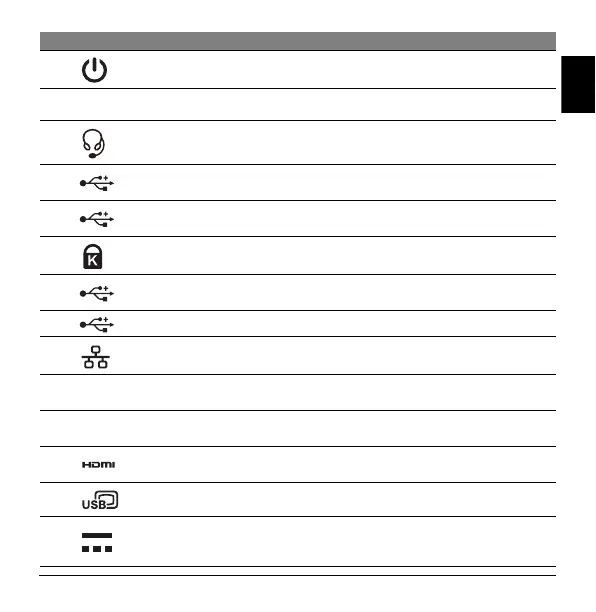
# Icon Item Description
1 Power button
Press to turn your dock on and off.
2 Power LED Indicates the dock power status.
3 Headset/speaker jack
Connects to audio devices (e.g., speakers,
headphones) or a headset with microphone.
4
USB 3.1 Gen1 Type C
port (Data Only)
Connects to USB devices.
5
USB 3.1 Gen1 Type C
port (Data Only)
Connects to USB devices.
6 Kensington security lock
Connects to a Kensington-compatible security
lock.
7
USB 3.1 Gen1 Type A
port x 2
Connects to USB devices.
8 USB 2.0 Type A port x 2 Connects to USB devices.
9 Ethernet (RJ-45) port
Connects to an Ethernet 10/100/1000-based
network.
10 DP1 DP 1.4 port
Supports high-definition digital video
connections.
11 DP2 DP 1.4 port
Supports high-definition digital video
connections.
12 HDMI 2.0 port
Supports high-definition digital audio/video
connections.
13 USB Type C port Connects to Host.
14 DC-in jack
Connects to the AC adapter to power the dock.
Note: Only use the 135 W power adapter that
comes with the dock.


 To Next Page