EasyManua.ls Logo

Acer USB Type-C Dock D501 - User Manual

Acer USB Type-C Dock D501
18 pages
Print Icon
To Next Page IconTo Next Page
Loading...
- 1
English
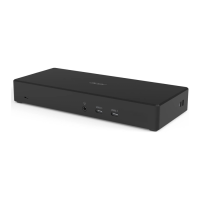
Acer USB Type-C Dock D501
Certified Works With Chromebook
User’s Manual
Question and Answer IconNeed help?

Do you have a question about the Acer USB Type-C Dock D501 and is the answer not in the manual?

Summary

Operation System Requirements

In the Box

Lists the contents included in the Acer USB Type-C Dock D501 package.

Ports and Connectors

Views

Illustrates the physical ports and connectors on the Acer USB Type-C Dock D501.

Using the Dock

Connecting a Chromebook

Steps to connect your Chromebook to the Acer USB Type-C Dock D501 for full functionality.

Disconnecting the Chromebook

Instructions on how to safely unplug the USB Type-C cable from your Chromebook or dock.

Multiple Displays Capabilities

Information for Your Safety and Comfort

Safety Instructions and Warnings

General safety guidelines, cleaning procedures, and important warnings for product usage.

Protecting Your Hearing

Advice on using audio devices safely to prevent permanent hearing loss.

General Precautions

Important general guidelines regarding product placement, ventilation, and handling of small parts.

Product Servicing

Instructions on when to seek qualified service personnel for product issues.

Disposal Instructions

Guidelines on how to properly dispose of the electronic device and recycle it.

Tips for Comfortable Use

Information on preventing physical discomfort and injury from computer usage.

Finding Your Comfort Zone

Advice on adjusting posture and workspace for maximum comfort during computer use.

Taking Care of Your Vision

Suggestions to reduce eyestrain and maintain good eye health during prolonged computer use.

Developing Good Work Habits

Tips for more relaxing and productive computer work, including breaks and exercises.

Regulations and Safety Notices

FCC Statement

Compliance information regarding FCC rules for digital devices and potential interference.

Canadian and Russian Compliance

Regulatory compliance notices for Canadian and Russian users.

Declaration of Conformity for EU Countries

Statement of compliance with EU directives for the product.

List of National Codes

Operating Environment

Specifies the recommended temperature and humidity for operating the device.

Storage and Transporting Environment

Specifies the recommended temperature and humidity for storing and transporting the device.

Specifications

Summary

Operation System Requirements

In the Box

Lists the contents included in the Acer USB Type-C Dock D501 package.

Ports and Connectors

Views

Illustrates the physical ports and connectors on the Acer USB Type-C Dock D501.

Using the Dock

Connecting a Chromebook

Steps to connect your Chromebook to the Acer USB Type-C Dock D501 for full functionality.

Disconnecting the Chromebook

Instructions on how to safely unplug the USB Type-C cable from your Chromebook or dock.

Multiple Displays Capabilities

Information for Your Safety and Comfort

Safety Instructions and Warnings

General safety guidelines, cleaning procedures, and important warnings for product usage.

Protecting Your Hearing

Advice on using audio devices safely to prevent permanent hearing loss.

General Precautions

Important general guidelines regarding product placement, ventilation, and handling of small parts.

Product Servicing

Instructions on when to seek qualified service personnel for product issues.

Disposal Instructions

Guidelines on how to properly dispose of the electronic device and recycle it.

Tips for Comfortable Use

Information on preventing physical discomfort and injury from computer usage.

Finding Your Comfort Zone

Advice on adjusting posture and workspace for maximum comfort during computer use.

Taking Care of Your Vision

Suggestions to reduce eyestrain and maintain good eye health during prolonged computer use.

Developing Good Work Habits

Tips for more relaxing and productive computer work, including breaks and exercises.

Regulations and Safety Notices

FCC Statement

Compliance information regarding FCC rules for digital devices and potential interference.

Canadian and Russian Compliance

Regulatory compliance notices for Canadian and Russian users.

Declaration of Conformity for EU Countries

Statement of compliance with EU directives for the product.

List of National Codes

Operating Environment

Specifies the recommended temperature and humidity for operating the device.

Storage and Transporting Environment

Specifies the recommended temperature and humidity for storing and transporting the device.

Specifications

Acer USB Type-C Dock D501 Specifications

General IconGeneral
BrandAcer
ModelUSB Type-C Dock D501
CategoryDocking Station
Ports1 x HDMI
Power DeliveryYes
Video OutputHDMI

Related product manuals