Programming ELT’s
Once you have the software and driver installed you are ready to program ELT’s.
To program an ELT follow these steps:
1.) Disconnect Antenna, Remote Control, and GPS cables.
2.) Remove the ELT transmitter head from the battery pack by removing the four
screws attaching the transmitter head to the battery pack using the hex driver
supplied.
3.) Place ELT in “Off” position.
4.) For Windows 7, 8, 10 type VAR in the search box to locate the VAR program.
You can run it from there or make a shortcut to desk top.
For XP
1.) Open the “start” menu on Windows Desktop.
2.) Look for the Icon and click on it to open software.
3.) If it is not listed on the start menu open “All Programs”
4.) Place the cursor on the “ACK E-04 ELT Programmer (VAR) file a menu should
appear to the right.
5.) Click on the icon to open the programming software.
6.) Insert Programming dongle into USB port. Watch for the Green LED on
dongle to illuminate indicating proper connection.
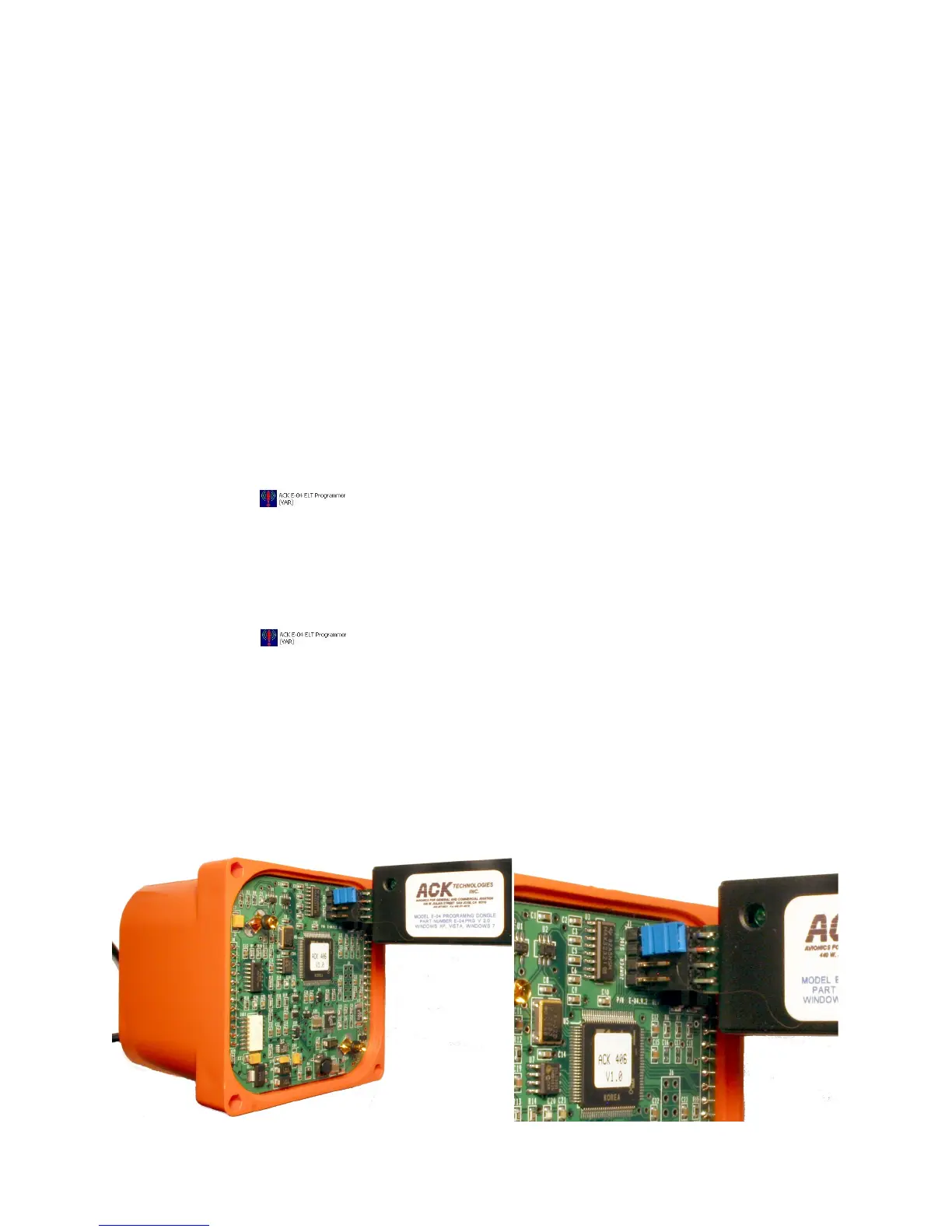
7.) Connect programming dongle into jack J2 located on the PC board.
Make sure the dongle is connected exactly as shown below.
4


 To Next Page