On the screen click on the “Beacon Type” down icon and the three type of
programming appear. Select the type programming you wish to use by placing
the cursor over the type of programming and click to select.
You may chose:
Standard Location Serial Number Country Code Protocol
Standard Location with Operator, Designator & Serial Number
Standard Location 24-Bit Address
To determine what protocol to use for a particular country we have compiled a
list of countries that have provided the type of programming protocol they
require this list may be found in Annex A of this document. Many countries have
a number of country codes listed. This list also provides the proper country
code to use when programming the E-04 ELT. If the country requires you to
apply for a registration card before registering that is noted on the list.
For countries that are not listed or require you apply for a registration card you
should contact the regularity agency of that country to determine which protocol
you should use or apply for a registration card. A list of contacts for each
country can be accessed on the COSPAS/SARSAT web site www.cospas.org on
the web site go to “Contacts” and select “National Contacts for Beacon Matters
(Coding, Registration and Type Approval)” Some countries only list tail number
protocol you should contact these countries regulatory agency and inquire as to
which of the 3 standard location protocols they will accept and what other
requirements must be met.
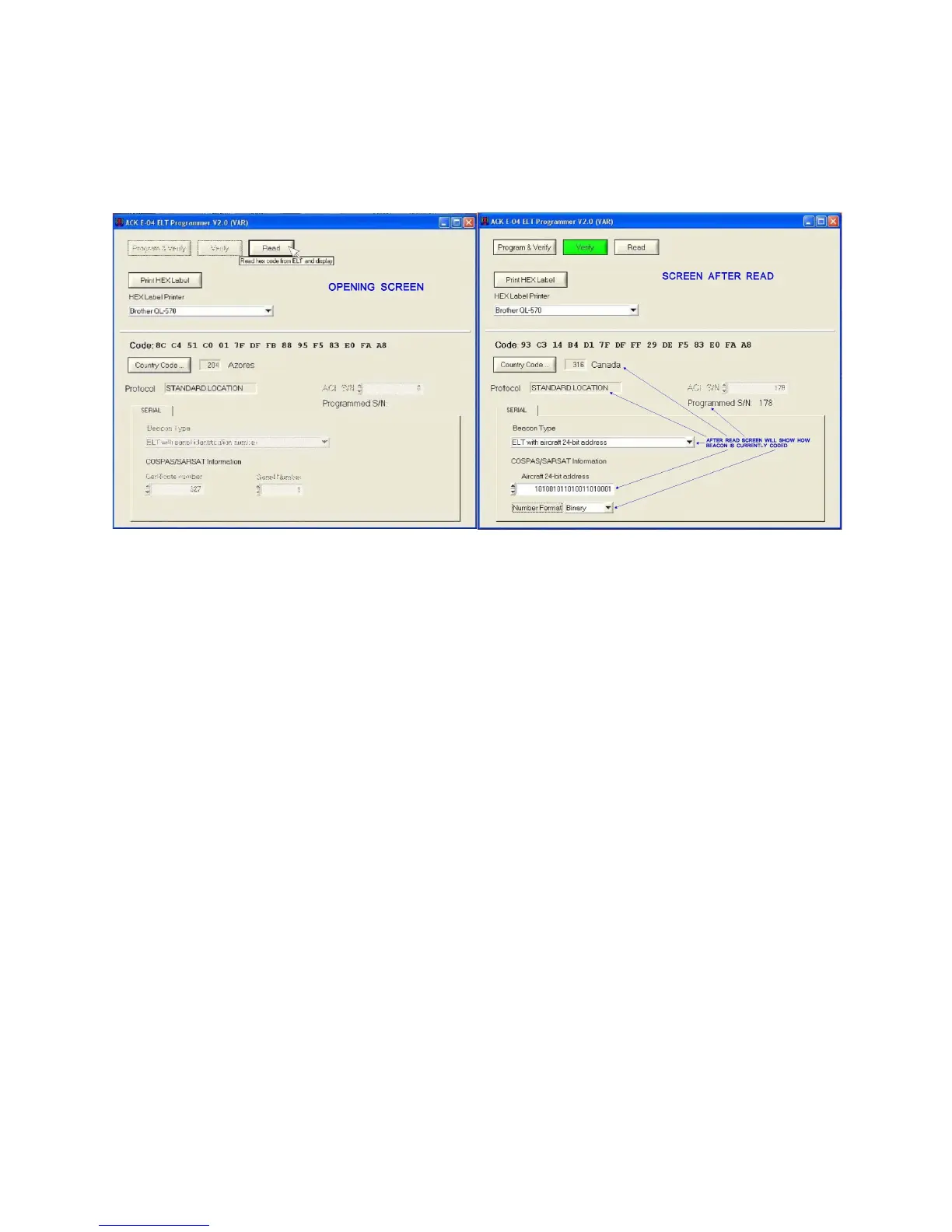
This is the opening screen make sure
the dongle is plugged in and the
green LED on the dongle is lit. Click
on the read button.
After the read is complete the screen
indicates how the ELT is currently
programmed. After completing this
step you may program the ELT.
5


 To Next Page