Need help?
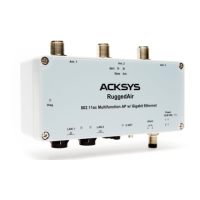
Do you have a question about the Acksys RuggedAir1000 and is the answer not in the manual?
Connect antennas to N-type connectors; use terminators on unused ports for optimal performance.
Connect power via M12 connectors or PoE; the device powers on automatically.
Connect the LAN cable to the M12 connector; the LAN LED indicates connection status.
Use ACKSYS WaveManager to change the default IP address for network compatibility.
Access the device's web interface through WaveManager for detailed configuration.
Place the device in an appropriate location and ensure connectors are protected.
Position antennas for optimal communication, ensuring clear line of sight with peers.
Test the device as an Access Point using a second PC for wireless connection.
Test the device in client role using two devices and a wired connection for verification.
Verify power supply and cabling if no LEDs are lit on the device.
Check remote device status, try another device, or use a different Ethernet cable.
Ensure Wi-Fi is enabled, check parameters, radio conditions, and security settings.
Details of M12 connector for Power1 and Power2, including pins and colors.
Details of M12 8-pole connector for PoE Ethernet, including signal names and pins.
Details of M8 3-pole connector for Digital Input and Alarm, including signal names and wire colors.
Details on N-type female connectors for antennas and their functions (RF chains).
Explains the function and color of each LED indicator on the device.
Procedure for removing and inserting the C-KEY, ensuring it's done with power OFF.
Details on using the digital input pins of the M8 connector for event signaling.
Describes the alarm contactor for signaling events and its limitations.
Instructions for attaching the WL-PLT-1 plate to the device and support.
Methods for connecting the device to earth grounding using clamp or threaded insert.
Details on weight, enclosure type, temperature ranges, and reset button functionality.
Information on device configuration, firmware upgrade, and supported protocols.
Supported operating modes (AP, Repeater, Bridge) and network topology.
Details on Wi-Fi security parameters like WEP, WPA, and 802.1x authenticator.
Number of interfaces, radio modes, modulation rates, and frequency ranges.
Specifications for DC power supply, consumption, and circuit breaker recommendations.
Requirements for PoE power supply, compliance standards, and connection to LAN2.
Details on transmit power for different Wi-Fi standards and antenna configurations.
Specifies receiver sensitivity for various Wi-Fi standards and antenna configurations.
Information on CE conformity, RED directive, and FCC part 15 compliance.
Details on compliance with EN50155 and related standards for railway rolling stock.
List of optional items that can be ordered, including cables and antennas.
 General
| Brand | Acksys |
|---|---|
| Model | RuggedAir1000 |
| Category | Wireless Access Point |
| Language | English |

 To Next Page