EasyManua.ls Logo

ACME XP-280 BS - 4 Fixture Description; Control Panel

ACME XP-280 BS
32 pages
Print Icon
To Next Page IconTo Next Page
To Previous Page IconTo Previous Page
Loading...
4. Fixture Description
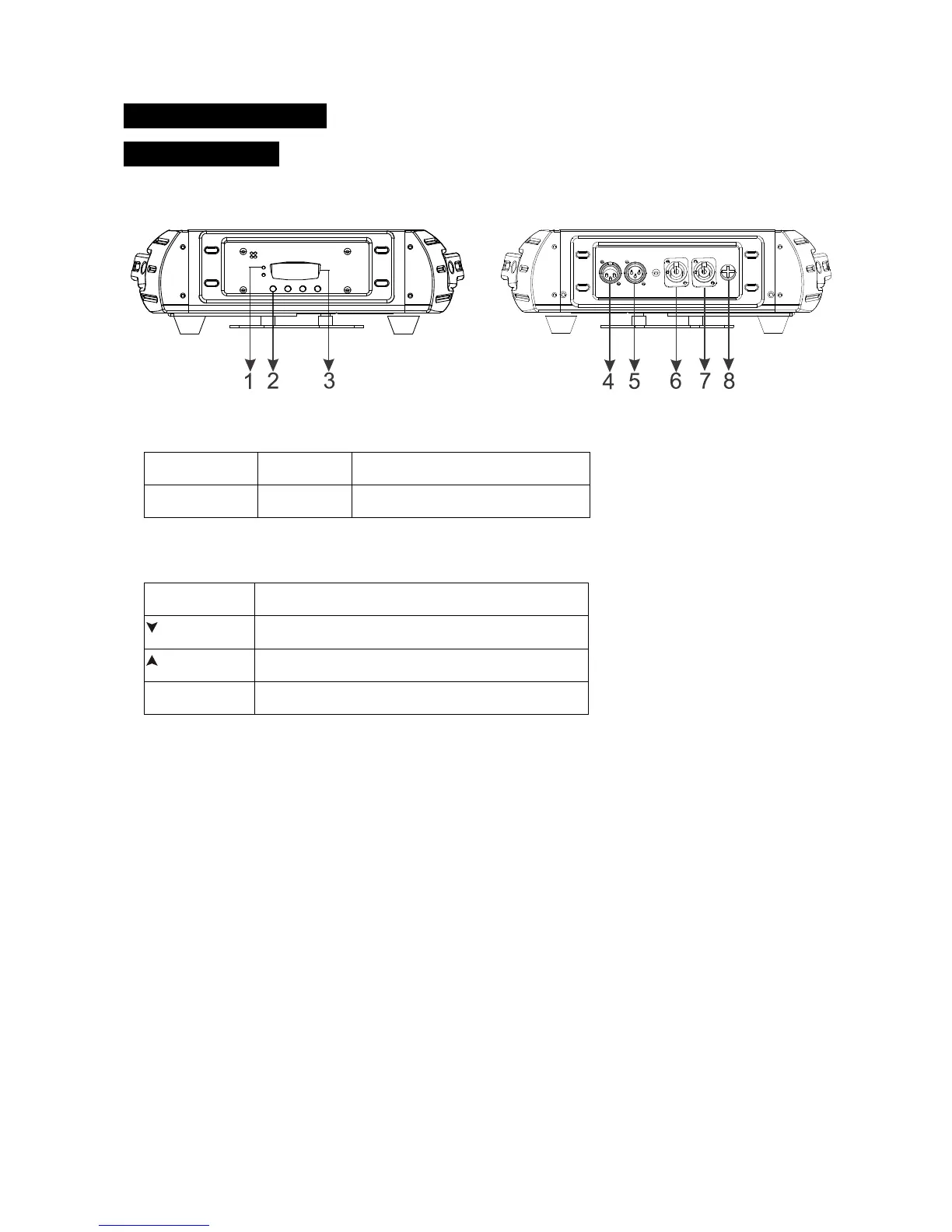
4.1 Control Panel
1. LED:
POWER
On
Power On
DMX
On
DMX input present
2. BUTTON:
To select the programming functions
To go forward in the selected functions
To go backward in the selected functions
To confirm the selected functions
3. FUNCTION DISPLAY: Used to show the various menus and the selected function;
4. DMX IN: DMX 512 link, use 3-pin XLR cable to link the unit and DMX controller;
5. DMX OUT: DMX 512 operation, use 3-pin XLR cable to link the next units;
6. POWER IN: Used to connect to supply power;
7. POWER OUT: Used to connect to supply power to the next unit;;
8. FUSE (T 10A): Protect the unit from damage of over voltage or short circuit.
A
6A


Related product manuals