Setting parameters 2
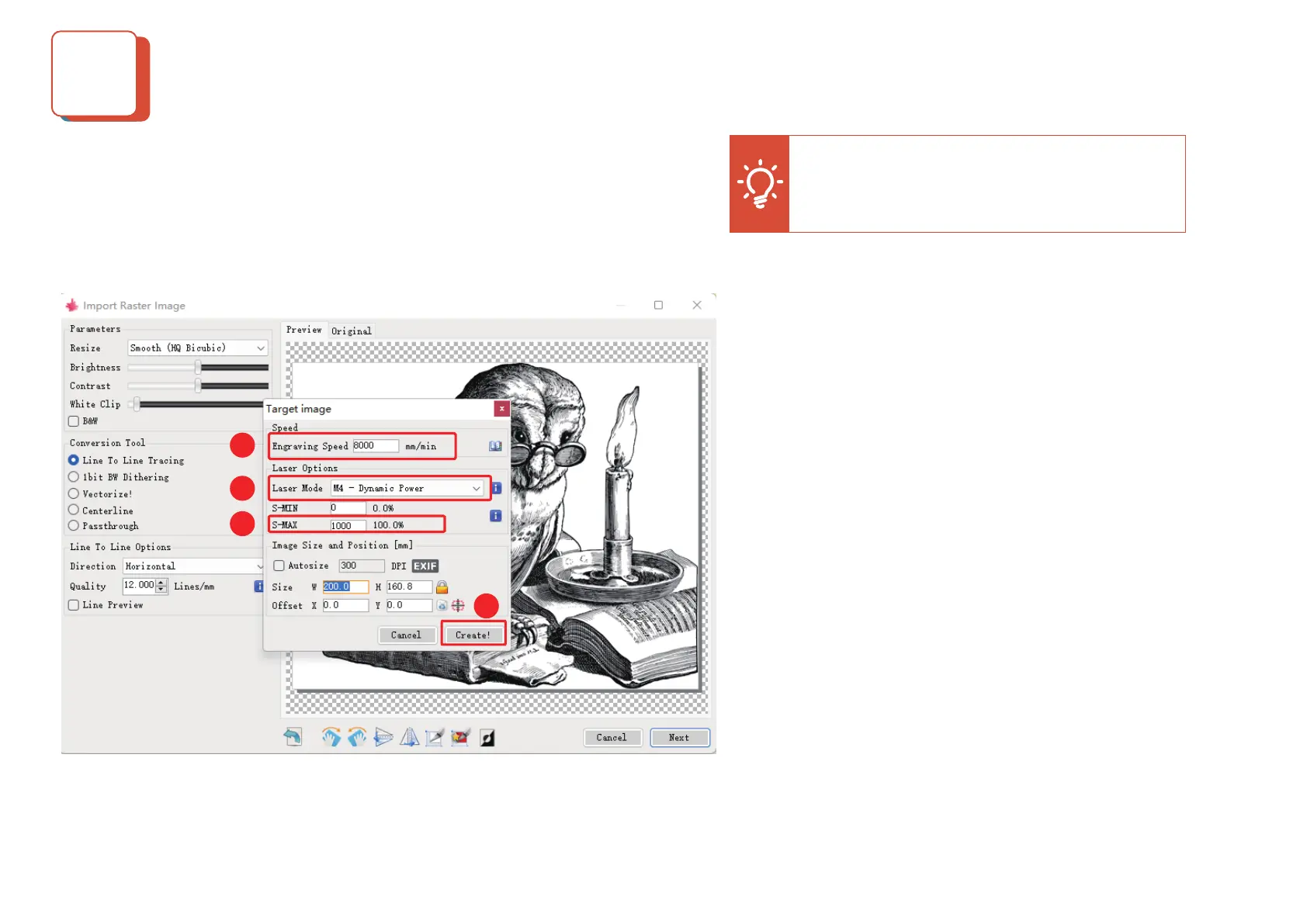
2. After completing the previous step of setting, then select the carving speed,
carving power, and the carving size (The carving power can be set according to
the recommended parameters)
5
1:Dierent materials correspond to dierent carving speed, we
recommend that you refer to the carving parameters table; of course
you can test dierent carving eects according to your carving materi-
als.
2:In the laser mode selection, there are two commands M3 and M4 to
turn on the laser. It is recommended to use the M4 command for
engraving and M3 command for cutting. If your software only has the
M3 command, please check if the laser mode conguration is on in
GRBL. Please refer to the ocial description of "LaserGRBL" for the
description of GRBL conguration.
3:The choice of engraving energy depends on dierent materials, we
recommend you to refer to the engraving parameters table we provide,
which has the recommended engraving parameters for common
materials.
4: Finally set the size to be engraved, click the "Create" button to
complete all the settings of the engraving parameters
Tip: Please ensure that the size you need to
engrave does not exceed the engraving range!
1
2
3
4


 To Next Page
 Loading...