CDN-USB
USB
CDNP6 / CDNP6ACC
INSTRUCTIONS FOR CHANGING LANGUAGES
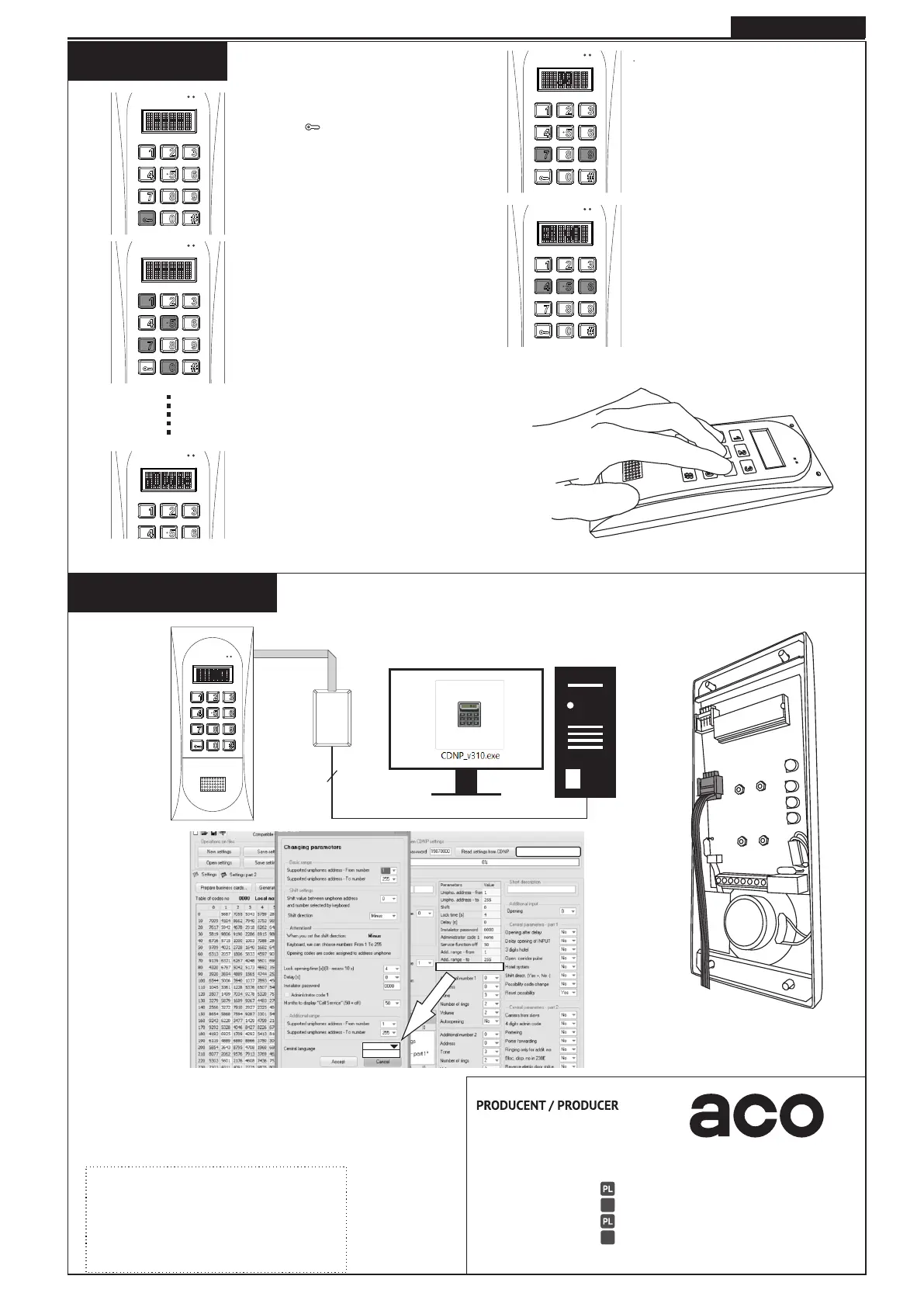
To enter the installer's menu:
- press the " " button
- within 5 seconds enter
"1507xxxx", where "xxxx" is the four-
digit password of the Installer, which
is factory set to"0000" and must be
changed to its own!
Confirmation of entry
there is a beep in the installer's menu,
the software version appears on the
display and then program number „0":
"Otwie" (Default - Polish) or other
language e.g. „Open”.
Press ”79'’ simultaneously
to exit the menu and start the
countdown.
After the countdown has been
completed (during the momentary the
"ACO" sign displayed) press
simultaneously the buttons
„456" to set language no. 2
- press simultaneously the buttons
"123" to set language no. 1
A - from panel
B - using software
Use latest version of CDNP software.
Select one of the languages.
Basic set of languages:
- basic: Polish
- second: English
Save settings: „Main unit`s parameters”.
Double-click on the language change.
The parameters tab will open.
Ask your seller for other set of languages.
1
2
Save settings in CDNP
Central language basic
basic
second
https://www.support.aco.com.pl/
Please download the latest version of CDNP software from:
Instructions and more information
also available on:
EN
ACO Sp. z o.o. sp. komandytowa
ul. Diamentowa 7
62-002 Suchy Las, Poland
tel. +48 61 843 93 71
+48 61 641 96 86
bok@aco.com.pl
www.aco.com.pl
tel.
export@aco.com.pl
DE
EN
FR
www.support.aco.com.pl
IU0708vA.2020



 To Previous Page