programmed will generate three “beeps”. When the door is opened, the display shows "Enter!". Immediate
opening of the door is also possible when the auxiliary INPUT is shorted to GND - exit button connection.
The OUTPUT exit can be activated upon pressing the F2 button in the receiver during the call or upon entering
the user code - in which case the "key" button must be pressed twice before entering the code, which is the
same as the basic access code. (the display shows “Exit-2”) When using ACC, the second output will be
activated upon pressing the "key" button and using the key fob programmed in the device.
PANEL PROGRAMMING
The settings in the control panel can be changed from the built-in installer menu. To enter the installer menu:
press the "key" button and within 5 seconds enter "1507xxxx", where "xxxx" is the four-digit installer’s
password, which is pre-set to correspond to the last four digits of the product serial number printed on the
sticker on the back of the device and which should be changed after installation! (menu 7). Access to the
installer's menu is confirmed with a beep, the software version and then program No. 0: "Open" on the display.
Use "2" to navigate the menu up and "8" - to navigate it down. Use the "Key" button to enter the currently
displayed menu and confirm the values entered. Use the "#" button to go back, cancel the changes and exit
the installer’s menu. The installer mode can be used to reset (restart) the panel by pressing buttons 7 and 9
simultaneously. Upon exiting the installer’s menu, the unit displays its current inner temperature. PLEASE
NOTE! Full configuration of the control panel is also possible using a PC software ("CDNP") which can be
downloaded free of charge from www.aco.com.pl. An optional CDN-USB cable is required to connect the
control panel to a PC, which must be purchased separately. Downloaded from the website can also be the
proximity key fob management software ("ACC_v3x") and an extended manual for the CDNP control panel,
including a description of common problems.
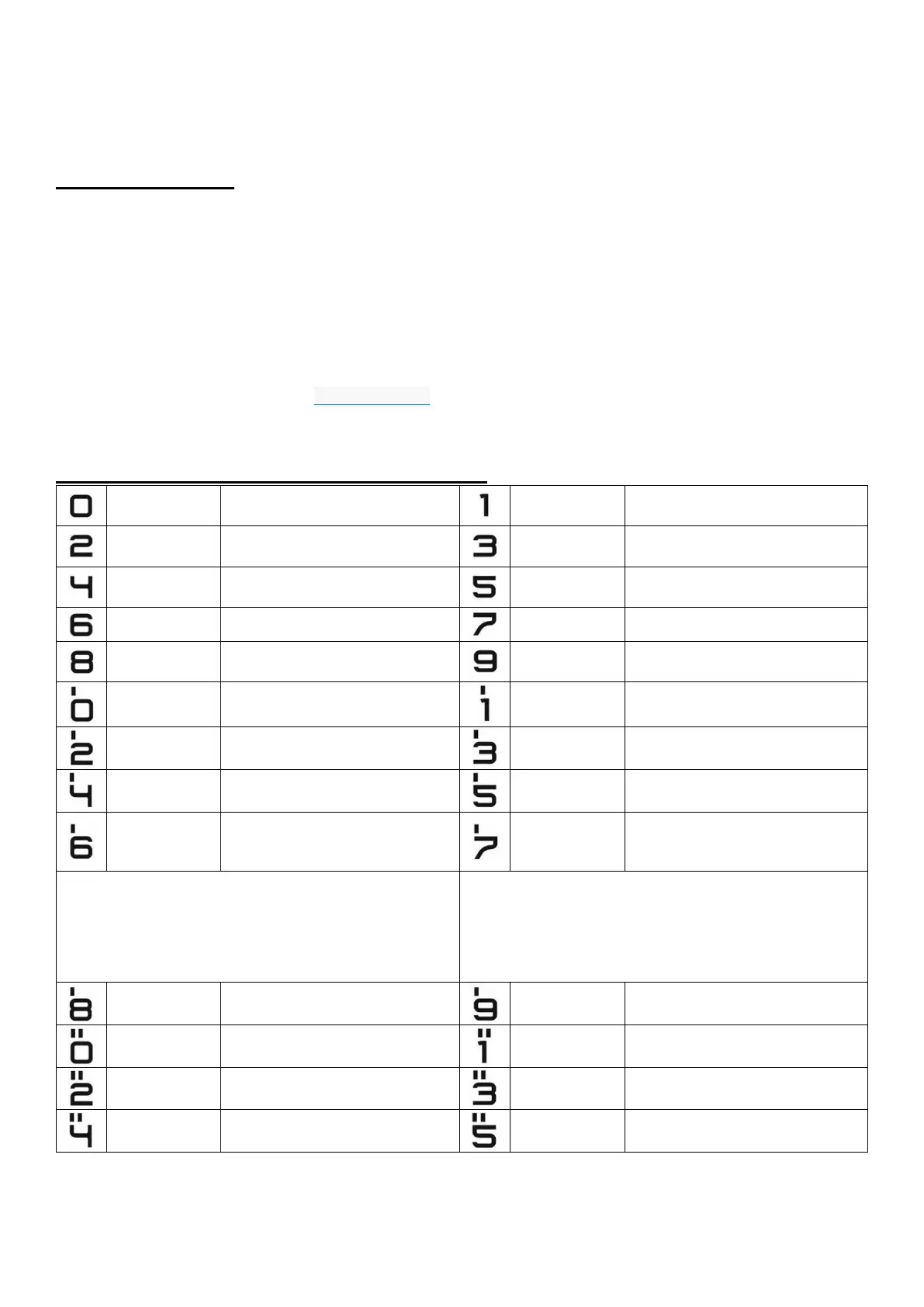
PROGRAMS AVAILABLE FORM THE INSTALLER’S MENU:
E-lock activation in maintenance
mode
Change of individual opening code,
administrator opening code
Setting silent or loud ringing
Setting the number of ringtones,
permission to call
Turning on - off the door opening
signal in the apartment
Receiver call from apartment in
maintenance mode
Installer’s password change
Verifying card assignment to
apartments
Hotel system dialling settings
Entering new access code table
Selecting the function of the
auxiliary input
Setting one of four ringtones
Finding misplaced or defective
receivers
Additionally supported numbers
Panel parameter settings:
Bit1 - enabling further door opening
after further door opening time
Panel parameter settings:
Bill - selecting the image preview
camera in standby
Bit2 - input function in slave panel
Bit3 - operation with optional electronic add-on module
Bit4 - enabling further door opening pulse
Bit5 - enabling dialing of apartment number in hotel system
Bit6 - changing the direction of the call number offset (from p9 program)
Bit7 - enabling access code change by the user
Bit8 - disabling the possibility of restoring factory settings
Bit2 - abbreviated (four-digit) administrator’s access code
Bit3 - doorman’s call
Bit4 - doorman's call forward
Bit5 - calling extension numbers only
Bit6 - disabling apartment number display in 23 OE module
Bit7 - enabling reversible E-lock
Bit8 - interface with Multimaster module
Parameters of input-output module
"CDN-I/O" and "OUTPUT"
Programming the electronic tenant
list module 230E
Programming the ACC proximity
reader
Programming module for names with
buttons 2,6, 10NP
Programming the intro text on the
display
Programming the time to turn off the
"call service" text
Programming an additional "from-
to" range
Line test - testing devices in the
installation


 To Previous Page
 Loading...

