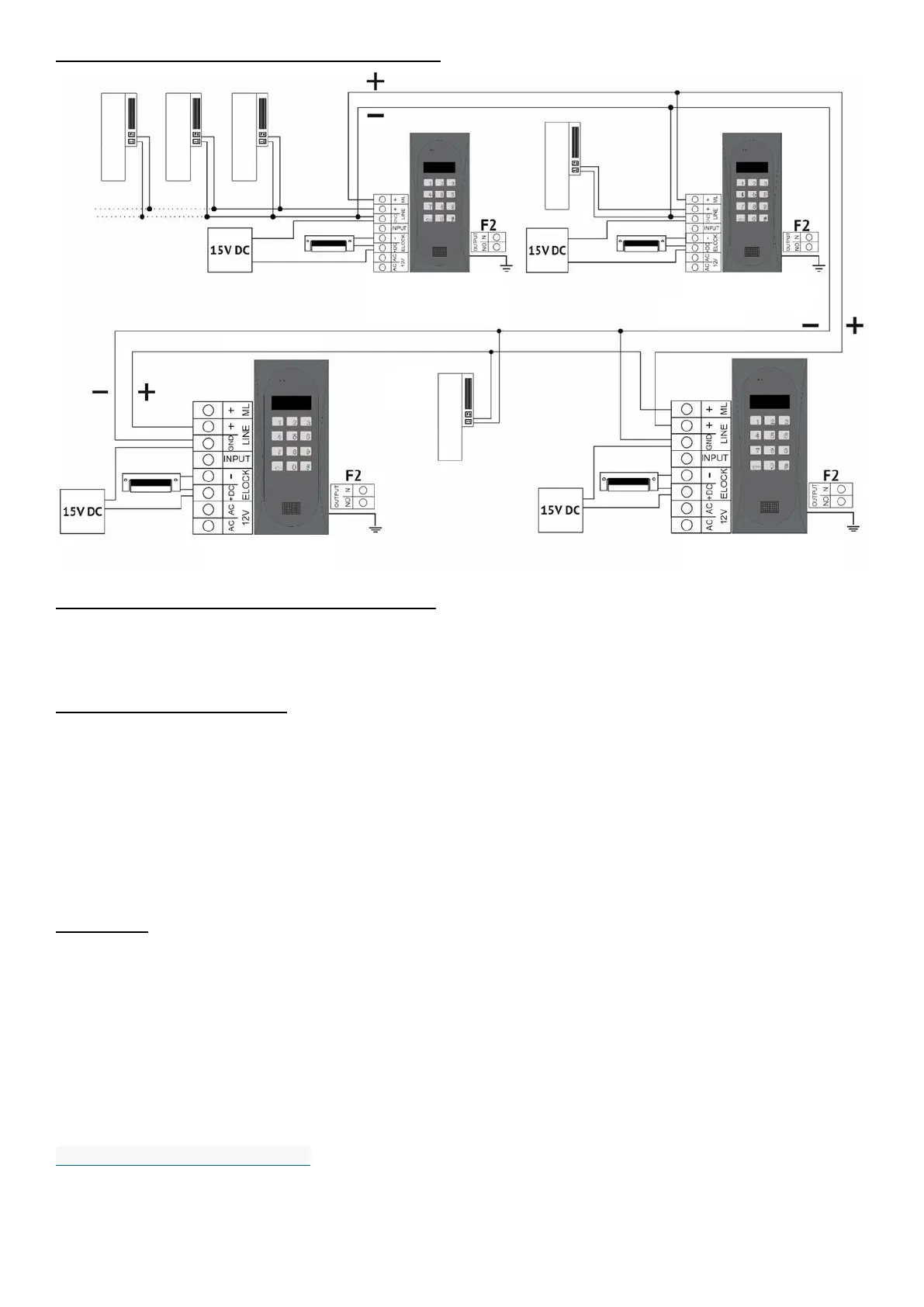
CONNECTION DIAGRAM, MULTIPLE CDNP PANELS
INSTALLATION AND CONNECTION OF RECEIVERS
Install receivers (uniphones) as per their relevant installation instructions and connect them, making sure that
the individual address in the receiver's decoder for each apartment is correctly set and that the polarity of
connection to "LINE+ and LINE-" terminals is correct. When using the 2 x 0.5 mm wire, the maximum distance
between the receiver and the control panel is 300m (for 2 x 2.5 mm
2
wire it is 1000 m).
VOLUME LEVEL ADJUSTMENT
The volume level settings can be accessed, when connected to the receiver, as follows:
- adjust the sensitivity of the unit microphone using the "MIC" potentiometer
- use the "SPK" potentiometer to adjust the volume level of the panel speaker
- use the "SOUNDS" potentiometer to adjust the volume level of the panel sound
As these values are set, turn the "BALANCE" potentiometer to determine the position of the excitation points (squeak)
in the loudspeaker and set the potentiometer halfway between these points (to move as far away as possible from the
position where the excitation/squealing occurs - if the position where no excitation occurs cannot be set - reduce the
microphone sensitivity and/or volume of the control panel speaker. In a mixed system with different receivers, the
adjustment id necessary for hands-free receivers, setting the maximum call volume on the receiver - when the call
“drops”, the panel speaker volume and/or microphone sensitivity should be reduced.
OPERATION
In standby the display shows "Intro", which can be freely changed (default into message: "aco"). The pre-set
number range is 1 to 255, which corresponds to the physical addresses set in the receivers. Use the installer
menu (program P9) to set the range of supported receivers in the facility (it is also possible to change dialing
of numbers from the keypad from 1 to 999, maintaining the continuity of physical addresses from 1 to 255).
To call an apartment, its number must be selected using the keypad (or if a 230E module is used, select an
entry with arrows and press the "ring" button). Within 3 seconds the receiver in the apartment will start ringing.
If a call is answered in ringing mode, communication is possible and door can be opened To open the door
with the user (tenant) code, select the number of the apartment with the keypad, confirm with the "key" button
and enter the four-digit code, unique for each apartment. Full table with codes for all users or name tags for
residents together with use instruction can be printed using the "ACO Code Generator" available at
www.aco.com.pl/aco_generator/. For each panel the code table is entered at the factory on the back of the
unit as a 4-digit number; in order for the same opening codes to work in each panel, the same code table
must be used. To get access using the administrator’s code, press the "key" button on the keypad and then
enter the six-digit code. This code is used by persons such as technicians, postmen, housekeepers, etc.
Devices with the ACC proximity reader (CDNP8ACC) can be used with key fob (resident’s or
administrator/installer’s key fob) programmed in the panel to open the door. A key fob which is not


 To Next Page
 Loading...

