EasyManua.ls Logo

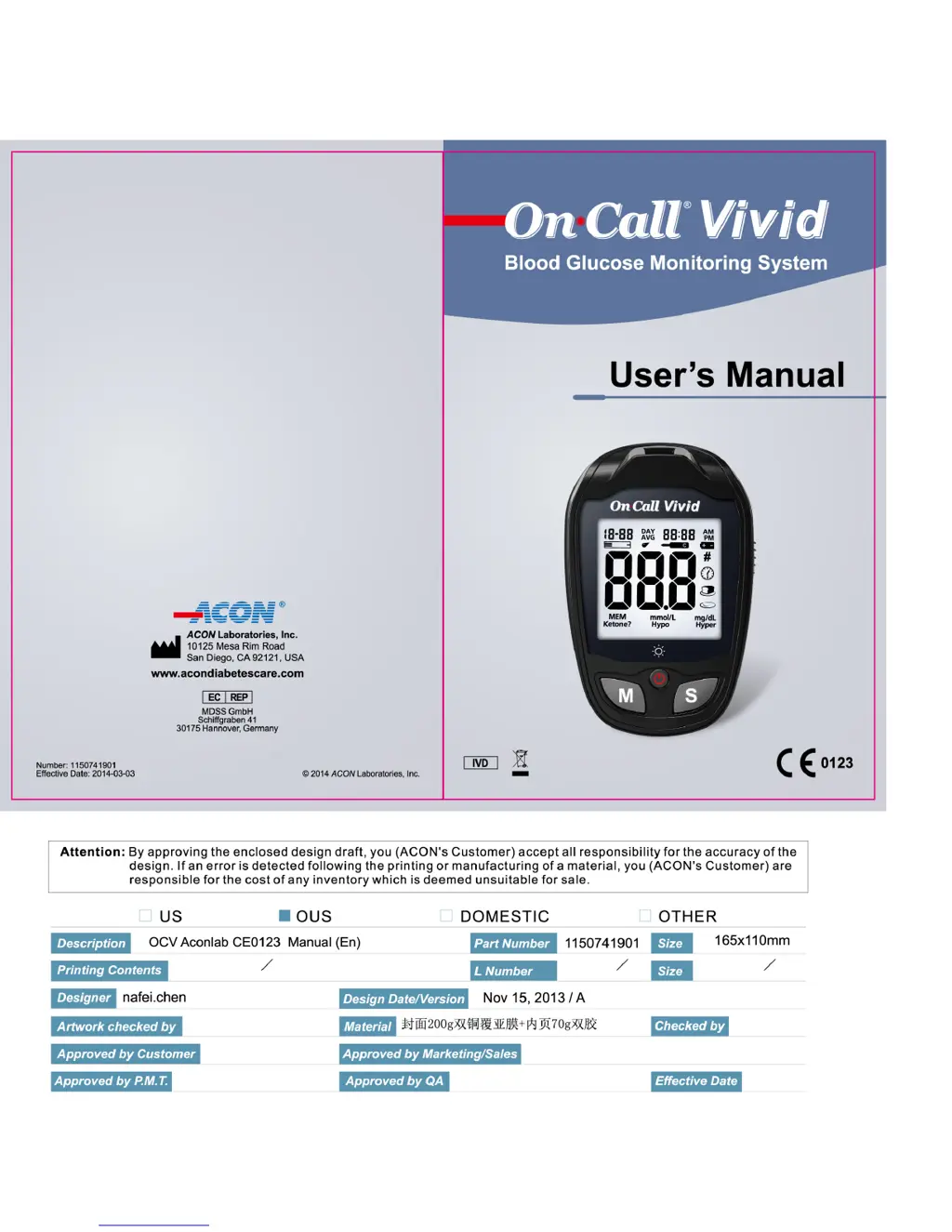
Acon ON CALL VIVID - User Manual

Acon ON CALL VIVID
49 pages
Print Icon
To Next Page IconTo Next Page
Loading...

Other manuals for Acon ON CALL VIVID

Questions and Answers

  • J
    Jennifer HicksAug 19, 2025
    What to do if my Acon ON CALL VIVID Blood Glucose Meter fails to turn on because the test strip was removed?
    • S
      Sharon PetersAug 19, 2025
      If your Acon Blood Glucose Meter fails to turn on because the test strip was removed during the test, repeat the test, ensuring the test strip remains in place.
  • T
    Timothy CastilloAug 22, 2025
    What to do if my Acon ON CALL VIVID fails to turn on because the sample was applied too soon?
    • J
      Jennifer JohnsonAug 22, 2025
      If your Acon Blood Glucose Meter fails to turn on because the sample was applied to the test strip too soon, repeat the test and apply the sample after the blood drop/test strip icon appears.
  • T
    Tyrone AyersAug 26, 2025
    What to do if my Acon ON CALL VIVID Blood Glucose Meter fails to turn on because of a contaminated test strip?
    • A
      Andrea GrayAug 26, 2025
      If your Acon Blood Glucose Meter fails to turn on because the test strip is contaminated or used, repeat the test with a new test strip.
  • B
    Brianna WhiteAug 28, 2025
    What to do if my Acon ON CALL VIVID Blood Glucose Meter fails to turn on due to an insufficient sample?
    • Z
      Zachary WilliamsAug 28, 2025
      If your Acon Blood Glucose Meter fails to turn on due to an insufficient sample, repeat the test, ensuring you apply enough sample to fill the test strip check window.
  • T
    thomaslaurenAug 31, 2025
    What to do if my Acon ON CALL VIVID Blood Glucose Meter fails to turn on due to late sample re-dosing?
    • S
      Stacy MooreAug 31, 2025
      If your Acon Blood Glucose Meter fails to turn on due to late sample re-dosing, repeat the test and apply enough sample to fill the test strip check window within 3 seconds.
  • E
    Eugene ChaneySep 3, 2025
    What to do if my Acon ON CALL VIVID Blood Glucose Meter fails to turn on because of high temperature?
    • E
      Elizabeth RichardsSep 3, 2025
      If your Acon Blood Glucose Meter fails to turn on because the temperature has exceeded the operating temperature of the system, move to a cooler environment and repeat the test.
  • M
    Michael RosalesSep 6, 2025
    What to do if my Acon ON CALL VIVID Blood Glucose Meter fails to turn on because it is too cold?
    • D
      danielsteeleSep 6, 2025
      If your Acon Blood Glucose Meter fails to turn on because the meter is too cold, wait 30 minutes to allow the meter to reach room temperature, then repeat the test.
  • T
    Terri FreemanSep 9, 2025
    What to do if my Acon ON CALL VIVID fails to turn on due to self check error?
    • B
      brianagonzalezSep 9, 2025
      If your Acon Blood Glucose Meter fails to turn on due to a Power On self-check error, remove the battery for 30 seconds, then put it back and turn the meter on again. If the problem persists, contact your local distributor.
  • D
    Dana MorenoSep 12, 2025
    What to do if my Acon Blood Glucose Meter fails to turn on due to calibration error?
    • X
      xjonesSep 12, 2025
      If your Acon Blood Glucose Meter fails to turn on due to an internal calibration check error, move the meter away from cell phones, radio frequency sources, or high power electrical sources, and then retest. If the problem persists, contact your local distributor.
  • H
    Heather Davis PhDNov 15, 2025
    Why won't my Acon Blood Glucose Meter turn on?
    • C
      Carl ChristensenNov 15, 2025
      If your Acon Blood Glucose Meter fails to turn on, several factors could be responsible. It may be due to a damaged or uncharged battery, so replacing the battery is recommended. Alternatively, if the meter has been in a cold environment, allow it to reach room temperature for 30 minutes before retesting. There may also be a Power On self check error, in this case remove the battery for 30 seconds, reinsert it, and try turning the meter on again. If the issue continues, contact your local distributor. In case of an internal calibration check error, move the meter away from cell phones, radio frequency sources, or high-power electrical sources and retest. If the problem persists, contact your local distributor. Additionally, ensure the test strip remains in place during the test, and that t...

Summary

Introduction to On-Call Vivid System

Guidelines for Accurate Blood Glucose Readings

Lists essential instructions and precautions for obtaining accurate blood glucose measurements.

On-Call Vivid Meter Overview

Decoding the Meter Display

Understanding Result and Alert Indicators

Details symbols for hyperglycemia, hypoglycemia, ketones, and meal markers.

Meter Usage and Safety Precautions

On-Call Vivid Test Strip Usage

Proper Blood Sample Application

Provides step-by-step guidance on applying blood to the test strip correctly.

Test Strip Precautions and Control Solution

Control Solution Handling and Safety

Installing Meter Batteries

Battery Replacement Procedure

Step-by-step visual guide for inserting new batteries into the meter.

Setting Up Your New Meter

Setting the Date and Time

Guides users through configuring the meter's clock and calendar settings.

Configuring Meter Indicators

Setting Meter Reminders and Alerts

Performing a Quality Control Test

When to Perform Quality Control

Lists critical situations where running a QC test is recommended.

Step-by-Step QC Test Procedure

Provides detailed instructions for executing a quality control test.

Quality Control Test Execution

Interpreting Quality Control Results

Explains how to analyze and validate control test outcomes.

Troubleshooting Quality Control Results

Resolving Out-of-Range QC Readings

Provides troubleshooting steps for QC results outside the specified range.

Testing Your Blood Glucose

Step 1: Obtaining a Blood Drop

Introduces the initial steps for collecting a blood sample for testing.

Fingertip Blood Sampling Technique

Fingertip Lancing and Blood Collection

Forearm and Palm Blood Sampling

Lancet Safety and Blood Glucose Testing

Step 2: Performing the Blood Glucose Test

Begins the process of using the meter to measure blood glucose.

Executing the Blood Glucose Test

Meter Activation and Blood Application

Covers inserting the test strip and applying the blood sample to the meter.

Understanding Test Results

Using Meal Markers and Marking Results

Details how to add meal context and mark results as invalid.

Result Confirmation and Error Messages

Interpreting HI and LO Messages

Explains error messages indicating results outside the meter's measurement range.

Interpreting Glucose Level Alerts

Understanding Hypo, Hyper, and Ketone Alerts

Details specific alert messages for blood glucose levels and ketone checks.

Managing Meter Memory Data

Viewing Past Test Records

Provides instructions on how to retrieve and view previously stored glucose readings.

Analyzing Glucose Averages

Accessing General and Meal-Specific Averages

Details how to view different types of glucose averages stored in the meter.

Memory Management Procedures

Clearing All Stored Test Data

Provides instructions on how to permanently delete all data from the meter's memory.

Transferring Data to a PC

Routine Meter Maintenance

Replacing the Meter Battery

Provides a step-by-step guide for replacing the meter's batteries.

Blood Glucose Testing Schedule and Goals

Comparing Meter and Laboratory Results

Guidelines for Accurate Result Comparison

Provides advice on how to effectively compare meter readings with laboratory tests.

Troubleshooting Meter Errors

Error Codes E-0 to E-5 and Solutions

Details common meter error messages and their corresponding troubleshooting steps.

Advanced Troubleshooting Guide

Error Codes LO, E-6 to E-12 and Solutions

Covers additional error codes and their remedies for meter issues.

Technical Specifications of the Meter

Acon ON CALL VIVID Specifications

General IconGeneral
Sample TypeCapillary whole blood
Test Time5 seconds
DisplayLCD
Operating Humidity10 - 90% RH
Hematocrit Range30 - 55%
Battery LifeApproximately 1, 000 tests
Measurement Range20-600 mg/dL
Sample Size0.8 µL
Memory Capacity500 results
Operating Temperature5°C to 45°C

Related product manuals