6
Meter Display
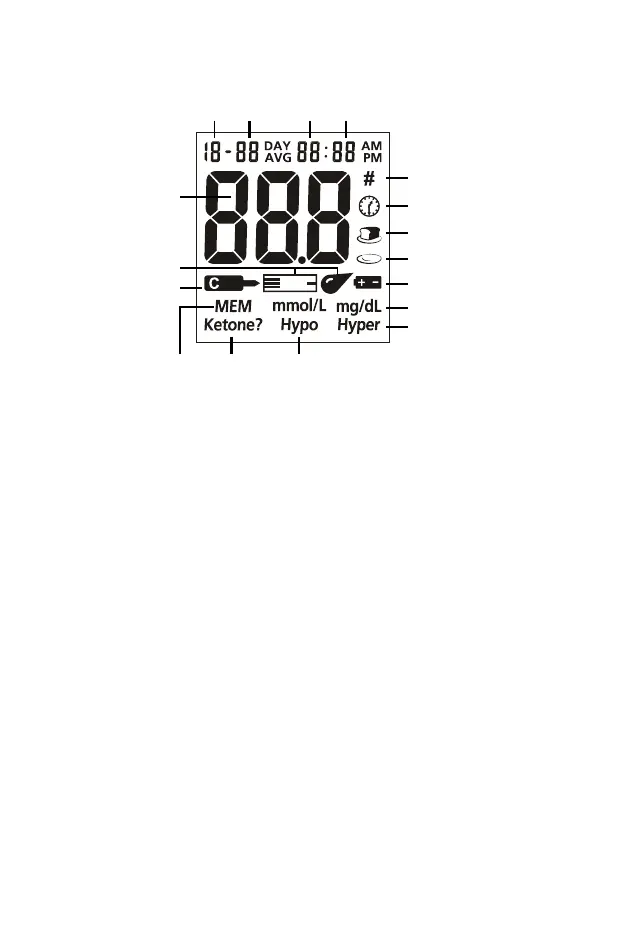
Test Result Area: Indicates test result.
Blood Drop / Strip Symbol: Wait for the Blood Drop / Strip Symbol to appear
before applying the sample. These two symbols appear at the same time.
Control Solution Symbol: Indicates a control test result. A pound sign (#) will also
be displayed when control solution symbol appears.
MEM: Shows a test result stored in memory.
Ketone?: Appears when the blood glucose concentration is above 300 mg/dl. This
simply suggests that a ketone test is recommended. Consult your doctor about
testing for ketones.
Note: This symbol does not mean that the system has detected ketones. It
recommends that a ketone test should be taken.
Hypo Symbol: Appears when the blood glucose concentration is below the
“Hypoglycemia” (low blood sugar) target level that you have set.
Hyper Symbol: Appears when the blood glucose concentration is above the
“Hyperglycemia” (high blood sugar) target level that you have set.
Measurement Unit: Only mg/dl will be displayed on your meter. It cannot be
adjusted.
Battery Symbol: Warns when you should replace the battery.
After Meal Symbol: Appears when after-meal test results are displayed.
Before Meal Symbol: Appears when before-meal test results are displayed.
Test Reminder Symbol: Appears when reminding you to test blood glucose.
Pound Sign (#): Appears with the control solution test result or when you mark an
invalid result to prevent it from being included in the average.
Month Day Hour Minutes
Pound Sign (#)
Test Remind Symbol
Before Meal Symbol
After Meal Symbol
Battery Symbol
Measurement Unit
Hyper Symbol
Blood Drop
Strip Symbol
Memory Ketone Hypo Symbol
Test Resul
Area
Control Solution
Symbol


 To Next Page