EasyManua.ls Logo

Acorto 2000s - Page 111

Acorto 2000s
237 pages
Print Icon
To Next Page IconTo Next Page
To Previous Page IconTo Previous Page
Loading...
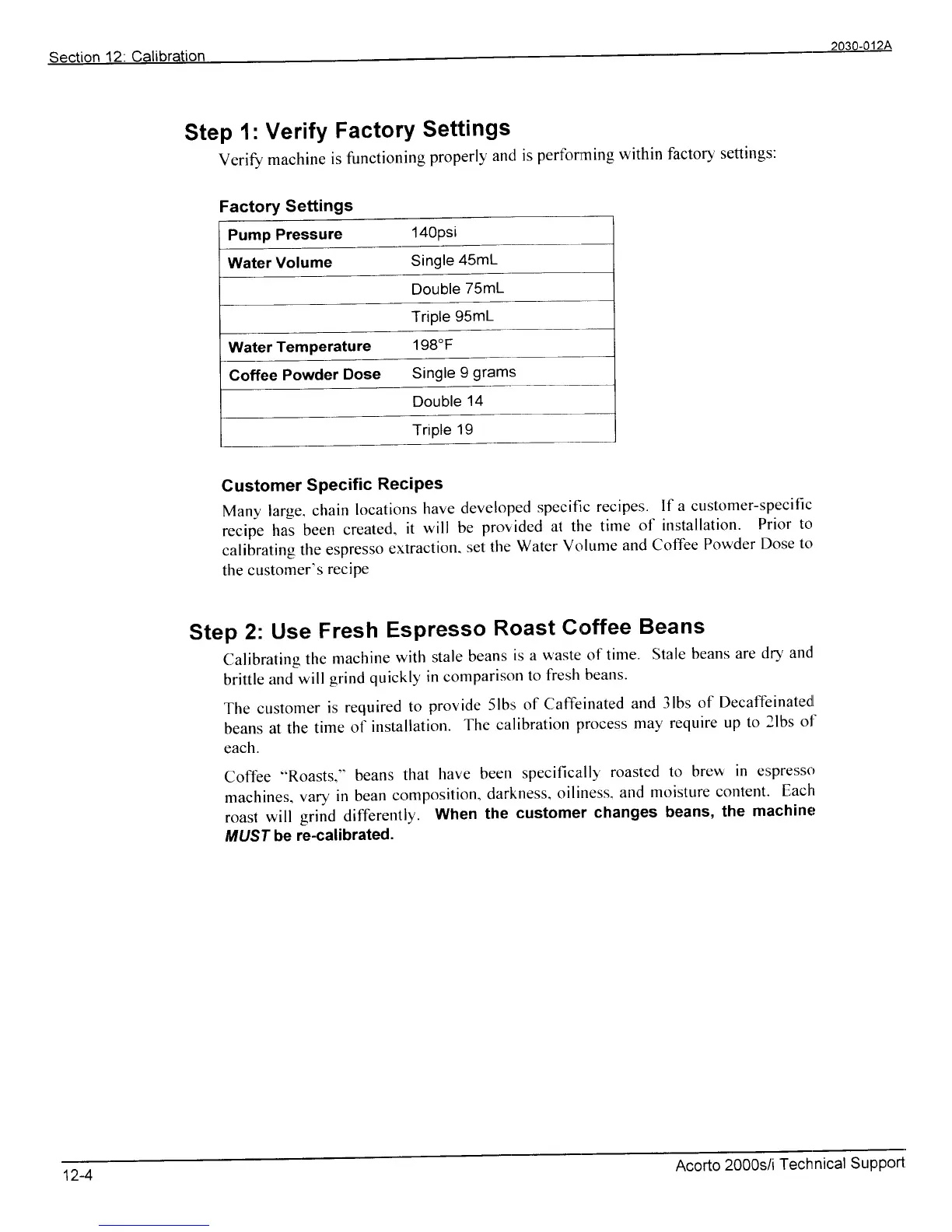
Factory
Settings
Pump
Pressure
'l40Psi
Water
Volume
Single
45mL
Triple
95mL
WaterTemPerature
198'F
Coffee
Powder
Dose
Single
9
grams
Step
1:
Verify
FactorY
Settings
Verify
machine
is
functioning
properly
and
is
performing
within factory
settings:
Customer
SPecific
ReciPes
Many
large.
chain
locations
have
developed
specifi,c
recipes.
If a customer-specific
recije
hai
been
created.
it
will
be
provided
at the
time
of irrstallation.
Prior
to
cali|rating
the
espresso
extraction.
set
the
Water
Volume
and
Coffee
Powder
Dose
to
the
customer's
reciPe
Step
2:
Use
Fresh
Espresso
Roast
Coffee
Beans
Calibrating
the
machine
with
stale
beans
is a waste
of time.
Stale
beans
are
dry
and
brittle
and
will
grind
quickly
in comparison
to
fiesh
beans.
The
customer
is
required
to
provide
5lbs
of
Caffeinated
and
3lbs of
Decaffeinatedl
beans
a1
the
time
of
installation.
The
calibration
process
may
require
up
to 2lbs
o1'
each.
Coff-ee
..Roasts."
beans
that
have
been
specifica:l11'
roasted
to brew
in espresso
machines.
vary
in bean
compclsition.
darkness,
oiliness.
and
moisture
content.
Each
roast
will
grind differently.
When
the
customer
changes
beans,
the
machiner
MUST
be
re-calibrated.
tz-1
Acorto
2000s/i
Technical
SuPPort