EasyManua.ls Logo

Acorto 2000s - Page 38

Acorto 2000s
237 pages
Print Icon
To Next Page IconTo Next Page
To Previous Page IconTo Previous Page
Loading...
Secfion 4: lnstallation
20.30-o0/.A
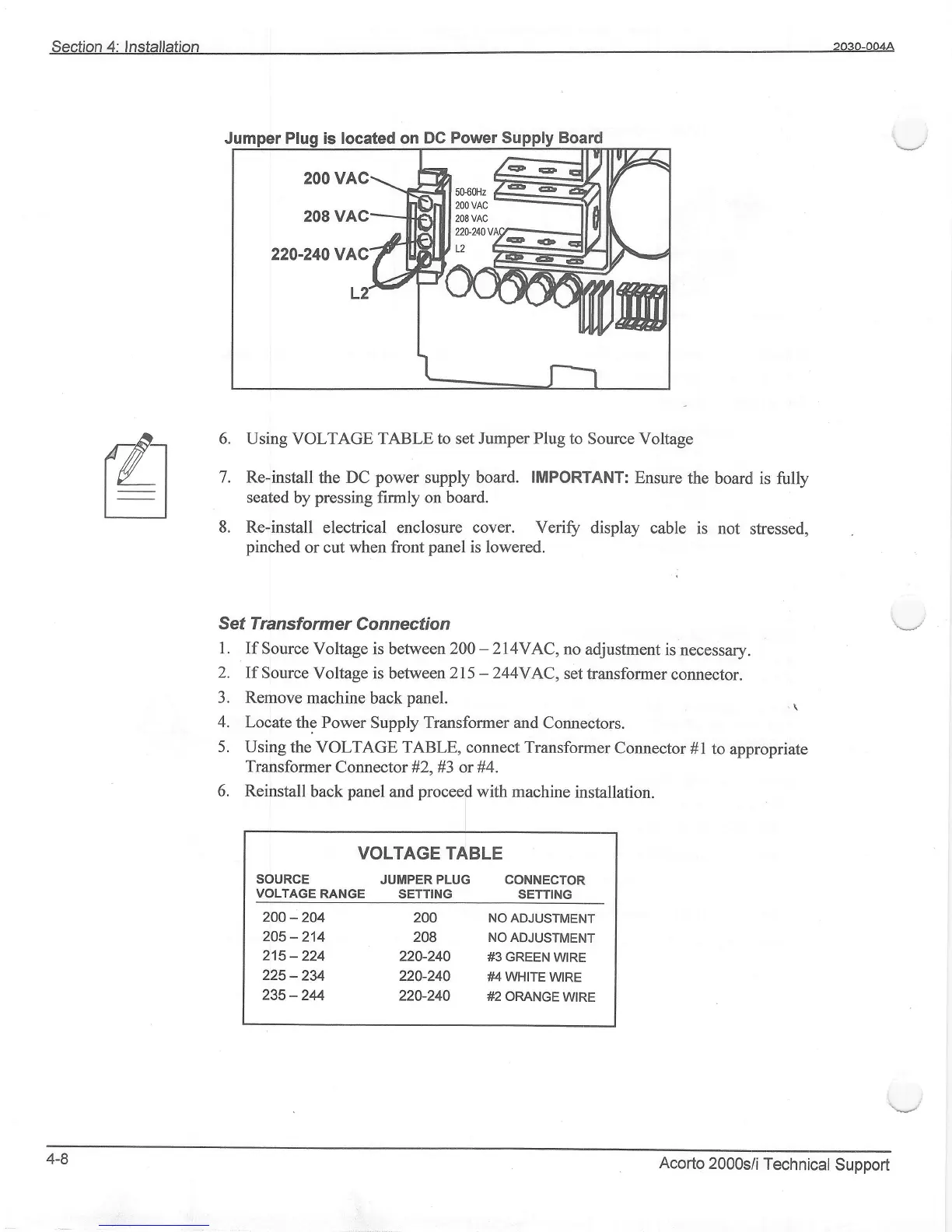
is located on
DC Power
rdt
EI
.7
Using VOLTAGE TABLE to set Jumper
Plug
to Source Voltage
Re-install
the
DC
power
supply board. IMPORTANT:
Ensure
the boardl
is fully
seated
by
pressing
firmly
on board.
Re-install
elechical enclosure cover. Verify
display cable
is not
stressed,
pinched
or cut
when front
panel
is lowered.
Sef lransfo
rm er C o n n ecti o n
1. If
Source
Voltage is between
200
-214VAC,
no
adjustment
is necessary.
2.
If Source
Voltage is between 215
-
244YAC,
set
transformer
connector.
3. Remove
machine
back
panel.
.
\
4.
Locate
the Power Supply Transformer and
Connectors.
5.
Using
the VOLTAGE TABLE, connect
Transformer
Connector
#1
to
apprropriate
Transformer
Connector #2,#3 or #4.
6. Reinstall
back
panel
and
procee$
with machine
installation.
VOLTAGE TABLE
SOURCE
JUMPERPLUG CONNECTOR
VOLTAGE
RANGE SETTING
SETTING
2OO-204
2OO NOADJUSTMENT
205_214
208
NOADJUSTMENT
215-224
220-240
#3 GREEN
W|RE
225
-2U
220-240 #4 WHtrE
W|RE
235-244
220-240
#2 oRANGEW|RE
4-8
Acorto
2000s/i
Technical
Support