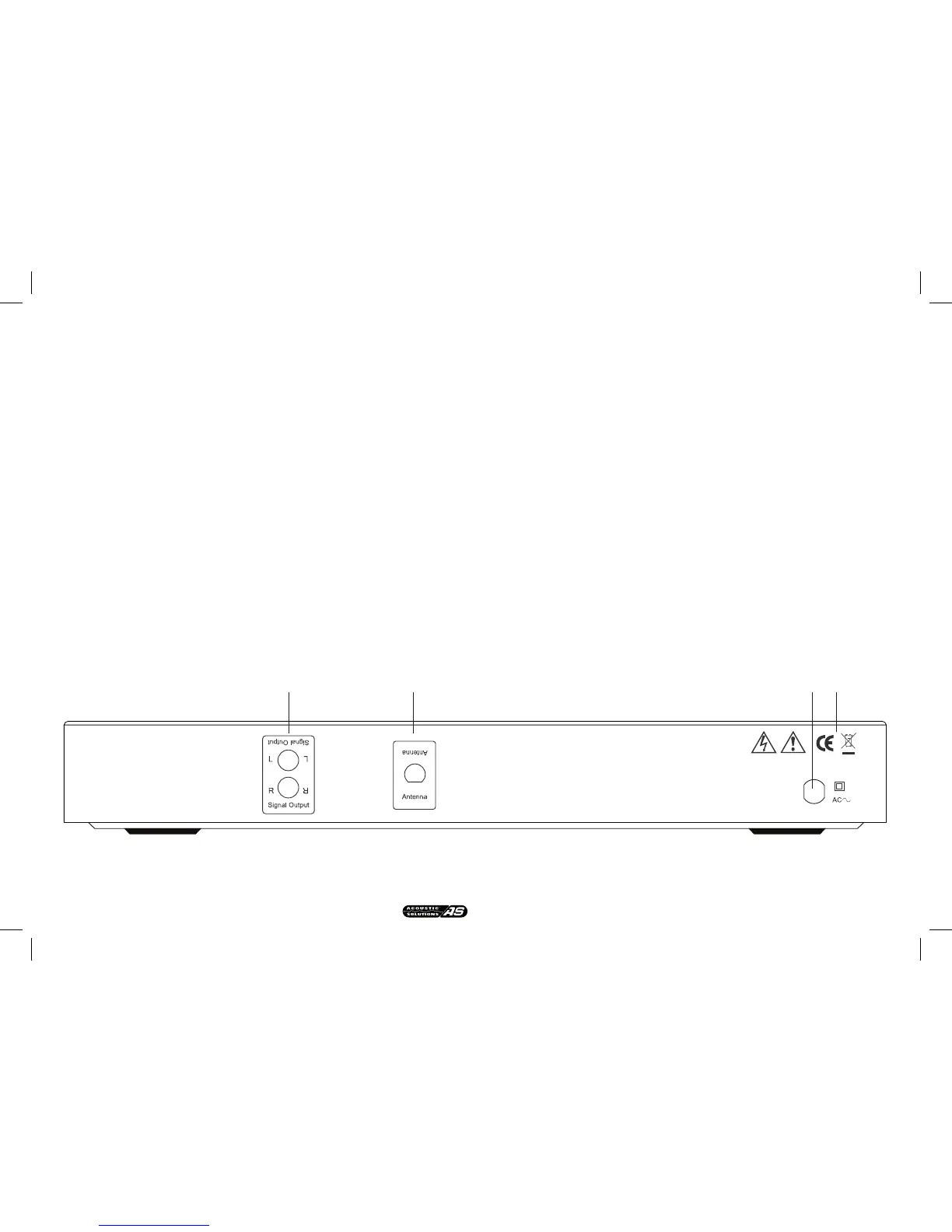
REAR PANEL CONNECTIONS
FRONT PANEL CONTROLS
music, varied speech etc), Stereo/Mono and bit rate of broadcast, Multiplex
name (name of multiplex broadcaster), time & date. Please note that this
information is supplied by the broadcaster and may not always be present.
In FM mode. This changes what information is displayed on line 2 of the
LCD display. The default setting will show the Program Station name
continue to press to show the following; time & date, RDS (radio data
system, info text supplied by each radio station), program type (classication
supplied by radio station ie: Pop music, Rock music, varied speech etc),
stereo/mono (auto) or mono mode selection (see rotary control knob).
Please note that some of this information is supplied by the
broadcaster and may not always be present.
8. PRESET Down. Button toggles presets downwards ie: 5-4-3.
9. STEREO/MONO. Switches between Stereo & Mono output (FM only)
10. PRESET up. Button toggles presets upwards ie: 3-4-5.
11. ANALOGUE AUDIO OUTPUTS. For connection to line input sockets on
ampliers.
12. ANTENNA CONNECTION.
13. MAINS CABLE INLET POSITION. Please ensure that this cable strain
relief bush is intact and has not been damaged.
14. WARNING/WEEE LABELS. Please observe that this unit contains high
voltages, and should not be opened, please refer to page 3 of this manual.


 To Next Page