12/11/2021 912S-03765-01.00 11
USER MANUAL
2.3 Optical indications on activation
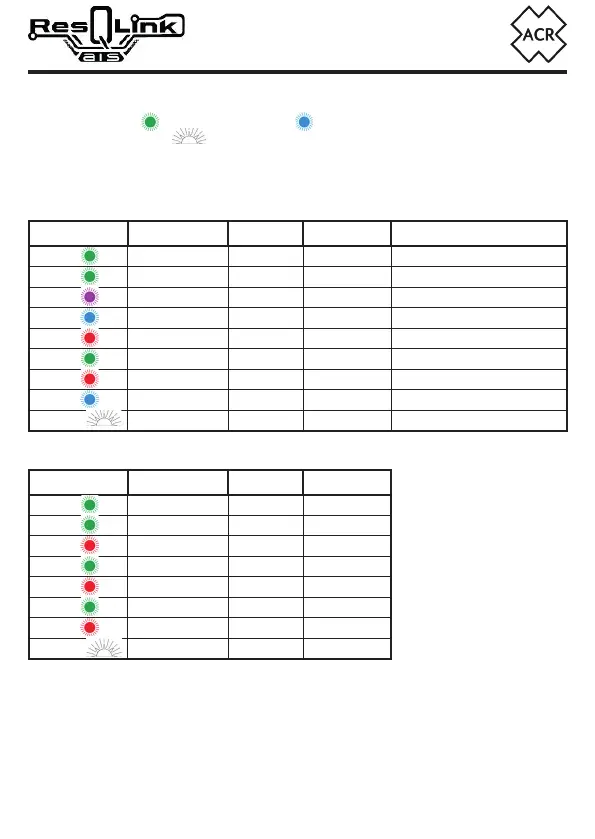
• The green LED will illuminate (blue if RLS is enabled) for 1 second.
• The strobe light
will start flashing.
• Within 30 seconds of activation, the indicator LED will flash indicating AIS transmission.
• Within 1 minute of activation, the indicator LED will flash a quick burst of 5 indicating
406MHz transmission.
2.3.1 LED Indications with RLS Enabled
LED When Transmit GNSS RLS
(x1)
Every 5 s Searching
(x3)
Once Fix acquired
(x5)
At transmit 406MHz No Fix Request sent
(x5)
At transmit 406MHz Fix acquired Request sent
(x8)
At transmit* AIS No Fix
(x8)
At transmit* AIS Fix acquired
(x1)
Every 2.5 s** 121MHz Reply not received
(x1)
Every 2.5 s** 121MHz Reply received
(x1)
Every 2.5 s
2.3.2 LED Indications for units configured with non-RLS Protocol
LED When Transmit GNSS
(x1)
Every 5 s Searching
(x3)
Once Fix acquired
(x5)
At transmit 406MHz No Fix
(x5)
At transmit 406MHz Fix acquired
(x8)
At transmit* AIS No Fix
(x8)
At transmit* AIS Fix acquired
(x1)
Every 2.5 s** 121MHz
(x1)
Every 2.5 s
* The AIS transmissions will show as 8 flashes (1 every 2 seconds) as a sequence repeated
once every minute
** The 121MHz Homer will not transmit until after the first 406MHz transmission.
2.4 Deactivation
To deactivate your ResQLink AIS after use or if it is accidentally activated, press the TEST/OFF Key
until the LED flashes red twice, then release. As long as it is turned off within 30 seconds of activation
there is no requirement to contact the authorities (see section 2.7 False Alerts).
NOTE:
Non-RLS Protocol is usually
country specific and is not a
user changeable function.


 To Next Page