720-00003.8
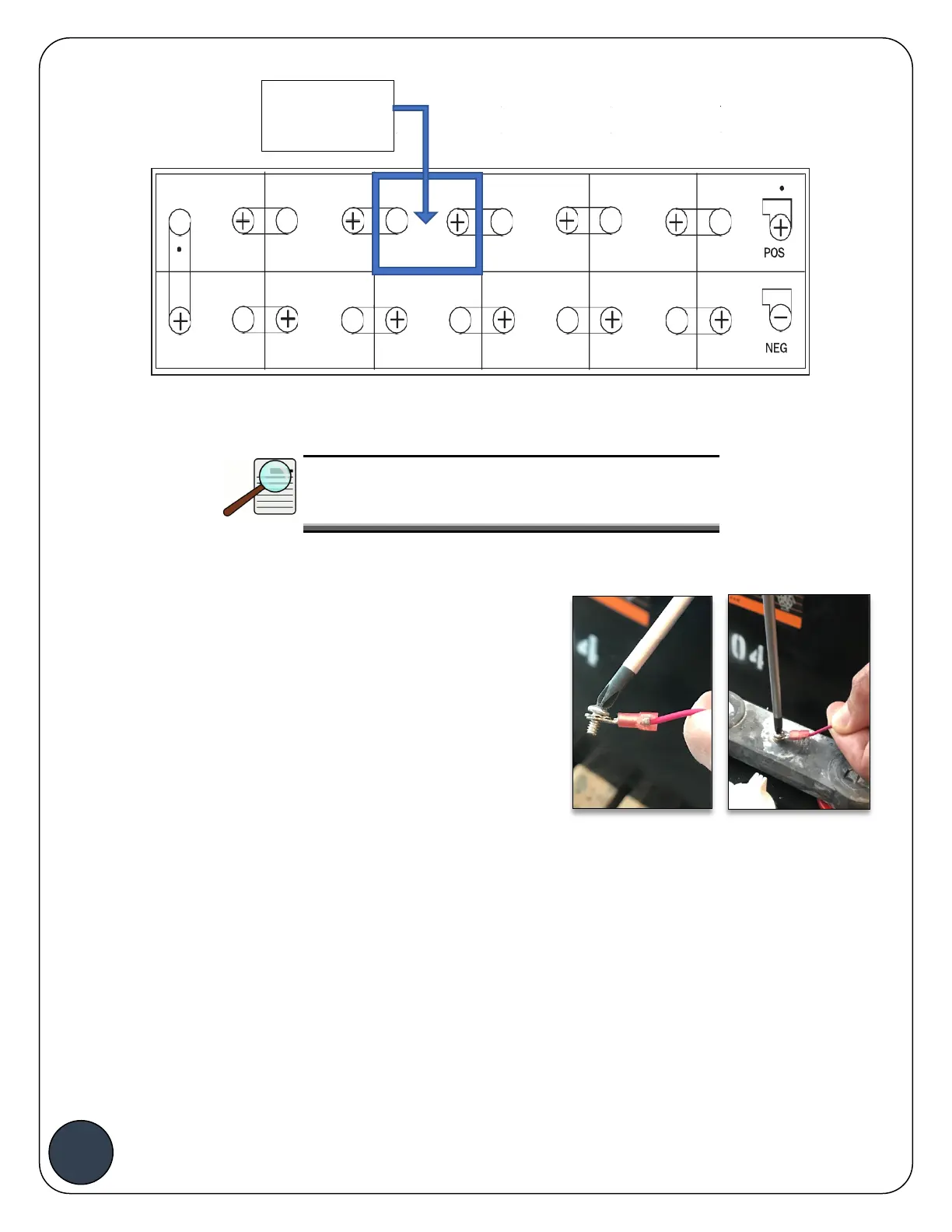
Example
: BATTview ll (
Combo Probe
) Installation Location on a 24V battery
Important:
Install BATTview combo probe
at least 8 cells from
the NEGATIVE
terminal
as shown above.
Battery Voltage Sense Leads (Lugs):
Connect the negative lead (
BLACK
) to the negative terminal
of the battery. Connect the positive lead
(RED)
to the positive
terminal of the battery. When connecting the positive voltage
sense lead place the ring terminal in the screw first, then tug
on the cable while screwing the screw into the battery
terminal to prevent sparking as shown in the pictures to the
side.
Battery Voltage Sense Leads (Piercing Connectors):
Using the 13-mm ratcheting wrench (not supplied) open the jaws of the 2 piercing connectors
and clamp them on the positive (RED) and negative (BLACK) battery terminals. Make sure the
battery voltage sensing leads are also clamped securely to the piercing connectors.
Note:
When the BATTview powers up, it will blink Blue one time and then perform a hardware check
that could take up to 3 seconds. The BATTview should blink Green 3 times to indicate hardware
check completed successfully. If the BATTview doesn’t show this color pattern, check lead
connections to ensure the leads are in full contact with the battery. Check BATTview
INSTALLATION


 To Next Page
 Loading...