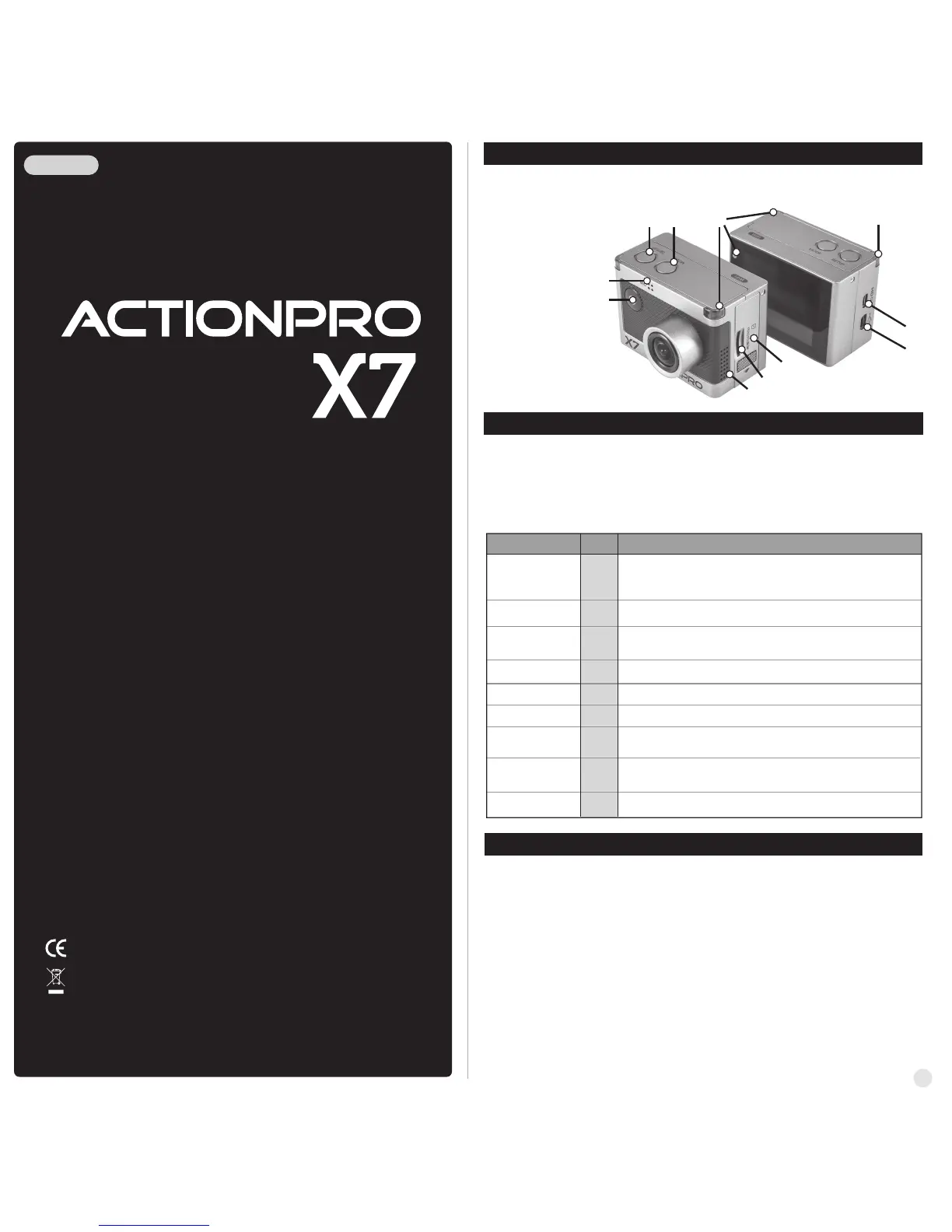
2. Operation & button description
3. Prepare the camera
1. Names of each part
ENGLISH
●
ACTIONPRO X7 is operated by three buttons (Button ON/OFF, SETUP, MODE)
●
Button ON/OFF means 'POWER / REC. / SELECT'.
●
Button SETUP means 'SETUP / QUICK SETUP / RIGHT'.
●
Button MODE means 'MODE / LEFT'.
●
The definition of each button is as below table.
Press the POWER button and hold for 2 seconds
Press the ON/OFF button to start video recording or photo shoot
Power On / Off
REC Start / Stop
Switch Mode
Quick Setup
Press the SETUP button to change quick setup before recording
Press the MODE button and hold for 2 seconds to switch modes
(Video, Photo, Playback)
Enter Quick Setup
Press the ON/OFF button to confirm to enter the quick setup menu
User Setup
Press the SETUP button and hold for 2 seconds to enter user setup mode
Change setting
category
Within user setup mode, press SETUP button to switch category
Enter Quick Setup
Within user setup mode, press MODE button to enter setting menu
in each category
Confirm setting menu
Within user setup mode, press ON/OFF button to confirm setting menu
Function Button
Description
If Auto Power off is set, the camera will automatically shut down in 3 minutes
when there is no operation.
1. Open the battery cover and insert ACTIONPRO Li-ion battery.
2. Open the battery cover and insert Micro SD card.
Please use high quality Micro-SD-Cards Class10, we recommend to use original
Intenso or Samsung Class10 memory cards.
3. Use the USB cable to connect the camera to your PC and charge the battery.
The battery is charged, when the two red LEDs go out.
4. The waterproof housing must be checked for leaks before each use. The seal must be
clean and undamaged. Check this before each use by a dive without the camera.
We accept no liability for any damage caused by leaks in the casing.
4. Press the ON/OFF button and hold for two seconds.
The camera turns on and LCD monitor shows camera image.
1
① ON/OFF / REC. / Select
② Setup / Quick setup / right
③ Mode / left
④ Internal MIC
⑤ HDTV Out
⑥ USB
⑦ Speaker
⑧ Micro SD slot
⑨ Li-ion battery slot
⑩ LED Indicator
USER MANUAL
Please read this manual completely
and thoroughly before use!
①
④
② ③
⑤
⑥
⑦
⑧
⑨
⑩
⑩
ON/OFF
ON/OFF
MODE
MODE
SETUP
SETUP
SETUP
ON/OFF
ON/OFF
www.actionpro.de
CI IMAGEWEAR activSport GmbH - Steinegaden 151 - D-88167 Röthenbach
RoHS



 To Next Page