11
7
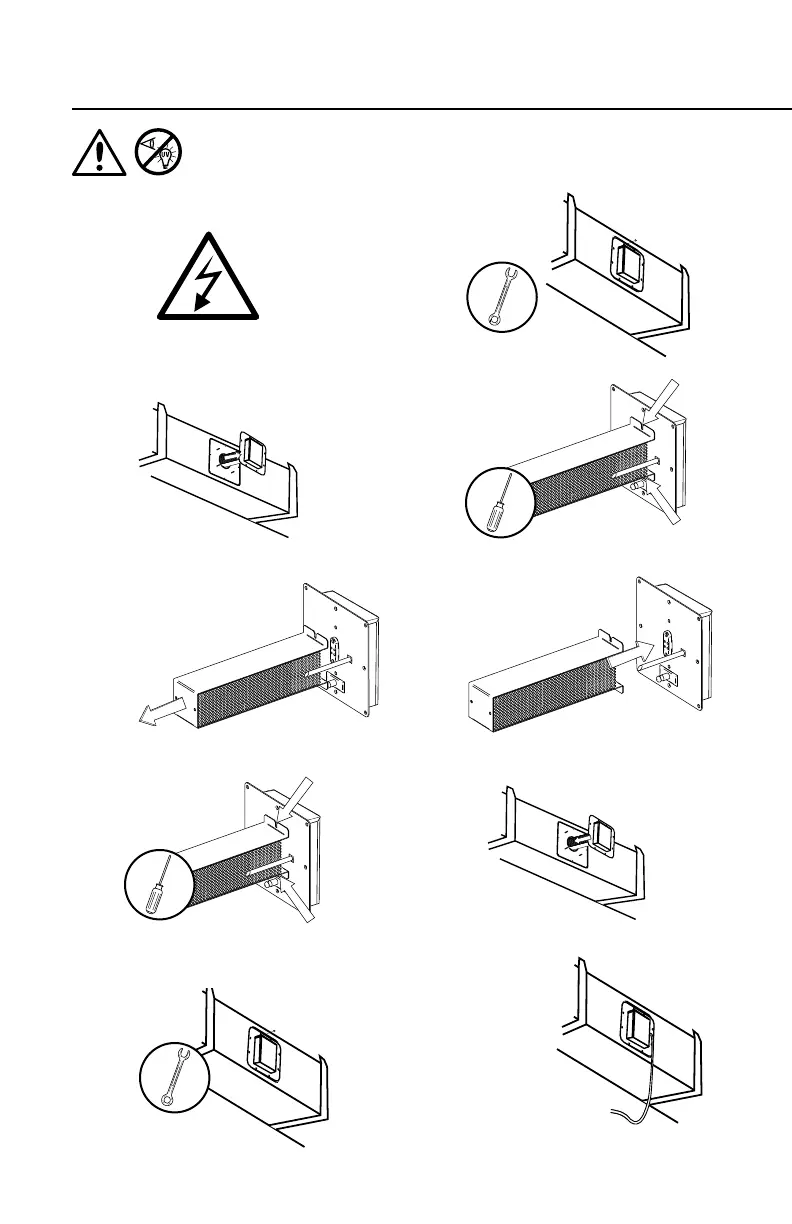
7. Secure with 2 screws.
8
1
3
3. Remove the unit from the mounting plate.
4
4. Remove the 2 screws holding the
ActivePure Cell.
1. Unplug unit. If the unit is hard wired, be
sure the power to the unit is off.
10
10. Reconnect
power supply.
9
9. Secure unit with 4 nuts.
2
2. Remove the 4 mounting nuts.
8.
Insert the unit into the mounting plate.
6
6. Plug the new ActivePure cell into the
base unit.
5
5. Separate the used ActivePure cell from
the base unit and dispose of properly.
CHANGING THE ACTIVEPURE CELL
WARNING! - UV Light in operation. Disconnect unit from power
supply before servicing. Failure to follow warnings may result in
severe eye damage.


 To Previous Page