EasyManua.ls Logo

ACTpro 1030e - ACTpro 1040 e;1050 e;1060 e Flush Mounting; Flush Mount Diagram

ACTpro 1030e
12 pages
Print Icon
To Next Page IconTo Next Page
To Previous Page IconTo Previous Page
Loading...
ACTpro Readers Installation Manual
Copyright © 2016 Access Control Technology Ltd. Part No.18-00106 Issue 0
ACTpro 1040e/1050e/1060e
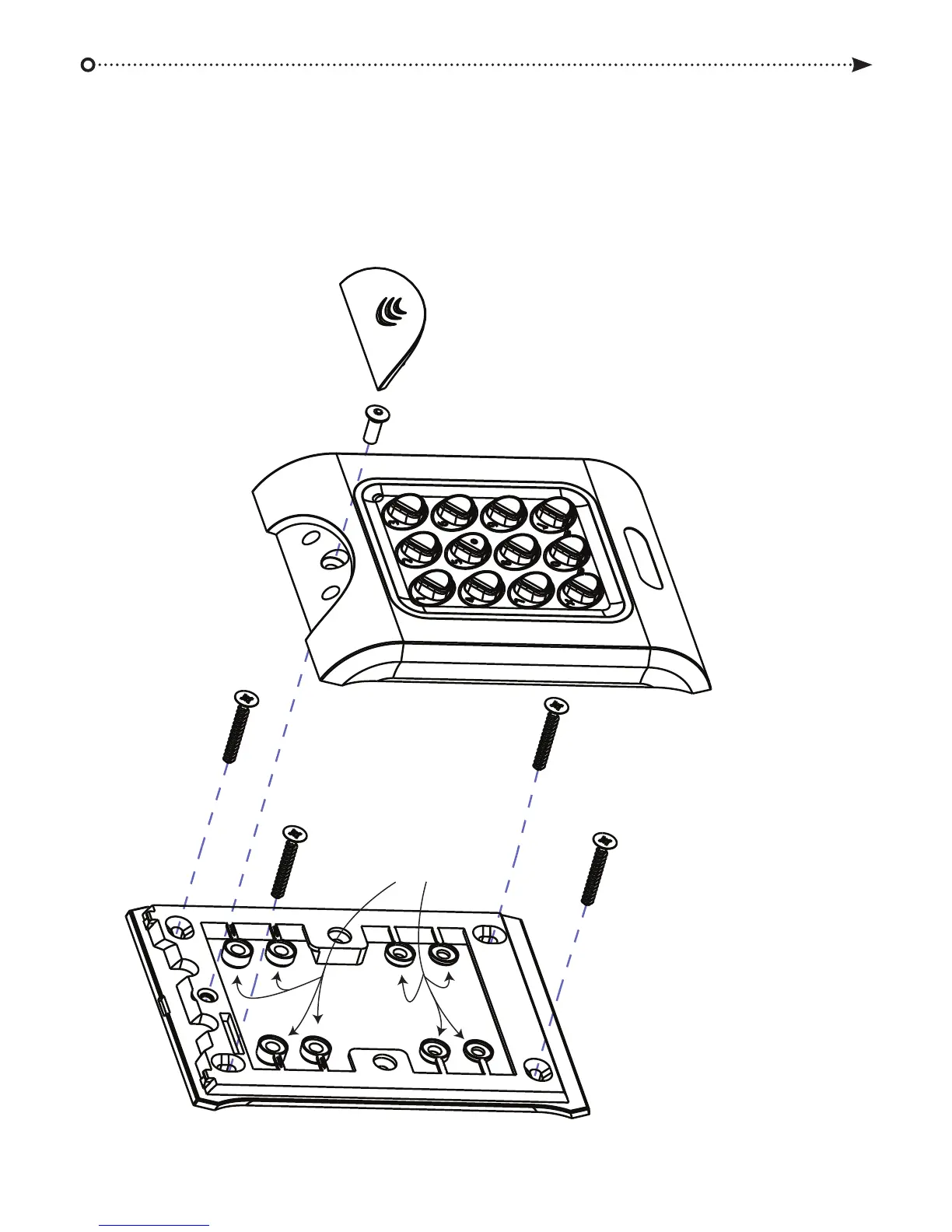
Flush Mount Diagram
Security screw
supplied with the unit
Remove spacers
before mounting
Place the cap onto the unit
and push firmly in place
Place the reader / keypad onto the flush
mount collar and clip down into place. Use
the security screw supplied to attach the unit
to the flush mount collar.
The flush mount collar is mounted on the wall
using the fixing kit supplied in the box. Prepare
the mounting surface to receive sub-surface
terminals.

Related product manuals