Model
Rated Voltage
8m (when using 3.0 voltage, it gets 11m)
3.0V(Dry batteries 1.5V AAA x 2)
Remote Controller Specifications
1. Operating Mode: AUTO, COOL, DRY, HEAT, and FAN.
2. Timer Setting Function in 24 hours.
3. Indo
4. Full function of LCD (Liquid Crystal Display).
Environment
Signal Receiving
Range
Performance Feature
RG35D // BG(C)EF
-5ºC 60ºC
1
2
4
5
3
9
10
8
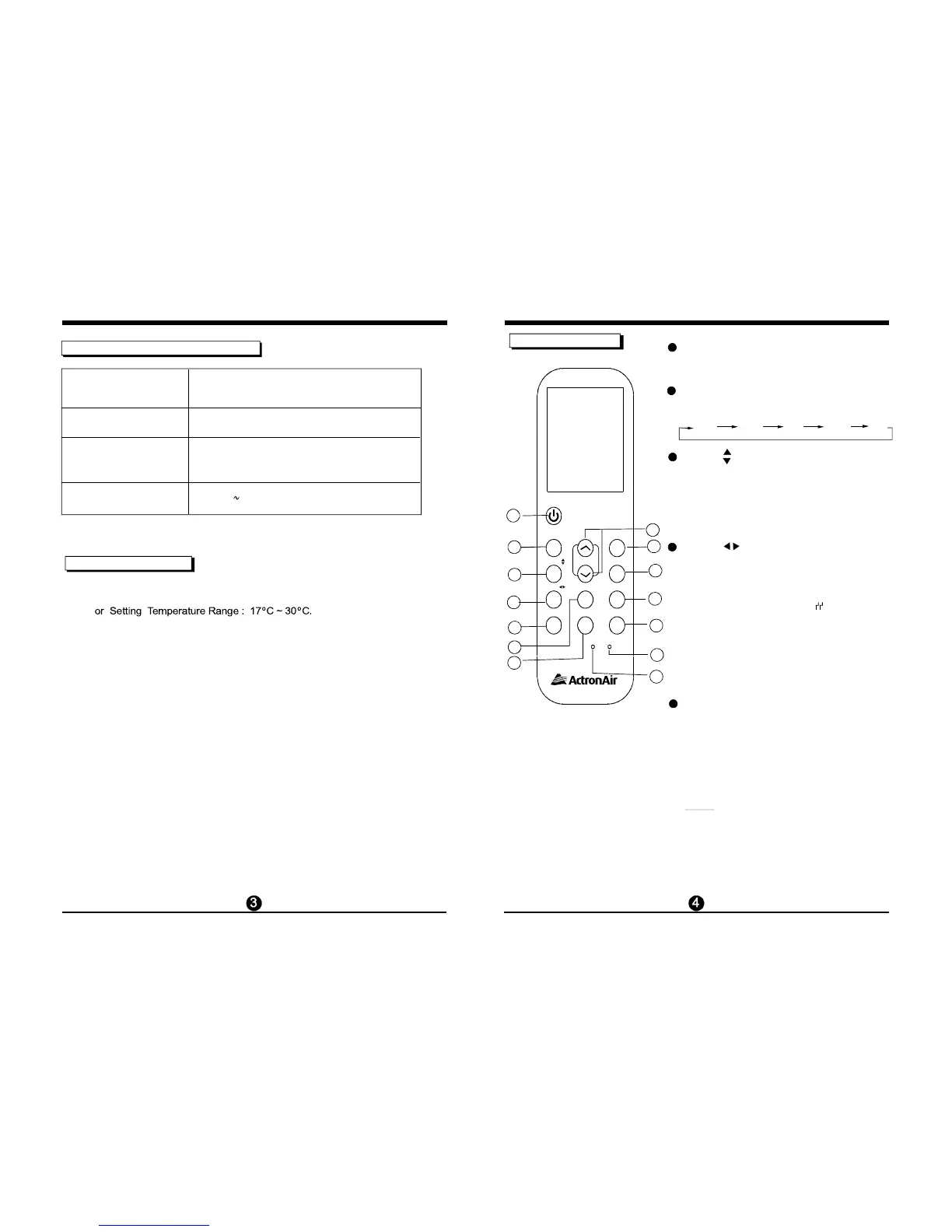
Each time the button is pressed, the operation
mode is selected in a sequence of following:
MODE Button
ON/OFF Button
Operation starts when this button is pressed
and stops when this button is pressed again.
AUTO COOL DRY HEAT FAN
NOT E: While the unit is running under SLEEP
mode, it w ould be cancelled if press the MODE,
FAN SPEED or ON/OFF button.
6
7
SWING Button
SWING Button
Active/Disable SLEEP function.The sleep
function enables the unit to automatically
increase(cooling) or decrease(heating)
1 C per hour for the first two hours, then hold
steady for the next 5 hours, after that the unit
will stop operation.
This function is only available
under Cooling,
Heating and AUTO operations.
O
SLEEP Button
Used to stop or start horizontal louvre move-
ment or set the desired up/down air flow
direction. The louvre changes 6º degrees in
angle for each press
. When pressed for more
than 2 seconds, the louvre will swing up and
down automatically.
Used to stop or start vertical louvre movement
and set the desired left/right air flow direction.
The vertical louvre changes 6 degree in angle
for each press. And the temperature display
area of indoor unit displays for one
second. When pressed for more than 2 seconds,
the vertical louvre swing feature is ac
tivated.
And the display area of indoor unit displays
, flashes four times, then the temperature
setting reverts back. If the vertical louvre
swing
feature is stopped, it displays LC and
remains
on for 3 seconds.
IIII
,
,
,
,
,
,
11
12
13
14
Function buttons
MODE
ON/OFF
SWING
TEMP
SHORTC UT
FAN
SPEED
TIMER
OF F
RE SET LO CK
LED
FOLLOW ME
TIMER
ON
T URBO
SELF CLEAN
SWING
SLEEP
2
1
3
4
5



 To Next Page