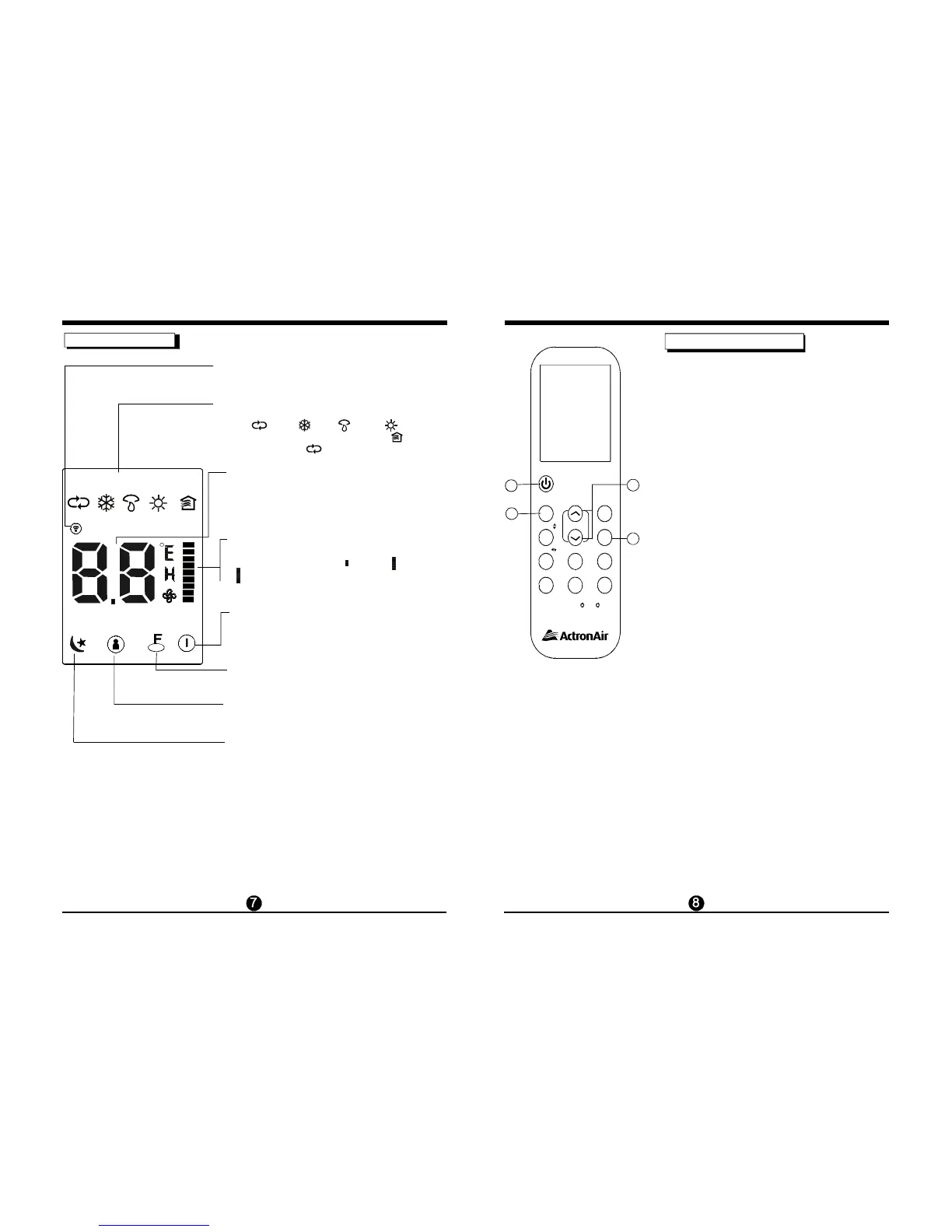
Indicators on LCD
Transmission Indicator
Temperature / Timer display
Fan speed display
Sleep Display
Mode display
ON/OFF display
The transmission indicator lights when remote
controller transmits signals to the indoor unit.
Displays the current operation mode. Including
auto ( ), c ool ( ), dry ( ), heat ( ) (Not
applicable to cooling only models), fan ( )
and back to auto ( ).
Displays the temperature setting (17 C~30 C). When
you set the operating mode to FAN, no temperature
setting is displayed. And
O O
if in the TIMER mode, shows
the ON and OFF settings of the TIMER.
Displayed by pressing the ON/OFF button.
Press the ON/OFF button again to remove.
Displays the selected fan speed, AUTO(no display)
and three fan speed levels " " (LOW) "
(HIGH) can be indicated. The fan speed is AUTO
when the operating mode is either AUTO or DRY.
" (MED)
" "
Displayed under sleeping operation.
Press the SLEEP button again to remove.
Note:
All indicators shown in the diagram are for instruction purposes
only. But during the actual operation
only the relative
functional
signs ar
e shown on the
display window.
Lock Display
Displayed when LOCK mode is activated.
FOLLOW ME Display
Displayed when Follow me function is activated.
auto co ol dr y heat fan
sleep follow me lo ck run
SET TEMP. TIMER ONOFF
How to use the buttons
Cooling /Heating/Fan operation
MODE
UP/DOWN
FAN
ON/OFF
En sure the un it is plugged in and power is
available.
1. Press the butt on to select CO OL,
HEAT or
FAN mode.
2. Press the but tons to s et the
de sired tem perature.
3. Press the button to select the fan speed
in four steps- Aut o, Low, Med,or High.
4. Press the button to start the air
conditioner.
The temperature can
be set wi th in a ra nge of 17 C~ 30 C in 1 C
increments.
O O O
In the FAN mode, the set temperature is not
displayed on
the remote controller and you are not
able to control the room temperature either. In this
case, only step 1, 3 and 4 may be performed.
NO TE
Auto operation
MO DE
UP /DO WN
ON /OFF
Ensure the un it is plugged in and p owe r is
ava ilab le. The OP ERATION indi cato r on the
dis play panel of the indoor unit start s flashing.
1. Pres s the button to select Auto.
2. Pres s the button to set the
desired temp erature. The temperature c an
be set within a range of 17 C~ 30 C in 1 C
increments.
3. Press the button to start the air
co
ndition e r.
O O O
1. In the Auto mode, the air conditioner can logically
choose the mode of Cooling, Fan, and Heating
by sensing the dif ference between the actual
ambient room temperature and the set
temperature
on the remote controller.
2. In the Auto mode, you can not switch the fan speed.
It has already been automatically controlled.
3. If the Auto mode is not comfortable for you, the
desired mode can be selected manually.
NO TE
1
2
3
4
MODE
SWING
TEMP
SHORTCUT
FAN
SPEED
TIMER
OFF
RES E T LOC K
LED
FOLLOW ME
TIMER
ON
TURBO
SELF CLEAN
SWING
SLEEP
ON/OFF



 To Next Page