Navigation System 81
Information Features
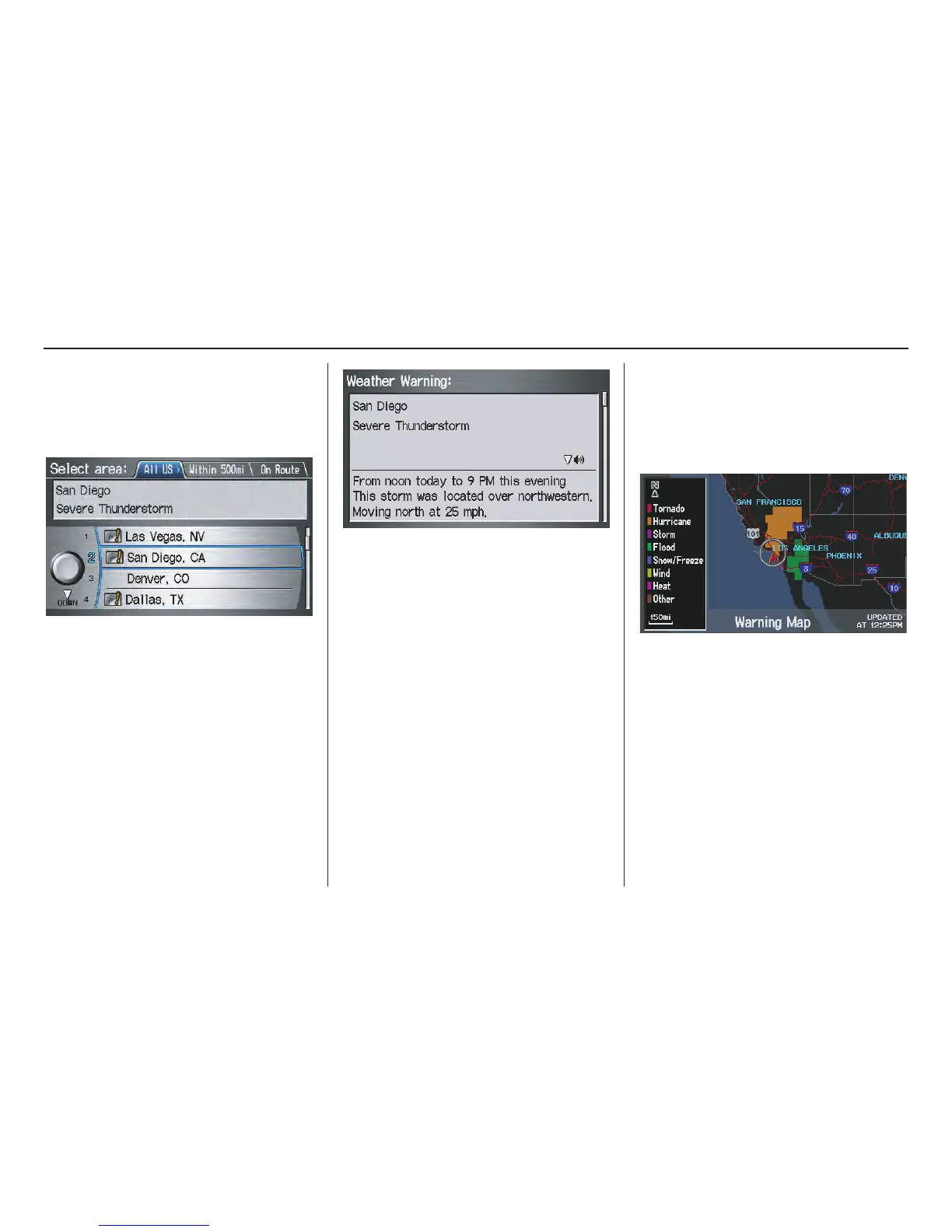
Viewing Warning List
You can view a list of all weather
warnings in the United States. Say or
select Warning List Sorted by
Distance, and the display changes to:
You can view three types of lists by
selecting a sorting method from “All
US,” “Within 500mi,” or “On Route.” A
warning icon in the list indicates that
your vehicle is in the warning area, or
the calculated route runs through the
area. When you select a listed item by
pushing in on the Interface Dial, the
detailed information will be displayed.
Say “Read List” or move the Interface
Dial down, and the information will be
read to you.
NOTE:
• The “On Route” tab can be selected
only when en route.
• Scrolling through the Weather
Warning screen is disabled when the
vehicle is moving.
Viewing Warning Map
You can view the warning map, which
contains different colors according to
the type of warning. Say or select
Warning Map, and the display
changes to:
Select the colored area by moving the
Interface Dial left, right, up, or down.
If desired, rotate the Interface Dial to
change the map scale (15, 50, or 150
miles). When you have the crosshairs in
the desired area, push in on the
Interface Dial. The Weather
Warning screen will be displayed.



 To Next Page
 Loading...