EasyManua.ls Logo

AcuRite 00309SBDI - User Manual

AcuRite 00309SBDI
2 pages
Print Icon
To Next Page IconTo Next Page
Loading...
Instruction Manual
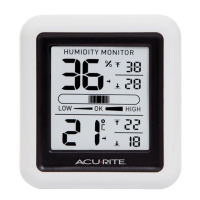
Humidity Monitor
model 00309SBDI
©Chaney Instrument Co. All rights reserved. AcuRite is a registered trademark of the
Chaney Instrument Co., Lake Geneva, WI 53147. All other trademarks and copyrights
are the property of their respective owners. AcuRite uses patented technology.
Visit www.AcuRite.com/patents for details.
Printed in China
00309SBDI INST 100614
FCC Information
This device complies with part 15 of FCC rules. Operation is subject to the following two conditions:
1- This device may NOT cause harmful interference, and
2- This device must accept any interference received, including interference that may cause undesired operation.
WARNING: Changes or modications to this unit not expressly approved by the party responsible for compliance could void the
user’s authority to operate the equipment.
NOTE: This equipment has been tested and found to comply with the limits for a Class B digital device, pursuant to Part 15 of the
FCC rules. These limits are designed to provide reasonable protection against harmful interference in a residential installation.
This equip ment generates, uses and can radiate radio frequency energy and, if not installed and used in accordance with the
instructions, may cause harmful interference to radio communications. However, there is no guarantee that interference will not
occur in a particular installation. If this equipment does cause harmful interference to radio or television reception, which can be
determined by turning the equipment off and on, the user is encouraged to try to correct the interference by one or more of the
following measures:
NOTE: The manufacturer is not responsible for any radio or TV interference caused by unauthorized modications to this equipment.
Such modications could void the user authority to operate the equipment.
Features & Benets
DISPLAY UNIT FRONT
1. Current Humidity
2. Humidity Level Indicator
Indicates a high, low or ideal humidity
comfort level.
3. Current Temperature
Arrow icon indicates the direction the
temperature is trending.
4. Low Temperature Record
Lowest temperature recorded over past
24 hours.
5. High Temperature Record
Highest temperature recorded over past
24 hours.
6. Low Humidity Record
Lowest humidity recorded over past
24 hours.
7. High Humidity Record
Highest humidity recorded over past
24 hours.
DISPLAY UNIT BACK
8.
o
C/
o
F Button
Press to select
o
C or
o
F temperature units.
9. Battery Compartment
10. Battery Compartment Cover
11. Integrated Hang Hole
For easy wall mounting.
1
1
8
9
10
7
5
6
4
2
3
PLEASE DISPOSE OF OLD OR DEFECTIVE BATTERIES IN AN ENVIRONMENTALLY SAFE WAY
AND IN ACCORDANCE WITH YOUR LOCAL LAWS AND REGULATIONS.
BATTERY SAFETY: Clean the battery contacts and also those of the device prior to battery installation. Remove batteries from equipment which is not to be
used for an extended period of time. Follow the polarity (+/-) diagram in the battery compartment. Promptly remove dead batteries from the device. Dispose of used
batteries properly. Only batteries of the same or equivalent type as recommended are to be used. DO NOT incinerate used batteries. DO NOT dispose of batteries in fire,
as batteries may explode or leak. DO NOT mix old and new batteries or types of batteries (alkaline/standard). DO NOT use rechargeable batteries. DO NOT recharge
non-rechargeable batteries. DO NOT short-circuit the supply terminals.
Specications
TEMPERATURE RANGE:
32°F to 122°F; 0°C to 50°C
HUMIDITY RANGE:
16% – 98% RH (relative humidity)
POWER:
1 x AA alkaline battery
Using the Humidity Monitor
Humidity Level Icon
The Humidity Level Icon easily conveys a low, high or ideal indoor humidity
level for your home and health:
Learn more at http://www.acurite.com/humidity-health
High/Low Records
High and low values are recorded for temperature and humidity. High and low
records reect the minimum and maximum temperature and humidity record in
the last 24 hours, starting at the time the batteries are installed.
11
OPERATION
LOW Humidity Level
Humidity is
low relative to
temperature.
Makes for a
DRY environment.
OK Humidity Level
Humidity is
OK relative to
temperature.
Makes for an
IDEAL environment.
HIGH Humidity Level
Humidity is
high relative to
temperature.
Makes for a HUMID
environment.

Question and Answer IconNeed help?

Do you have a question about the AcuRite 00309SBDI and is the answer not in the manual?

Summary

Using the Humidity Monitor

Humidity Level Icon

Conveys indoor humidity level (low, high, ideal) for home and health.

High;Low Records

Displays minimum and maximum temperature and humidity recorded in the last 24 hours.

Specifications and FCC Information

Specifications

Details temperature and humidity ranges, and power requirements for the device.

FCC Information

States compliance with FCC rules and provides warnings about modifications.

Display Unit Components

Display Unit Front

Identifies front display elements: humidity, level indicator, temperature, and records.

Display Unit Back

Details back panel features: °C/°F button, battery compartment, and hang hole.

Setup and Battery Installation

Remove Protective Film

Instructions for removing the protective film from the LCD screen.

Install or Replace Batteries

Guidance on inserting AA batteries, emphasizing proper polarity and battery type.

Select Degrees Fahrenheit or Celsius

How to switch between Fahrenheit and Celsius temperature units using the button.

Placement and Support

Placement for Maximum Accuracy

Recommendations for optimal placement to ensure accurate temperature and humidity readings.

Customer Support

Contact information and online resources for AcuRite customer support.

Product Registration and Warranty

Information on registering the product for warranty and details of the limited one-year warranty.

Overview

This document describes the AcuRite Humidity Monitor, model 00309SBDI, a device designed to measure and display indoor humidity and temperature.

Function Description

The AcuRite Humidity Monitor provides real-time readings of current humidity and temperature. It features a humidity level indicator that visually conveys whether the indoor humidity is low, OK (ideal), or high, helping users understand their home's environment and its impact on health. The device also tracks and displays the lowest and highest temperature and humidity records over the past 24 hours, starting from the time batteries are installed. An arrow icon indicates the current temperature trend (trending up or down). Users can select between Fahrenheit (°F) and Celsius (°C) temperature units.

Important Technical Specifications

  • Temperature Range: 32°F to 122°F (0°C to 50°C)
  • Humidity Range: 16% - 98% RH (relative humidity)
  • Power: 1 x AA alkaline battery

Usage Features

  • Humidity Level Icon: A clear visual indicator (LOW, OK, HIGH) helps users quickly assess indoor humidity.
    • LOW Humidity Level: Indicates humidity is low relative to temperature, resulting in a DRY environment.
    • OK Humidity Level: Indicates humidity is OK relative to temperature, resulting in an IDEAL environment.
    • HIGH Humidity Level: Indicates humidity is high relative to temperature, resulting in a HUMID environment.
  • High/Low Records: The monitor automatically records and displays the minimum and maximum temperature and humidity values over the last 24 hours. These records reset every 24 hours from the time batteries are installed.
  • Temperature Trend Indicator: An arrow icon next to the current temperature reading shows whether the temperature is trending up or down.
  • Selectable Temperature Units: Users can easily switch between Fahrenheit (°F) and Celsius (°C) by pressing the "°C/°F" button on the back of the display unit.
  • Integrated Hang Hole: The device includes an integrated hang hole on the back for easy wall mounting.
  • Battery Compartment: Located on the back, it houses a single AA alkaline battery.
  • Placement for Maximum Accuracy: For optimal performance, the monitor should be placed in a dry area, free of dirt and dust. To ensure accurate temperature readings, keep it out of direct sunlight and away from heat sources or vents. For accurate humidity readings, place it away from humidity sources.

Maintenance Features

  • Battery Installation/Replacement: The device requires one AA alkaline battery. Users are instructed to slide off the battery compartment cover, insert the battery following the polarity diagram, and then replace the cover. High-quality alkaline or lithium batteries are recommended for best performance; heavy-duty or rechargeable batteries are not recommended.
  • Battery Safety Guidelines: The manual provides comprehensive battery safety instructions, including:
    • Cleaning battery contacts prior to installation.
    • Removing batteries from equipment not used for extended periods.
    • Following polarity diagrams.
    • Promptly removing dead batteries.
    • Properly disposing of used batteries.
    • Using only recommended battery types.
    • Avoiding incineration, disposal in fire, mixing old and new batteries, mixing different battery types, using rechargeable batteries, or short-circuiting supply terminals.
  • Protective Film Removal: Users are instructed to remove a protective film from the LCD screen prior to first use.
  • FCC Information: The device complies with part 15 of FCC rules, ensuring it will not cause harmful interference and must accept any interference received. Users are warned against unauthorized modifications to the unit, which could void their authority to operate the equipment.
  • Customer Support: AcuRite offers customer support via phone, email, and their website (www.AcuRite.com). The website provides installation videos, instruction manuals, replacement parts, a support user forum, and a product registration portal.
  • Product Registration: Users are encouraged to register their product online at www.AcuRite.com to receive a 1-year warranty protection.
  • Limited One Year Warranty: Chaney Instrument Co. warrants its products to be of good material and workmanship, free of defects, for one year from the date of purchase, provided they are properly installed and operated. The warranty covers repair or replacement of defective items and disclaims liability for special, consequential, or incidental damages. It also outlines conditions that void the warranty, such as normal wear and tear, damage from acts of nature, tampering, abuse, improper installation, shipping damage, or repairs by unauthorized personnel.

AcuRite 00309SBDI Specifications

General IconGeneral
BrandAcuRite
Model00309SBDI
CategoryAccessories
LanguageEnglish

Related product manuals