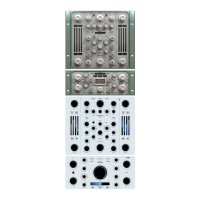
- Compressor adjustment only
1) Set the SOLO compressor to SOLO via the SOLO button.
2) Adjust the SLOW compressor, taking into account that
a) the POWER control is absent (the detector operates in RMS mode only)
b) there is no dual detector as in the case of the FAST compressor
c) the HOLD mode related to the ASHMOD control is disabled.
- Blend adjustment between fast and slow
1) Lift the SOLO mode of both compressors and manage the balance between them
via the BLEND control.
Managing a dual compressor in parallel allows you to optimize the dynamic action,
focusing on handling dynamics in successive steps. Milder handling corresponds to
MIX control between a virtual WET signal (FAST, more compressed) and a virtual DRY
signal (SLOW, gently compressed). The power of Tiger lies precisely in this additional
control to balance the dynamic action.
- Output signal management
1) It is possible to manage the output signal volume using the OUTPUT control. This
way, you can balance the signal by comparing the RMS IN meters with the RMS OUT
meters.
2) Adjust the OUTPUT L and OUTPUT R controls to balance the output signals accor-
ding to the RMS OUT left and right values.


 To Next Page
 Loading...