Python & CircuitPython
It's easy to use the MAX9744 amplifier with Python and CircuitPython, and the Adafruit CircuitPython
MAX9744 (https://adafru.it/C5j) module. This module allows you to easily write Python code that controls the volume of
the amplifier over its I2C connection.
You can use this sensor with any CircuitPython microcontroller board or with a computer that has GPIO and Python
thanks to Adafruit_Blinka, our CircuitPython-for-Python compatibility library (https://adafru.it/BSN).
CircuitPython Microcontroller Wiring
First wire up a MAX9744 to your board exactly as shown on the previous pages for Arduino using an I2C connection. In
addition just like the basic test page mentions be sure to also wire up a power supply, speakers, and audio input to the
amplifier.
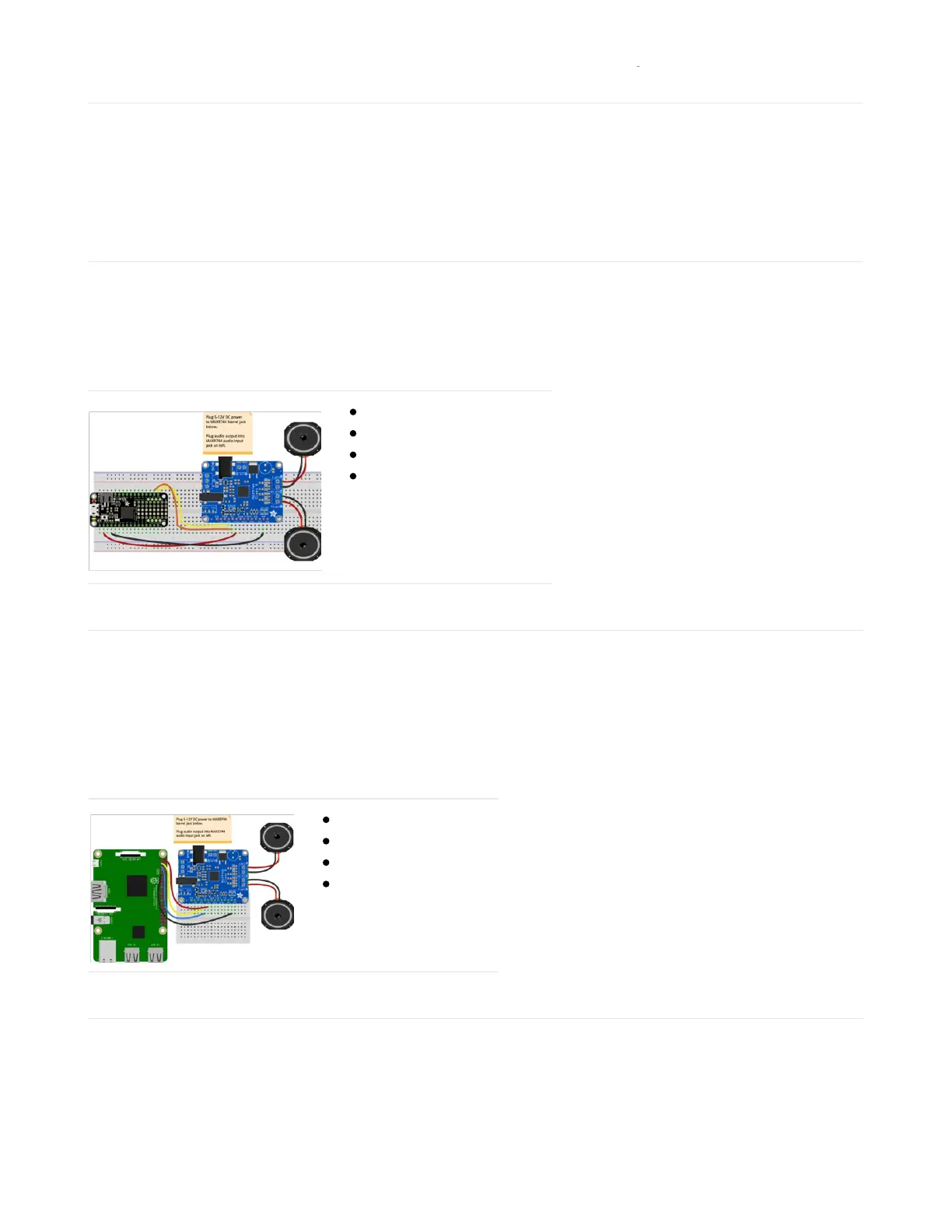
Here's an example of wiring a Feather M0 to the sensor with I2C:
Board 3V to sensor Vi2c
Board GND to sensor GND
Board SCL to sensor SCL
Board SDA to sensor SDA
Python Computer Wiring
Since there's
dozens
of Linux computers/boards you can use we will show wiring for Raspberry Pi. For other platforms,
please visit the guide for CircuitPython on Linux to see whether your platform is supported (https://adafru.it/BSN).
In addition to wiring the sensor to your computer, just like the basic test page mentions, be sure to also wire up a
power supply, speakers, and audio input to the amplifier.
Here's the Raspberry Pi wired with I2C:
Pi 3V3 to sensor VIN
Pi GND to sensor GND
Pi SCL to sensor SCL
Pi SDA to sensor SDA
CircuitPython Installation of MAX9744 Library
Next you'll need to install the Adafruit CircuitPython MAX9744 (https://adafru.it/C5j) library on your CircuitPython board.
First make sure you are running the latest version of Adafruit CircuitPython (https://adafru.it/Amd) for your board.


 To Next Page