2. About Bluetooth Speaker phone
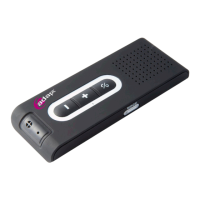
This versatile Bluetooth speakerphone is portable and specially designed for user to enjoy convenience
and freedom of wireless communication. Dual capacity of use on desk-top like a Conference Speakerp
-
hone and in-car like a Hands-Free car kit. Unique Privacy Handset/Mute control button allows user to
use this kit like a normal handset for private communication purpose. Advanced built-In Dual-Mic.(BEAM
FOAMING) with D.S.P. solution for Echo Cancellation & Noise Suppression gives you impeccable full du
-
plex sound quality you’ve never dreamed of.
3. About Bluetooth Technology?
Bluetooth wireless technology is set to revolutionize the personal connectivity by providing freedom from
wired connections-enabling links and connectivity between mobile computers, mobile phones, portable
handheld devices and other Bluetooth enables devices within 10 meters. Utilizing global sound & digital
data 2.4G ISM transmission, it makes global communication in the way you’ve never dreamed of!
4. Getting Started
To use your Bluetooth speakerphone, please follow these simple steps:
(a) Charge your speakerphone. Prior to using the speakerphone, it is recommendable to charge the bat
-
tery fully for the rst time.
(b) Connect the charger to an AC wall outlet and the charge plug to speakerphone’s charging socket.
After completion of charge, please remove the chargers from speakerphone and outlet.
(c) Place your speakerphone and a Bluetooth-enabled mobile handset no more than 1 meter apart for
pairing.
(d) Ensure your speakerphone and handset is within 10 meters - Bluetooth sensing distance.
Important:
(a) Charge time: Normal full charge time is 3 hrs. (Approx.).
(b)
Charge indication: When charge is in process, the LED will ash red. When charge is completed, the
LED will ash off.
(c) Low voltage indication: LED will ash red every 3 seconds. It’s recommended to charge the spea
-
kerphone immediately to prolong durability of battery and standby time. Under low voltage, if bat
-
tery is not charged within certain time, the speakerphone will be powered off.
(d)
Charging indication will be delayed for a few minutes if the speakerphone has not been used for a
long time or the battery is drained.
5. Turning On/Off the Speakerphone
Turning On: Speakerphone is under off mode:
Press and hold the MFB for 3 seconds until you hear a short beep. The LED will ash blue for 3 seconds.
Turning Off: Speakerphone is under standby mode:
Press and hold the MFB for 3 seconds until you hear a long beep. The LED will ash red for 3 seconds.
Important:
Press the MFB again each time you turn on the speakerphone to react the paring so that the connection
in between the speakerphone and paired mobile handset is resumed. For pairing, please refer to proce
-
dures under “Pairing”.
page 3


 To Next Page