
 Need help?
Do you have a question about the ADB Safegate ACE2 and is the answer not in the manual?
Compliance with essential safety and hygiene requirements for CE certified products.
Compliance with safety and FAA Airfield regulations for ETL certified products.
Details warranty for ADB SAFEGATE LED airfield guidance signs and light fixtures.
Outlines warranty for ADB SAFEGATE manufactured products against defects.
Confirms ADB SAFEGATE products meet FAA, ICAO, IEC requirements and outlines repair/replacement policy.
Discusses liability limits, disclaims warranties, and warns about unsafe equipment use and unintended uses.
Explains HAZARD icons and general safety warnings for installation and use of equipment.
Defines qualified personnel as those understanding safe operation, maintenance, and repair.
Provides cautions and best practices for safe equipment use, installation, and maintenance.
Emphasizes using the equipment only for its intended purpose to avoid injury or damage.
Outlines the manual's purpose for installation, maintenance, and troubleshooting of ACE2.
Guides users on familiarizing with the manual's structure and executing actions sequentially.
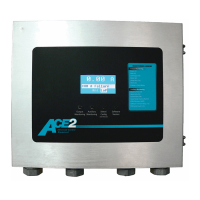
Overview of ACE2, its compliance, and capabilities as a universal device.
Covers Theory of Operation, Communication, I/O, and Fail-safe functionalities of the ACE2 system.
Details the ACE2 GUI, technical specifications, and physical dimensions for various mounting options.
Describes the ACE2 Wall Mount, Internal Mount, and Combo Box mounting configurations.
Explains the ACE2 Main Circuit Board, Power Supply Circuit, and Lamps-Out Monitoring Board components.
Guides on configuring ACE2 in stand-alone mode via local menu and buttons.
Explains the functions of ACE2's push buttons for monitoring, configuration, and software version display.
Describes how to view I/O status and perform Lamps-Out calibration in stand-alone mode.
Provides an overview of ACE2 installation, referencing airport plans and codes.
Details the exterior view and mounting considerations for the ACE2 Wall-Mount assembly.
Instructions for routing conduit and wiring into the ACE2 enclosure for combo box installations.
Explains ACE2 installation within an L-829 CCR door, including access procedures.
Guides on locating and mounting the ACE2 Combo Box unit near controllable elements.
Outlines general troubleshooting steps and provides a chart for common problems and corrective actions.
Lists common ACE2 error messages, their causes, and corrective actions.
Provides wiring schematics and details main board connectors for ACE2 system connections.
Lists spare parts for the ACE2 system, including part numbers, descriptions, and quantities.
Provides contact information and procedures for obtaining live technical support for ADB SAFEGATE products.
Lists essential information to have ready before contacting technical support for faster assistance.
Directs users to the ADB SAFEGATE website for information on solutions, products, and company details.
Outlines procedures for local authority recycling and ADB SAFEGATE's product recycling program.
Lists contact addresses and phone numbers for ADB SAFEGATE offices worldwide.
 General
| Brand | ADB Safegate |
|---|---|
| Model | ACE2 |
| Category | Control Systems |
| Language | English |

 To Next Page
