2
www.addcom.com |
3. PRODUCT OVERVIEW
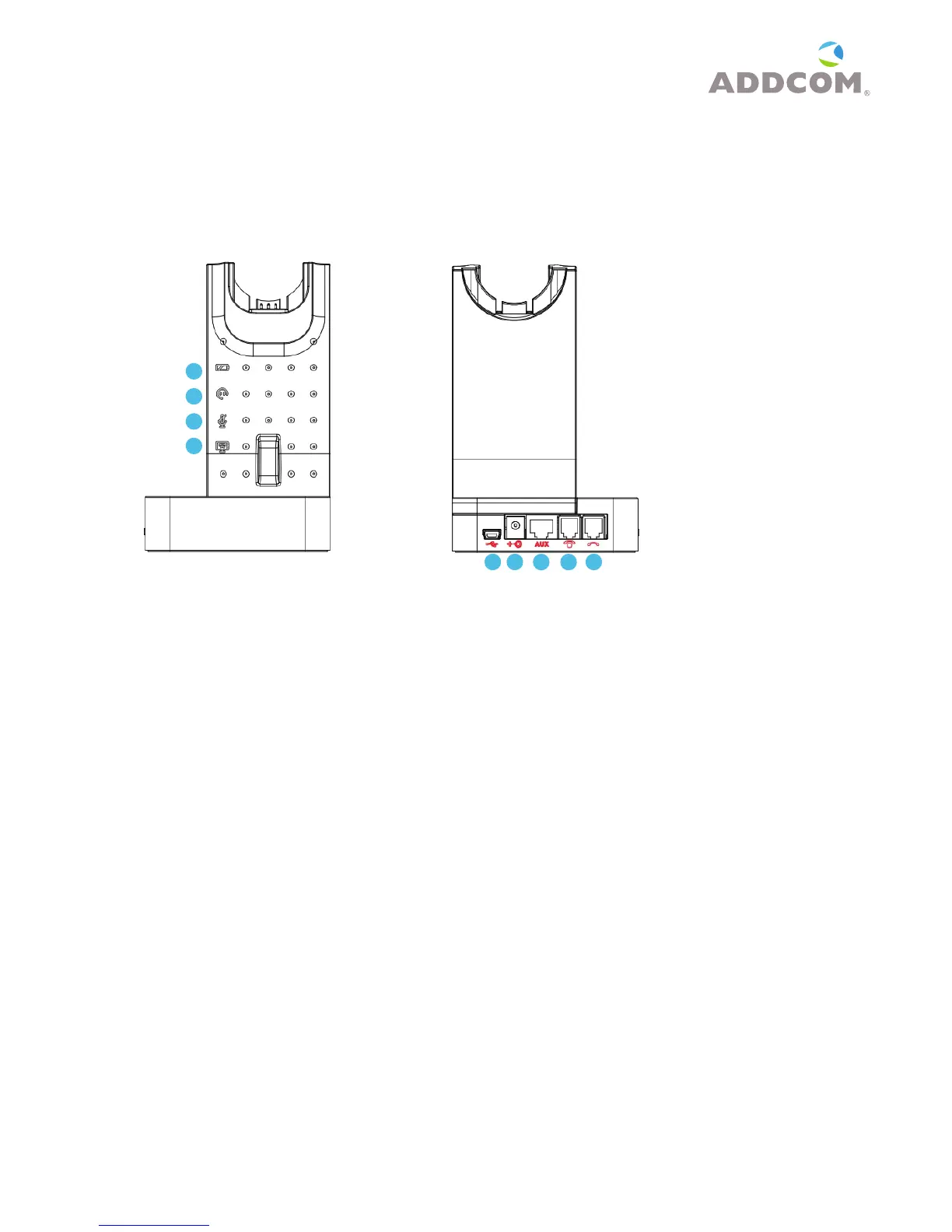
3.1 Base unit with LED indicators
Base - front Base - back
Base - front with LED indicators
1 Battery indicator: Charging: Battery indicator-“blinking” 3 seconds - on, 1 second - off
Low Battery: Battery indicator “blinking” 1/2 second - on, 1/2 second - off
Fully charged: Battery indicator -“on”
2 In use indicator: Hook off: In-use indicator - “on”
3 Mute indicator: Microphone mute on: Mute indicator -“on”
4 PC/TEL indicator: Telephone connection: “off”; - PC connection: “on”
Base - back
5 USB port: Connect USB cable between PC and base unit
6 DC jack: Connect power adapter to DC jack
7 AUX port: Connection for handset lifter (available separately)
8 Telephone port: Connect telephone cord to the headset port or handset port of a
telephone/base unit
9 Handset port: Plug handset cord from the telephone to handset port
1
2
3
4
5
6
7 8
9



 To Next Page