3. Place the battery compartment cover and
turn it clockwise all the way to the stop.
Suggestions for changing the battery:
The batteries must be changed when
nothing is shown on the display.
Only use the battery type specied in the
“Technical Data”.
Dispose of old batteries in an
environmentally friendly manner, see
“Disposal”.
Use
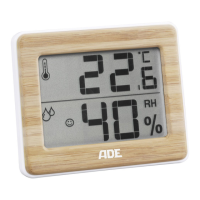
As soon as the thermometer/hygrometer is
supplied with power, the display shows the
following:
Room temperature in °C
Humidity in percentage
Comfort indicator in the form of a smiley
Druckbuch Hygrometer WS 1706_1707.indb 33 15.05.2017 14:48:56



 To Next Page