19
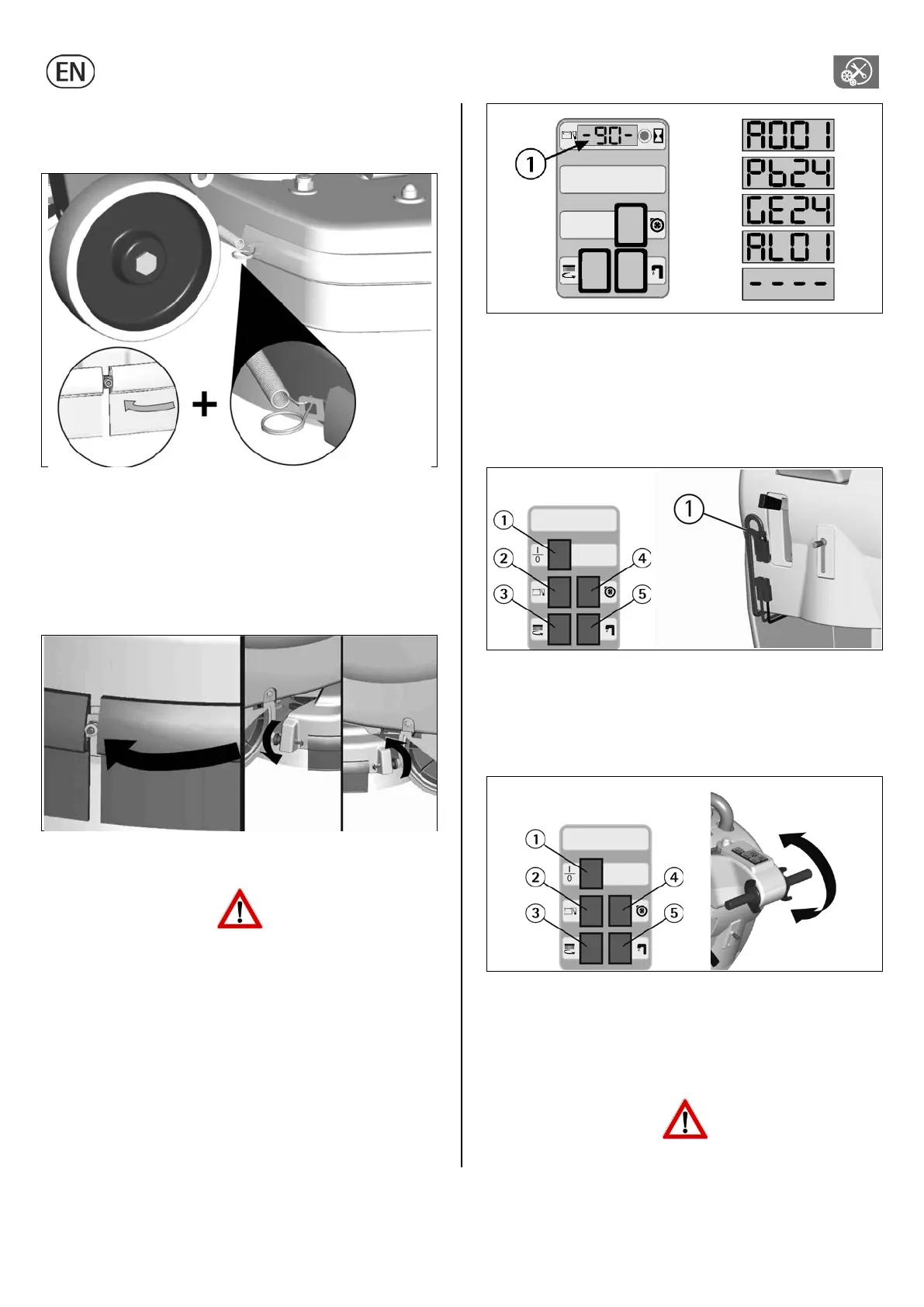
3. Replace the splash guard rubbers and follow assembling
instructions at “SPLASH GUARD ASSEMBLY” paragraph.
With brushes assembled, the splash guard must slightly touch the
floor.
KNOBS-LOCK SYSTEM
1. Unscrew the knobs in the rear part of the brush base group from
the extremity of the metal strips. The operation has to be carried
out on both splash guards.
2. Unscrew the nut on the front part of the brush base group and
take off the metal strips.
3. Replace the splash guard rubbers and follow the assembling
instructions at “SPLASH GUARD ASSEMBLY” paragraph.
With the brush assembled, the splash guard must slightly touch the
floor.
TROUBLESHOOTING GUIDE
The checking of all the other foreseen machine operations is left
to the authorized technical assistance.
SIGNALS ON THE DISPLAY (IF PRESENT)
A001: Indication of the version of the electronic check card (the last
number indicates the revision of the check card).
Pb24: Indication battery check card set for lead batteries.
GE24: Indication battery check card set for gel batteries.
AL01: Signal indicating an absorption of excessive current of the
brushes motor, only on machines equipped with the overload
protection device for the brushes pressure adjustment (see under
"OPTIONAL ACCESSORIES”).
---- (blinking): signal indicating the discharged batteries.
THE SUCTION MOTOR DOES NOT WORK
1. Verify that the key switch (see under "OPTIONAL ACCESSORIES”)
is in the correct position (clockwise).
2. Check that the suction motor switch is on.
3. Check the charge level of the batteries (see “BATTERIES
CHARGING”)
4. Check that the battery connector (1) is correctly plugged in.
If the problem persists, please contact the authorized technical
assistance.
THE BRUSH MOTOR DOES NOT WORK
1. Verify that the key switch (see under "OPTIONAL ACCESSORIES”)
is in the correct position (clockwise).
2. Verify that the brush motor switch is on.
3. Activate the levers movement.
4. Check the charge level of the batteries (see “BATTERIES
CHARGING”)
5. Check that the battery connector (1) is correctly plugged in.
6. On machines equipped with brush/es motor overload protection
device (see under "OPTIONAL ACCESSORIES”), check that on the
display (1) does not appear the alarm “AL01” (brush/es motor
overload alarm).
If the problem persists, please contact the authorized technical
assistance.
Never leave the batteries discharged for a long time.



 To Next Page