Owner’s Guide
10
Connecting to the PowerLab
To connect a front-end to the PowerLab, first ensure that the PowerLab is turned o .
Failure to do this may damage the PowerLab, the front-end, or both.
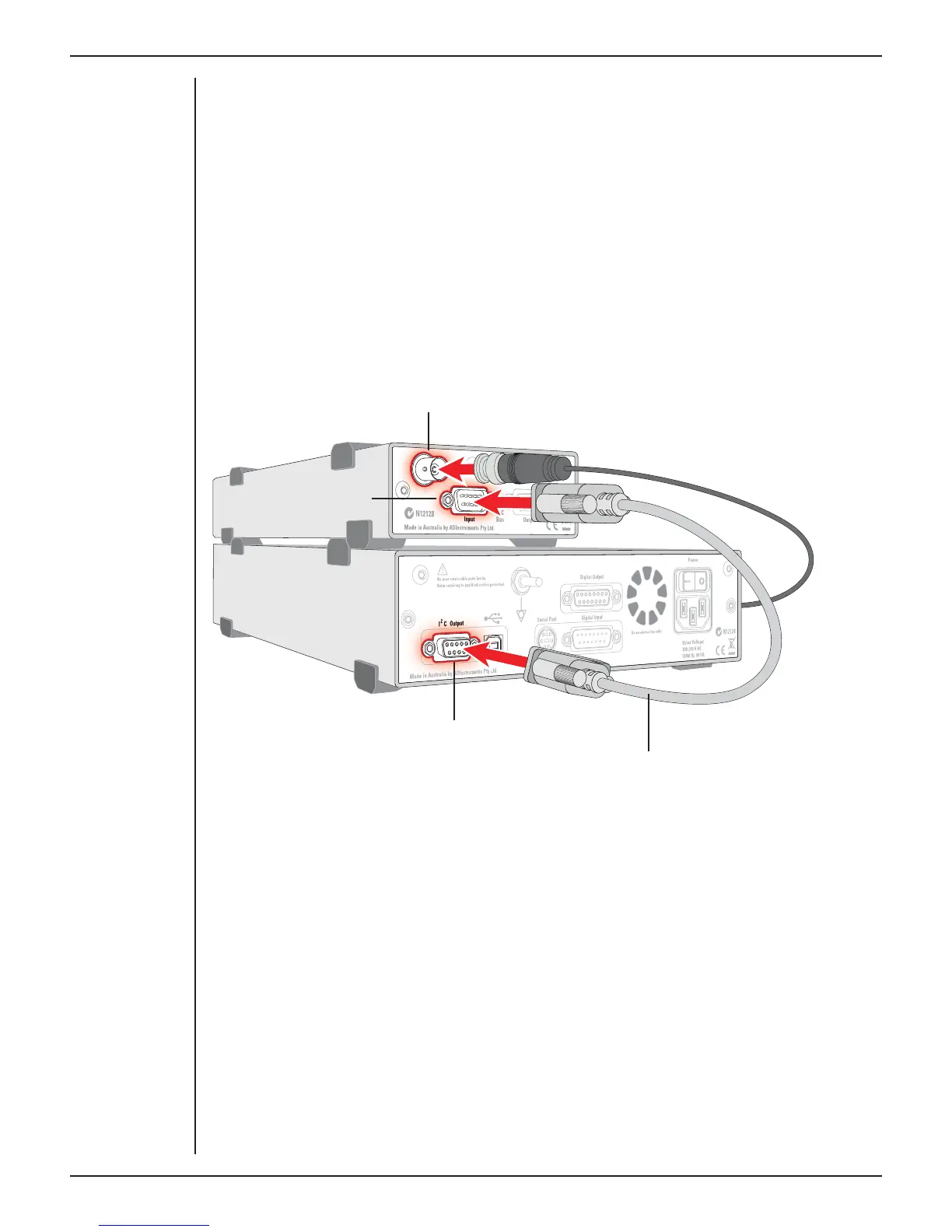
The BNC cable from the front-end signal output must connect to an analog input on
the PowerLab. If you have an older PowerLab that has di erential (rather than single-
ended) inputs, the front-end must connect to a positive input.
Single Front-ends
Connect the I
2
C output of the PowerLab to the I
2
C input of the front-end using the I
2
C
cable provided. Figure 2–1 shows how to connect up a single front-end to your recording
unit.
I
2
C connector cable
PowerLab I
2
C output
Front-end Signal output
Front-end I
2
C input
Check that the connectors for the I
2
C bus are screwed in firmly. Check the BNC cable
for firm connections as well. Loose connectors can cause erratic front-end behavior, or
may cause the front-end to fail to work at all.
The Signal Output Socket
The BNC socket labelled Signal Output on the back panel of the front-end provides
the signal output to connect to an analog input socket on the front of the PowerLab. A
BNC-to-BNC cable is supplied for this connection. If necessary, use a BNC to DIN smart
adapter [MLAC22] to connect the BNC cable to your PowerLab’s input.
Note: If you have an older PowerLab with di erential (rather than single-ended) inputs,
the BNC cable must connect to a positive analog input on the PowerLab.
Figure 2–1
Connecting a
front-end to the
PowerLab: a
PowerLab has
only one I
2
C
output, and each
front-end has one
I
2
C output and
one I
2
C input



 To Next Page