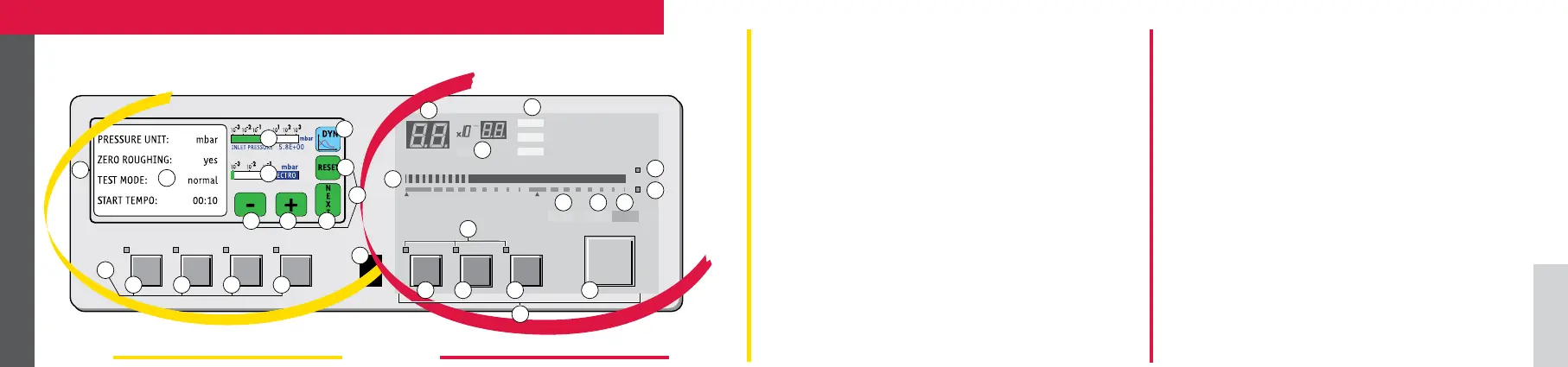
1 Inlet port pressure analog display
2 Control and menu selection indicators (ON when activated)
3 Auto-calibration START/ABORT control key
4 Sniffing mode ON/OFF control key
5 Auto-zero ON/OFF control key
6 Cycle START/STOP control key
7 Control keys (4 keys)
8 Standby ON/OFF indicator
9 Evacuation ON/OFF indicator
10 Test ON/OFF indicator
11 Helium signal analogic display
12 Helium signal analogic scale ON/OFF indicator
13 Helium signal Zero scale ON/OFF indicator
14 Correction factor COR indicator (applied to digital display)
15 Units of measurement selection
16 Helium signal digital display
17 Menu display (4 lines)
18 Spectro pressure analog display
19 Modification access keys (4 keys)
20 RESET: next display/parameter circular function
21/22 Plus or minus value adjustment, parameter
selection, audio volume adjustment keys
23 NEXT of previously displayed values (cancels tempo-
rary inputs)
24 Menu selection access key (4 keys)
25 SET POINT menu selection key
26 SPECTRO calibration and analyzer cell configuration
menu selection key
27 MAINTENANCE menu selection key
28 OTHER menus selection key (test mode selection,
inlet VENT selection, date/time)
29 Remote control connection: connect if before swit-
ching on the detector
30 Graphic interface selection key
31 Color touch screen
4
AUTO CAL ZERO
CYCLE
SNIFFER
SET POINTS SPECTRO
MAINTENANCE
OTHER
10
-12
10
-11
10
-10
10
-9
10
-8
10
-7
10
-6
10
-5
10
-4
10
-3
10
-2
COR
mbar.l/s
STDBY
LEAK RATE
EVAC TEST
Pa.m
3
/s
Torr.l/s
11
17
25 26 27
14
15
20
22 2321
19
24
28
30
31
16
29
18
1
2
1098
13
12
3 4 5 6
7
Setting and maintenance part Operation part
Operator interface ASM GRAPH/GRAPH D



 To Next Page