LESSON 6
142
Document Editing
Defining a user variable
The name of the dog breed (
Labrador Retriever
) appears often in the article, as does a
shorter version of the name (
Labrador
). The long name is already defined as a user variable.
A
user
variable
is a placeholder for text, such as a technical term or name, that you can
define once and use repeatedly in a document. When you change the definition,
FrameMaker 7.0 updates the variable throughout the document. In this way, variables can
help save you time and ensure consistency in your documents.
Note:
FrameMaker provides system variables that you can redefine but cannot delete.
In this part of the lesson, you’ll create a user variable.
1
Click once on the heading,
LABRADOR RETRIEVERS
. The entire phrase (except for the
S
at the end) is selected, indicating that you can’t edit the variable as you do regular text.
First you’ll define a user variable for the short name. Then you’ll simply insert the variable
rather than type the name yourself.
2
Choose Special > Variable.
3
Click Create Variable.
4
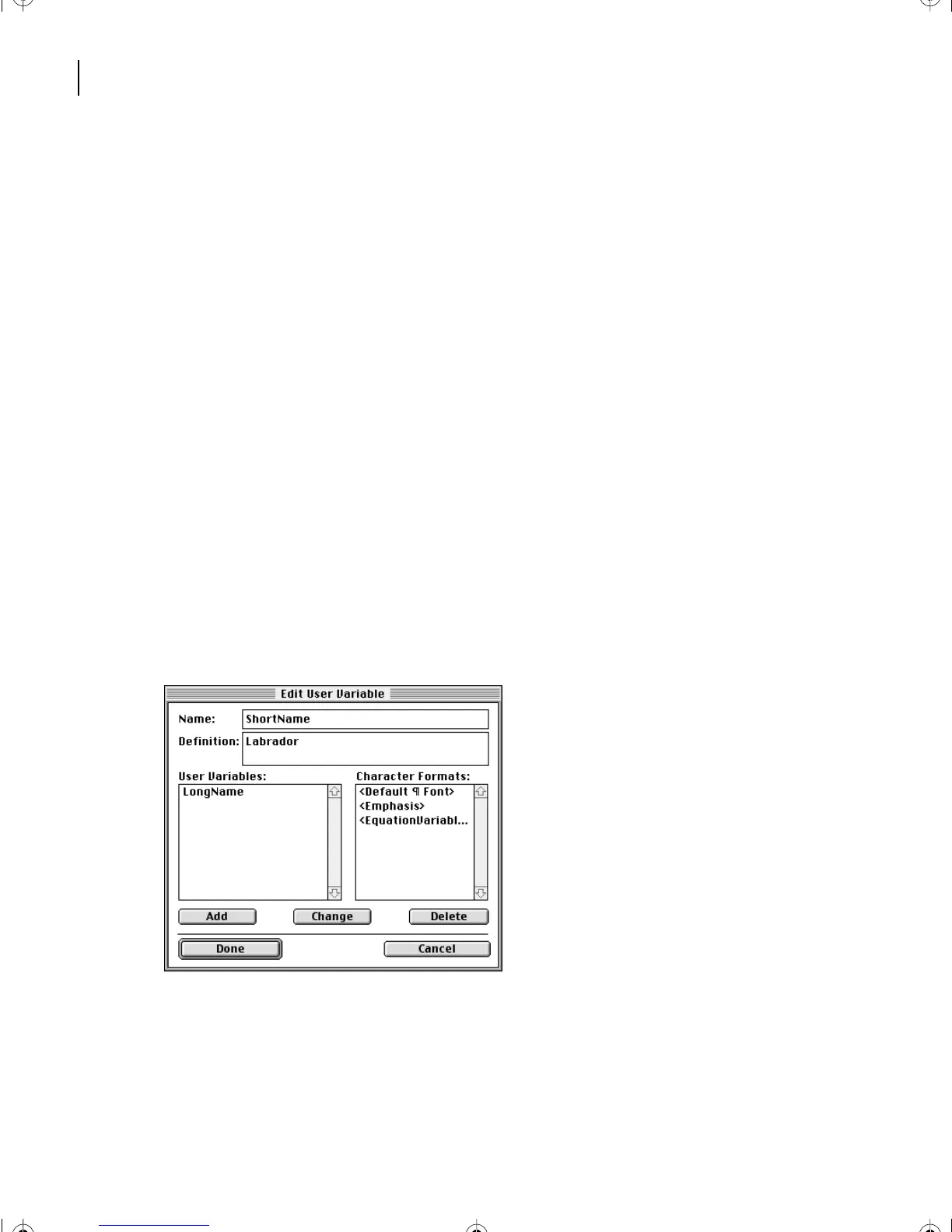
Enter
ShortName
in the Name text box, and enter
Labrador
in the Definition text box.
5
Click Add, and then click Done.
The new variable appears in the Variable dialog box.
6
Click Done.
L06.fm Page 142 Saturday, July 6, 2002 11:51 AM



 To Next Page