LESSON 7
178
Tables
3 Click Update All. The heading row is now shaded.
4 Close the Table Designer.
The black text in the heading is hard to read against the brown background, so you’ll
change the text to white.
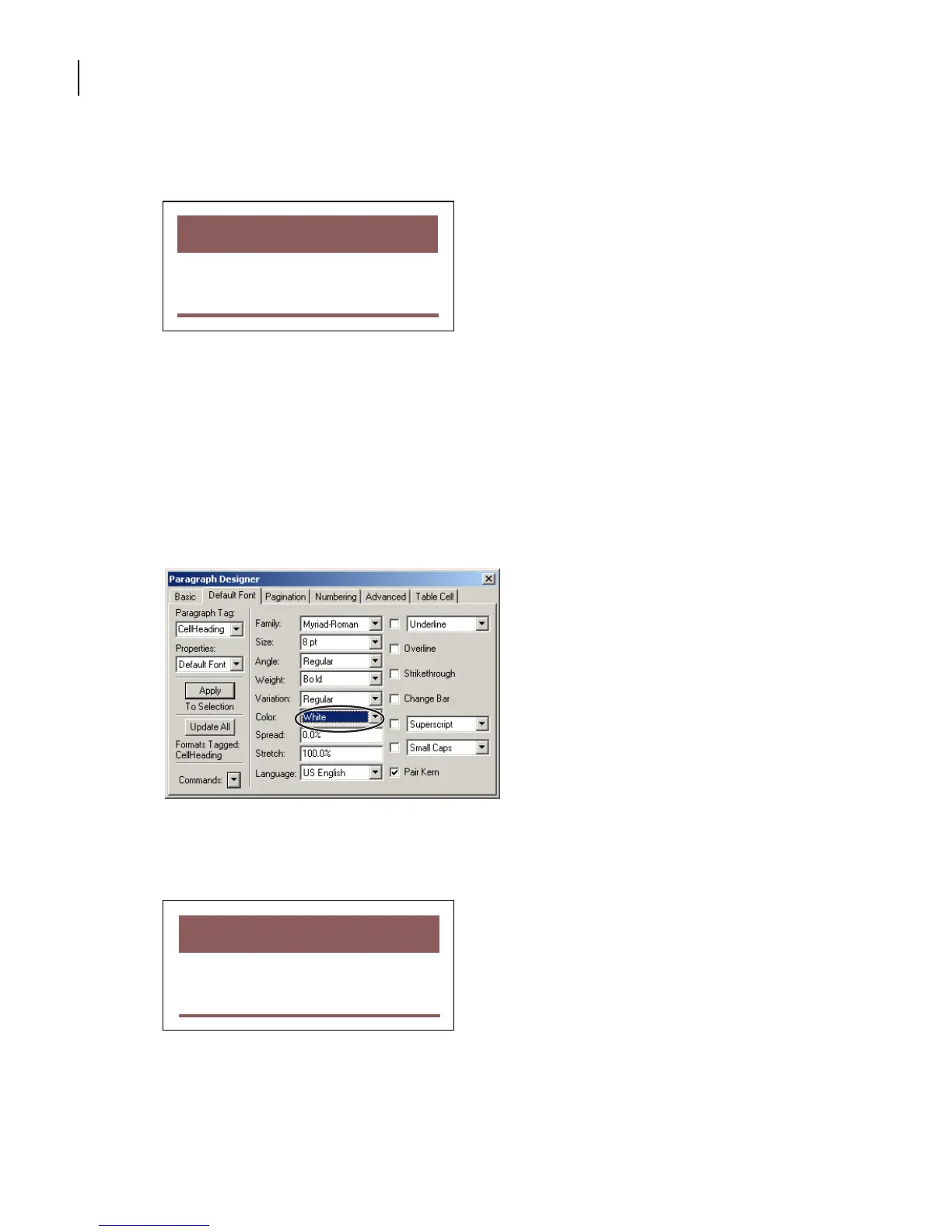
5 Click in any heading cell. Choose Format > Paragraphs > Designer.
6 Choose Default Font from the Properties pop-up menu.
7 Choose White from the Color pop-up menu.
8 Click Update All.
The heading row text is now white against the shaded background.
9 Close the Paragraph Designer and save the file.
Yo u’ve finished modifying the table format.
Resolution
(ppi)
Line Screen
(lpi)
5 x 5 in. Newspaper 160 80
Magazine 266 133
Art book 350 175
Publication
Image
Size
Resolution
(ppi)
Line Screen
(lpi)
5 x 5 in. Newspaper 160 80
Magazine 266 133
Art book 350 175
Publication
Image
Size



 To Next Page