3
USING ADOBE MEDIA SERVER ON AMAZON WEB SERVICES
Getting started
Last updated 9/20/2013
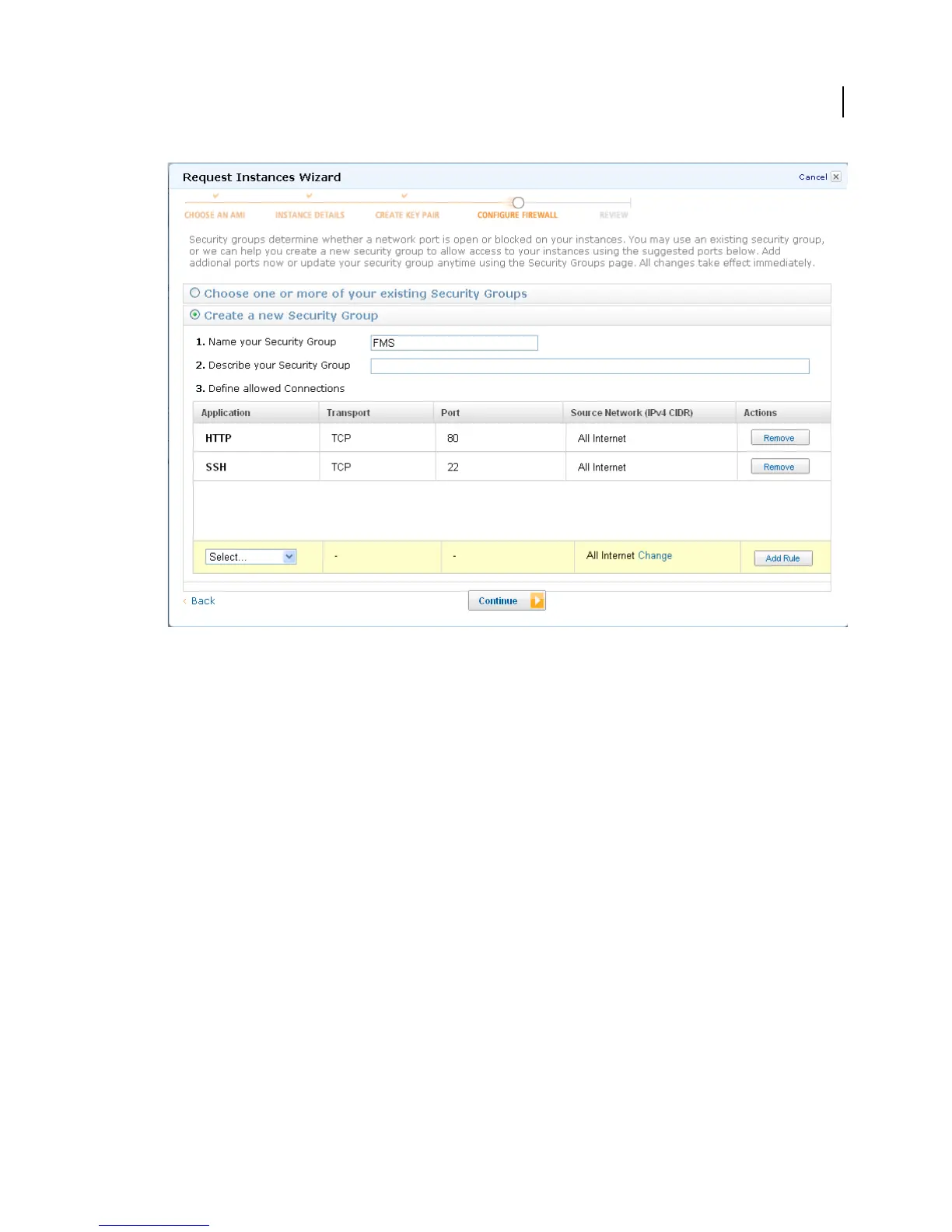
Create a Security Group in the Request Instances wizard.
Important: To stream media, you must open port 1935 for the RTMP protocol for TCP and UDP. You cannot add
this rule in the Request Instances wizard. You will add it in the AWS Management Console.
11 Review the information for the instance. When you’re satisfied with the settings, click Launch.
Your instances may take a few minutes to launch. Click View your instances on the Instances page to go to the AWS
Management Console.
Note: From the Amazon EC2 FAQ: It typically takes less than 10 minutes from the issue of the RunInstances call to
the point where all requested instances begin their boot sequences. This time is dependant on a number of factors
including: the size of your AMI, the number of instances you are launching, and how recently you have launched that
AMI. Images launched for the first time may take slightly longer to boot.
12 To add port 1935 to the Security Group, do the following:
a In the AWS Management Console, in the Navigation pane, click Security Groups.
b Select the Security Group you want to modify.
c Select Connection Method: Custom, Protocol: TCP, From Port: 1935, To Port: 1935, Source (IP or Group):
0.0.0.0/0 and click Save.



 To Next Page