Revision date: 22.01.2024
2. Use the arrows (buttons 5/6) to navigate through the menu, until “Technical settings (08) / Settings
technical” is reached.
3. Press SET / OK to access.
4. An access key will be required. Use the arrows (button 1/2) to navigate to the access key “A9”. Hold
the arrow until you reach A9. Press SET / OK.
5. The technical settings menu (n-8/n-10) will now be displayed.
How to adjust the technical settings
Each menu contains settings related to the operation of the stove and can be accessed by pressing SET /
OK.
The technical settings should be adjusted within the suggested limits shown in this excel sheet.
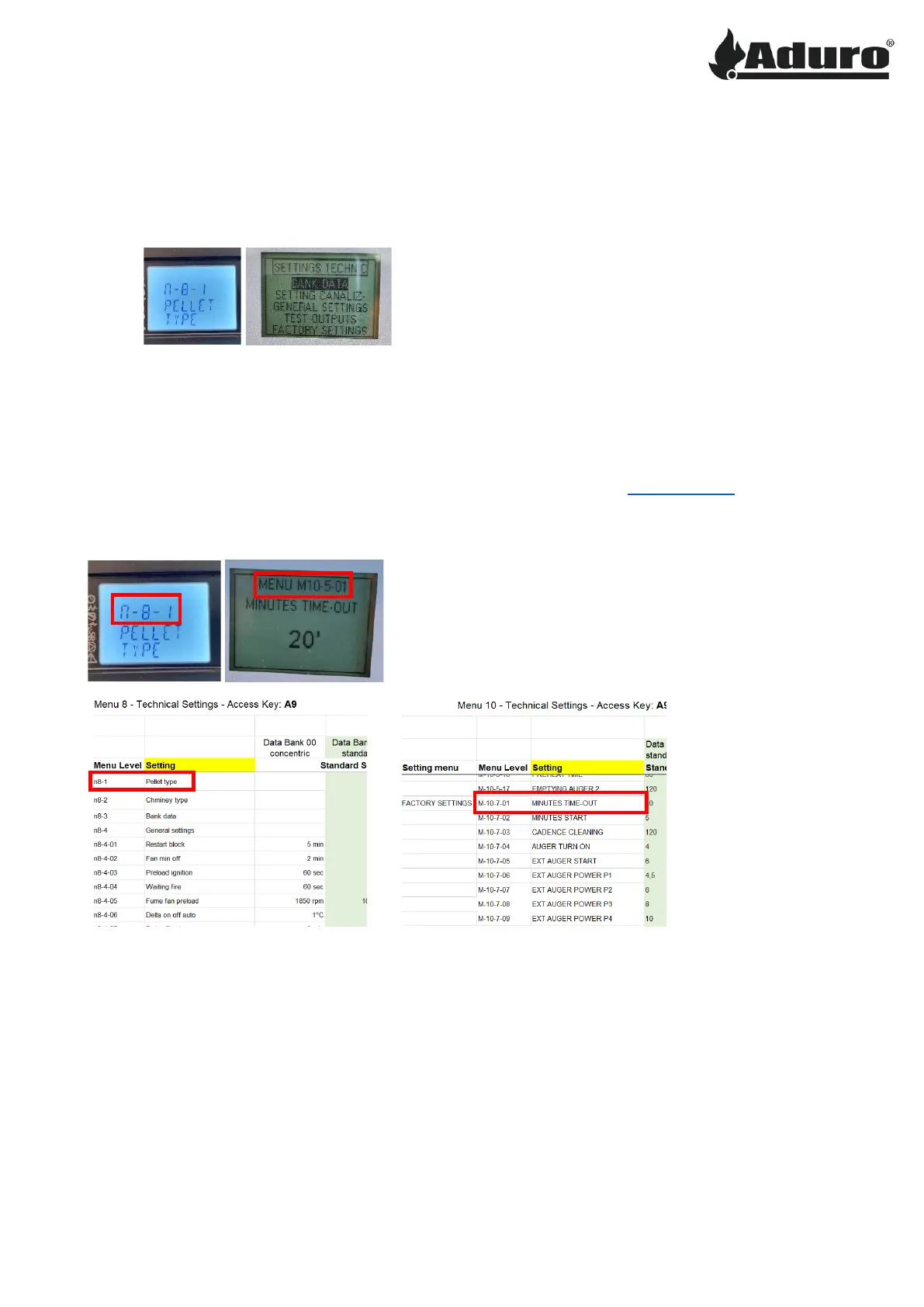
The display on the Aduro P1/P4 will show the menu number corresponding to the one shown in the excel
sheet. The P5 remote control will also show this when entering a menu:
Navigation in the menu is a little different based on the stove model:
P1/P4: The buttons 5/6 are used to navigate through the different settings. The buttons 1/2 are used to
adjust the value of the shown setting.
The ON/OFF button (button 4) is used to go back/exit the menu.
P5: The arrows are used to adjust the value of the given setting. The OK and ESC buttons are used to
navigate between the settings.
The ON/OFF button is used to go back/exit the menu.
When a value has been adjusted it will automatically save.


 To Next Page