EasyManua.ls Logo

Advice SV750 User Manual

Default Icon
7 pages
To Next Page IconTo Next Page
Page #1 background imageLoading...
Page #1 background image
קספ לאה לע טבמ
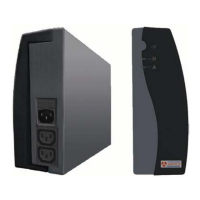
תימדק תיזח:
ירוחא דצ:
הסינכ עקש
האיצי יעקש
USB ושקת תאיציתר
RS232 תרושקת תאיצי
1.5K/2K VA 750/1K
הרהזא !ןיא רבחל תספדמ, קרוס, סקפ וא רישכמ המוד לאל קספ.
קספ לא
Smart Vision
וניתוכרב לע תשיכר רישכמה תיבמ "סיוודא"
ךירדמ שמתשמל
וקוויש ינפל קדבנו הדיפקב זראנ הז רצומ ,הו הדימבאל ךילא עיג
עוגפ וא ןיקת , ךות תידימ ונעידוהל אנ24 ופילחהל גאדנו תועש.
תקלחמ סיוודא תורש 03 9000-940
עב הקינורטקלא סיוודא"מ
לט :03-9000900 סקפ :03-9027444
עדי ריתע16 אבס רפכ4464321
הסינכ חתמ

האיצי חתמ

תשר חתמ יוויח

סמוע תגוצת

רתי סמוע יוויח

רבצמ תדובע יוויח

רבצמה תניעט יוויח

ךומנ רבצמ חתמ יוויח

הלקת יוויח

LCD תגוצת
הלעפה קספמ

Questions and Answers:

Advice SV750 Specifications

General IconGeneral
CategoryUPS
Capacity750VA
Capacity (Watts)450W
Communication InterfaceUSB
Operating Temperature0-40°C
Weight7.5 kg
Output Voltage230V
Input Voltage230V
Frequency50/60Hz

Summary

Product Overview

Front View

Details components and indicators on the front panel of the UPS, including the LCD display and power switch.

Back View

Describes the ports and connections on the rear panel of the UPS, such as AC input, output receptacles, and communication ports.

Installation and Operation

Installation Instructions

Steps for physically connecting the UPS to utility power, loads, and surge protection devices.

UPS Communication Setup

Guidance on connecting the UPS to a computer via USB or RS232 for monitoring and shutdown control.

Operation and System Test

Instructions for powering on the UPS, initial charging, and performing a system self-test.

Troubleshooting

General Safety Warnings

ViewPower Software Guide

Software Installation

Steps for installing the ViewPower monitoring software from the included disk.

Software Main Screen

Overview of the primary interface and functions of the ViewPower software.

Software Configuration

Parameter Settings

Configuration options for UPS behavior, including shutdown delays and warning dialogues.

Safety and Usage Precautions

General Safety Precautions

Covers environmental, usage, and emergency shutdown guidelines to prevent fire or shock.

Battery Safety and Handling

Precautions for battery servicing, replacement, disposal, and general handling to avoid risks.

Software Download & Installation Steps

Specifications

Related product manuals