8
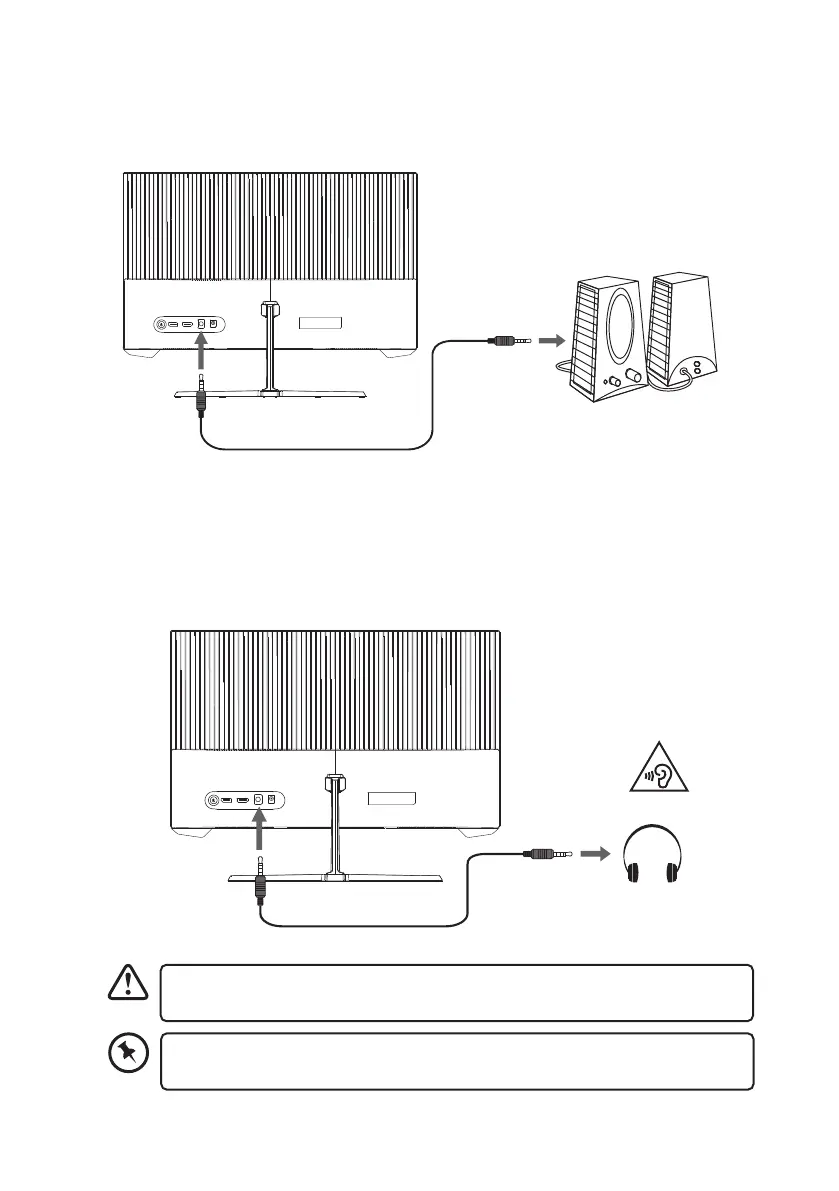
AUDIO Connection
Use an audio cable (not included) to connect the AUDIO socket of the main unit and an
AUDIO IN socket of an audio device (e.g. speaker; not included).
HDMI
DP
AUDIO
DC
Earphones
(not included)
Main Unit
HDMI
DP
AUDIO
DC
Audio device
(not included)
Audio Cable
(not included)
Long-term exposure to loud music may cause hearing damage. It is best to avoid
extreme volume when using earphones, especially for extended periods.
Using Earphones
Turn down the volume from the source input before using the earphones (not included).
Connect the earphones to the AUDIO socket. Slowly raise the volume with the earphones
on until you reach your desired volume.
If you select the main unit (A25H2G25) for audio output in your computer, make
sure that you have a valid AUDIO connection.


 To Next Page