11.2 How to clean: Cavity
embossment
Clean the cavity embossment to remove
limestone residue after cooking with
steam.
Step 1 Step 2 Step 3
Pour: 250 ml of white vinegar
into the cavity embossment.
Use maximum 6% vinegar
without any additives.
Let the vinegar dissolve the
limestone residue at the am-
bient temperature for 30 mi-
nutes.
Clean the cavity with warm
water and a soft cloth.
For the function: True Fan Cooking PLUS clean the oven for every 5 - 10 cooking cycles.
11.3 How to remove: Shelf
supports
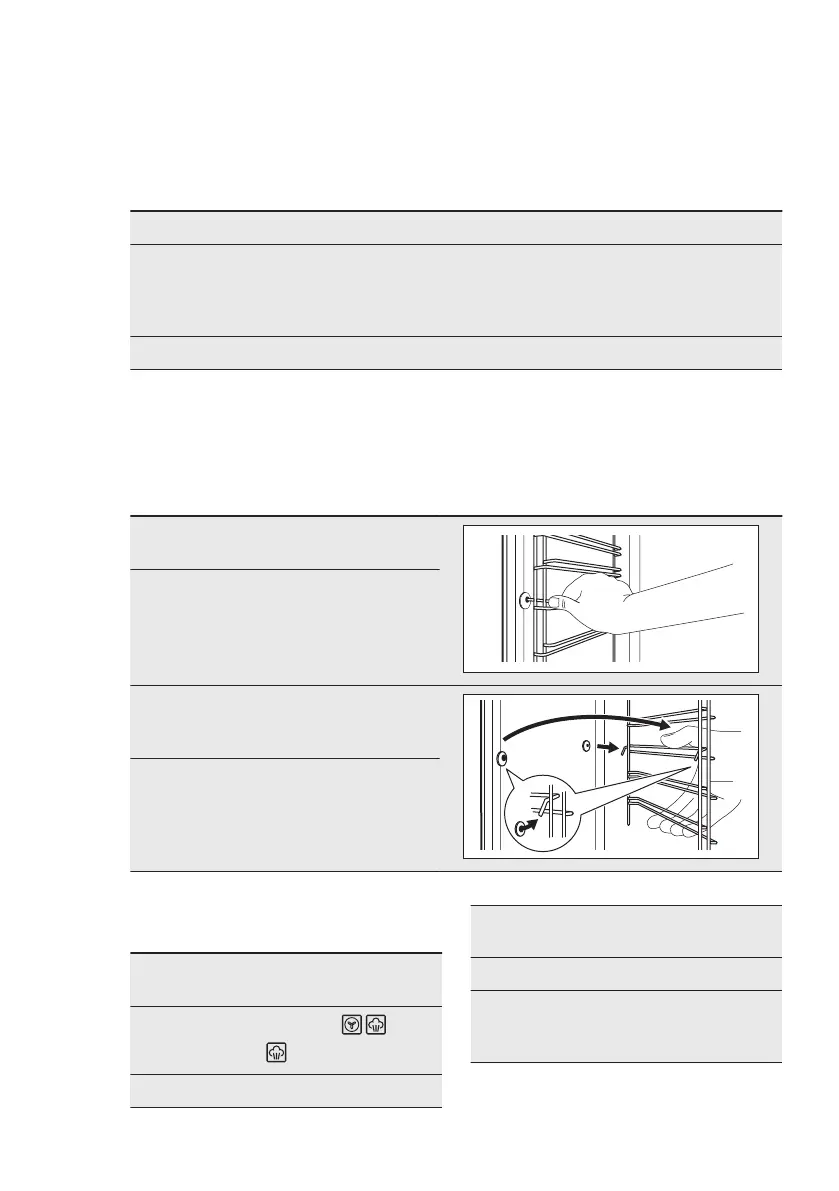
Remove the shelf supports to clean the
oven.
Step 1 Turn off the oven and wait
until it is cold.
Step 2 Pull the front of the shelf sup-
port away from the side wall.
Step 3 Pull the rear end of the shelf
support away from the side
wall and remove it.
Step 4 Install the shelf supports in
the opposite sequence.
11.4 How to use: Aqua
Cleaning
Step 1 Pour water into the cavity em-
bossment: 200 ml
Step 2
Set the function: .
Press: .
Step 3 Set the temperature to 90 °C.
Step 4 Let the oven work for 30 mi-
nutes.
Step 5 Turn off the oven.
Step 6 Wait until the oven is cold.
Dry the cavity with a soft
cloth.
ENGLISH 33


 To Next Page