Need help?
Do you have a question about the AEG BEB335061B and is the answer not in the manual?
Safety precautions for children and vulnerable individuals.
General safety guidelines for appliance usage and installation.
Instructions and warnings for safe installation of the appliance.
Guidance on proper electrical connections and safety measures.
Important warnings and guidelines for safe appliance operation.
Procedures for cleaning and maintaining the appliance.
Information about the oven's internal lighting and lamp replacement.
Instructions for contacting authorized service for repairs.
Guidelines for environmentally responsible disposal of the appliance.
Detailed instructions for installing the oven into cabinetry.
Steps to securely fix the oven within the cabinet.
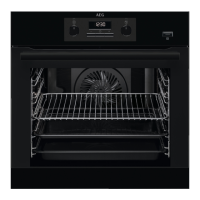
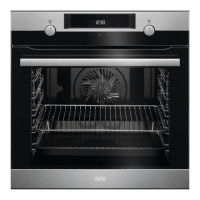
Overview of the oven's components and their identification.
Description of included accessories like wire shelf, roasting pan, and trivet.
Explanation of how to use the retractable control knobs.
Guide to operating the appliance via the control panel.
Explanation of the oven's display indicators and functions.
Instructions for cleaning the oven before its first use.
Steps for preheating the oven before the initial cooking.
Guide to setting heating functions and temperatures for cooking.
Details on various heating functions and their applications.
Specific notes and energy efficiency compliance for Moist Fan Baking.
Overview of available clock functions like timer and time delay.
Step-by-step instructions for setting various clock functions.
Instructions on how to correctly insert oven accessories like shelves.
Guidance on using the trivet and grill/roasting pan safely.
How to activate and deactivate the control panel lock function.
Explanation of the automatic switch-off feature for safety.
Information on the cooling fan's operation during and after use.
General recommendations for temperature, time, and shelf positions.
Specific cooking suggestions for Moist Fan Baking.
Recommended accessories for optimal Moist Fan Baking results.
Cooking data for test institutes according to IEC 60350-1.
Guidelines and methods for cleaning different parts of the appliance.
Step-by-step guide to removing and reinstalling shelf supports for cleaning.
Instructions for using the Aqua Clean function for cleaning.
Detailed steps for removing and reinstalling the oven door.
Instructions for safely replacing the oven lamp.
Common problems and their solutions for the appliance.
Information required for contacting service and warranty.
Technical data and energy ratings for the appliance.
Tips and features for saving energy during cooking.
Overview of the appliance's menu structure and navigation.
Guidelines for recycling and environmentally sound disposal.
This document is a user manual for an AEG oven, covering its functions, usage, and maintenance.
The oven is designed for cooking purposes in a single household domestic indoor environment. It can also be used in offices, hotel guest rooms, bed & breakfast guest rooms, farm guest houses, and similar accommodations, provided the usage does not exceed average domestic levels. The appliance is equipped with an electric cooling system that operates automatically to keep surfaces cool during operation and may continue to run after the appliance is turned off until it cools down.
The oven offers various heating functions, each tailored for specific cooking needs:
The oven also includes several clock functions:
The oven is operated via a control panel with retractable knobs. To use a knob, it must be pressed to extend it. One knob is for selecting heating functions, and the other is for setting the temperature. The display shows key functions and indicators for lock, assisted cooking, settings, fast heat up, minute minder, end time, time delay, and uptimer. A progress bar indicates temperature or time, turning fully red when the set temperature is reached.
Before first use, the oven requires initial cleaning and preheating. The time must also be set. The "Fast Heat Up" function can be activated by pressing and holding a specific button, available for some oven functions.
Accessories include a wire shelf for cookware, cake tins, and roasts; a grill-/roasting pan for baking, roasting, or collecting fat; and a trivet for roasting and grilling, to be used with the grill-/roasting pan. The accessories are inserted between the guide bars of the shelf support, ensuring the feet point down for the wire shelf.
The oven features a "Lock" function to prevent accidental changes to the appliance's settings. This can be activated whether the appliance is on or off. An automatic switch-off feature turns off the appliance after some time if no settings are changed while a heating function is active, as a safety measure.
Regular cleaning is essential for the appliance. The front of the oven should be cleaned with a microfibre cloth, warm water, and a mild detergent. Metal surfaces require a cleaning solution, and stains can be removed with a mild detergent. The cavity should be cleaned after each use to prevent fat accumulation, which can cause fire. Moisture condensation can occur, so the cavity should be dried with a soft cloth after each use, and the appliance can be run for 10 minutes before cooking to reduce condensation. All accessories should be cleaned with a microfibre cloth, warm water, and a mild detergent after each use and allowed to dry. Abrasive cleaners or sharp-edged objects should not be used on non-stick accessories.
The shelf supports are removable for easier cleaning of the oven cavity. To remove them, the oven must be turned off and cold. The front and then the rear end of the shelf support are pulled away from the side wall. Installation is done in the reverse sequence.
The oven also has an "Aqua Clean" cleaning procedure that uses humidity to remove fat and food particles. This involves pouring 300 ml of water into the cavity embossment and activating the function for 30 minutes. After the cycle, the oven should be allowed to cool, and the cavity dried with a soft cloth.
The oven door has three glass panels that can be removed for cleaning. This process involves opening the door fully, lifting and pulling latches, closing the door halfway, and then lifting and pulling it from its seat. The door should be placed on a soft cloth on a stable surface. The door trim can then be removed, and the glass panels carefully pulled out one by one, starting from the top. The glass panels should be cleaned with water and soap and dried carefully, but not in a dishwasher. When reinstalling, the glass panels (A and B) must be placed in the correct sequence, checking for symbols or printing on the side. The door trim should click into place, and the middle panel of glass must be correctly seated.
For internal lighting, the lamp can be replaced. The oven must be turned off and cold, and disconnected from the mains. A cloth should be placed on the bottom of the cavity. The glass cover is removed, cleaned, and the lamp replaced with a suitable 300°C heat-resistant halogen lamp, which should always be held with a cloth to prevent grease residue.
 General
| Grill | Yes |
|---|---|
| Oven size | Medium |
| Oven type | Electric |
| Grill type | Fixed rate grill |
| Number of ovens | 1 |
| Shelves material | Chrome |
| Total oven power | - W |
| Microwave cooking | No |
| Number of shelves | 2 shelves |
| Full surface grill | - |
| Cleaning technology | AquaClean |
| Oven thermostat range | 30 - 300 °C |
| Number of shelf positions | 5 |
| Number of cooking programs | 9 |
| Total oven(s) interior capacity | 72 L |
| Door hinge | down |
| Noise level | 53 dB |
| Control type | Rotary, Touch |
| Display type | LED |
| Door material | Glass |
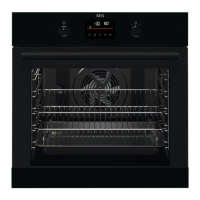
| Product color | Black |
| Control position | Front / Top front |
| Interior material | Enamel |
| Oven door opening | Drop down opening |
| Appliance placement | Built-in |
| Number of glass door panels | 3 |
| Country of origin | Italy |
| UK Trade Tariff code | 85166080 |
| Plastic packaging weight | 280 g |
| Expanded Polystyrene (EPS) packaging weight | 1100 g |
| Lamp type | Halogen |
| Lamps quantity | 1 lamp(s) |
| Clock type | Electronic |
| Timer type | Digital |
| Current | 15 A |
| Connected load | 3490 W |
| Power plug type | No plug |
| AC input voltage | 220 - 240 V |
| AC input frequency | 50 Hz |
| Power connection type | Hard-wired |
| Energy efficiency scale | A+++ to D |
| Energy consumption (conventional) | 0.93 kWh |
| Energy consumption (forced convection) | 0.69 kWh |
| Package depth | 670 mm |
| Package width | 635 mm |
| Package height | 654 mm |
| Package weight | 31500 g |
 Weight and Dimensions
| Depth | 568 mm |
|---|---|
| Width | 594 mm |
| Height | 589 mm |
| Weight | 30500 g |
| Installation compartment width | 560 mm |
| Installation compartment height | 600 mm |

 To Next Page