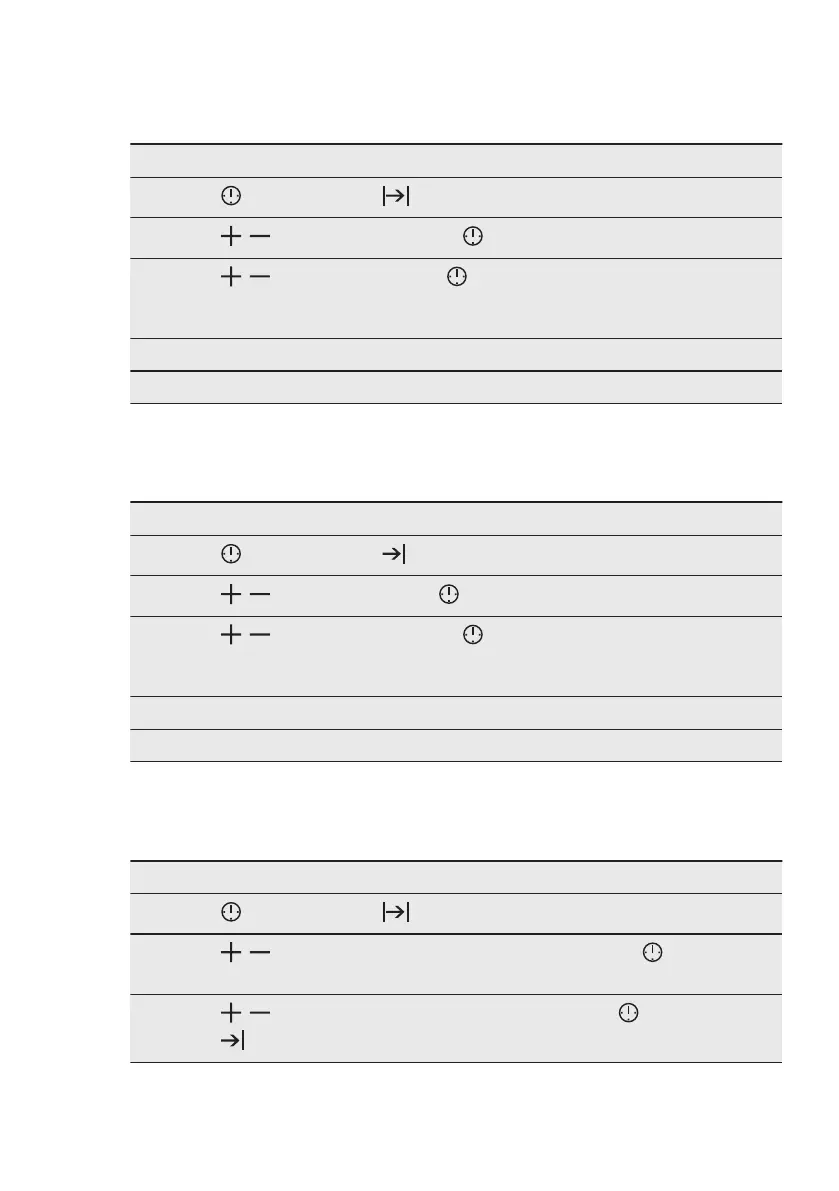
7.3 How to set function:
Duration
Step 1 Set a heating function.
Step 2
- press repeatedly. - starts to flash.
Step 3
, - press to set the minutes. - press to confirm.
Step 4
, - press to set the hours. - press to confirm.
When the set time ends the signal sounds for 2 min. Time setting flashes in
the display. The oven turns off automatically.
Step 5 Press any button to stop the signal.
Step 6 Turn the knobs to the off position.
7.4 How to set function: End
Time
Step 1 Set a heating function.
Step 2
- press repeatedly. - starts to flash.
Step 3
, - press to set the hour. - press to confirm.
Step 4
, - press to set the minutes. - press to confirm.
At the set end time the signal sounds for 2 min. The time setting flashes in the
display. The oven turns off automatically.
Step 5 Press any button to stop the signal.
Step 6 Turn the knobs to the off position.
7.5 How to set function: Time
Delay
Step 1 Set a heating function.
Step 2
- press repeatedly. - starts to flash.
Step 3
, - press to set the minutes for the function: Duration. - press to con‐
firm.
Step 4
, - press to set the hour for the function: Duration. - press to confirm.
- starts to flash.
ENGLISH 13


 To Next Page