Step 5
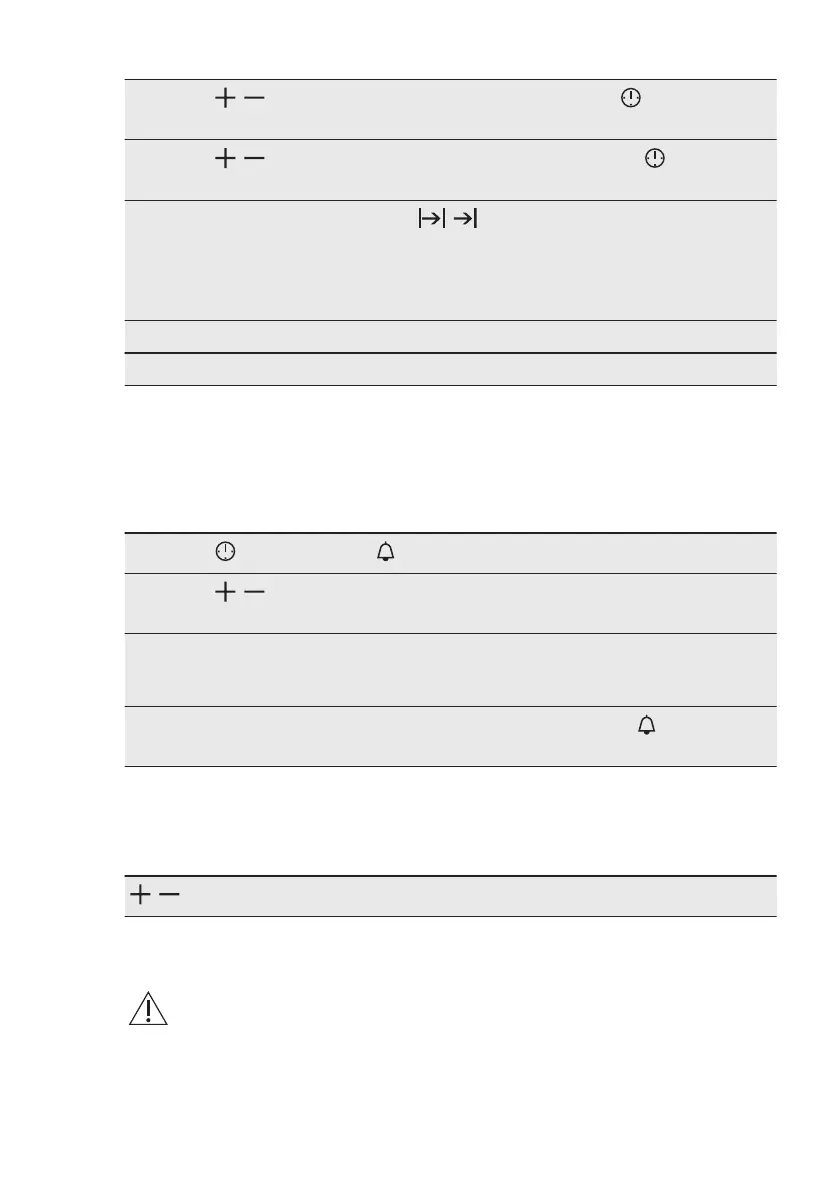
, - press to set the hour for the function: End Time. - press to con‐
firm.
Step 6
, - press to set the minutes for the function: End Time. - press to
confirm.
The display shows: the set temperature, , .
Oven turns on automatically later on, works for the set Duration time and stops at the set
End Time.
At the set End Time the signal sounds for 2 min. The time setting flashes in the display.
The oven turns off.
Step 7 Press any button to stop the signal.
Step 8 Turn the knobs to the off position.
7.6 How to set function:
Minute Minder
Minute minder can be both set when the
oven is turned on and off.
Step 1
- press repeatedly. , 00 - flash.
Step 2
, - press to set the seconds and than the minutes.
When the time you set is longer than 60 min, hr flashes.
Step 3 Set the hours.
Minute Minder - starts automatically after 5 sec.
After 90% of the set time the signal sounds.
Step 4
When the set time ends the signal sounds for 2 min. 00:00, - flash. Press
any button to stop the signal.
7.7 How to set function:
Count Up Timer
, - press and hold to reset the Count Up Timer. The timer starts to count up again.
8. USING THE ACCESSORIES
WARNING!
Refer to Safety chapters.
8.1 Inserting accessories
A small indentation at the top increases
safety. The indentations are also anti-tip
devices. The high rim around the shelf
prevents cookware from slipping of the
shelf.
www.aeg.com14


 To Next Page