14. MENU STRUCTURE
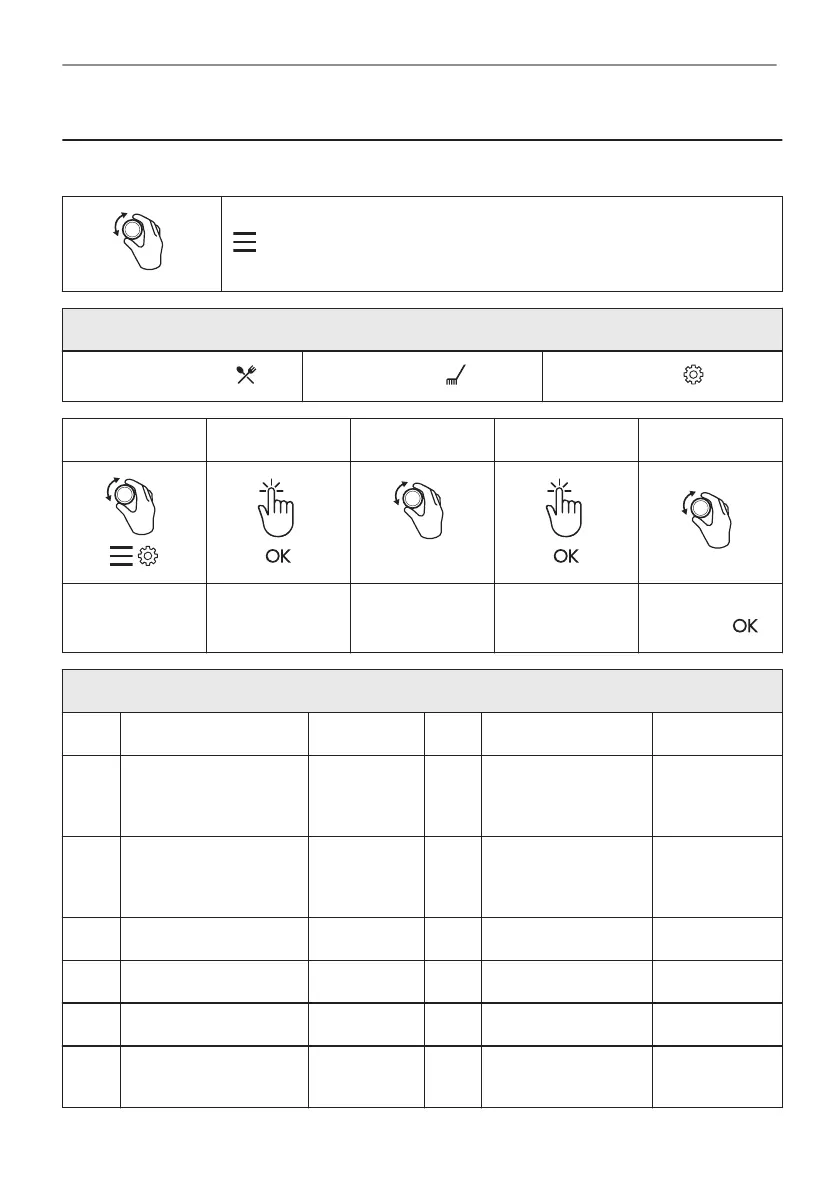
14.1 Menu
- select to enter the Menu.
Menu structure
Assisted Cooking
Cleaning
Settings
Step 1 Step 2 Step 3 Step 4 Step 5
O1 - O15
Select the Menu,
Settings.
Confirm setting.
Select the set‐
ting.
Confirm setting.
Adjust the value
and press .
Settings
O1 Time of day Change O2 Display brightness 1 - 5
O3 Key tones 1 - Beep
2 - Click
3 - Sound off
O4 Buzzer volume 1 - 4
O5 Food Sensor Action 1 - Alarm
and stop
2 - Alarm
O6 Uptimer On / Off
O7 Light On / Off O8 Fast Heat Up On / Off
O9 Cleaning Reminder On / Off O10 Wi-Fi On / Off
O11 Auto remote operation On / Off O12 Forget network Yes / No
O13 Demo mode Activation
code: 2468
O14 Software version Check
39/44
MENU STRUCTURE


 To Next Page