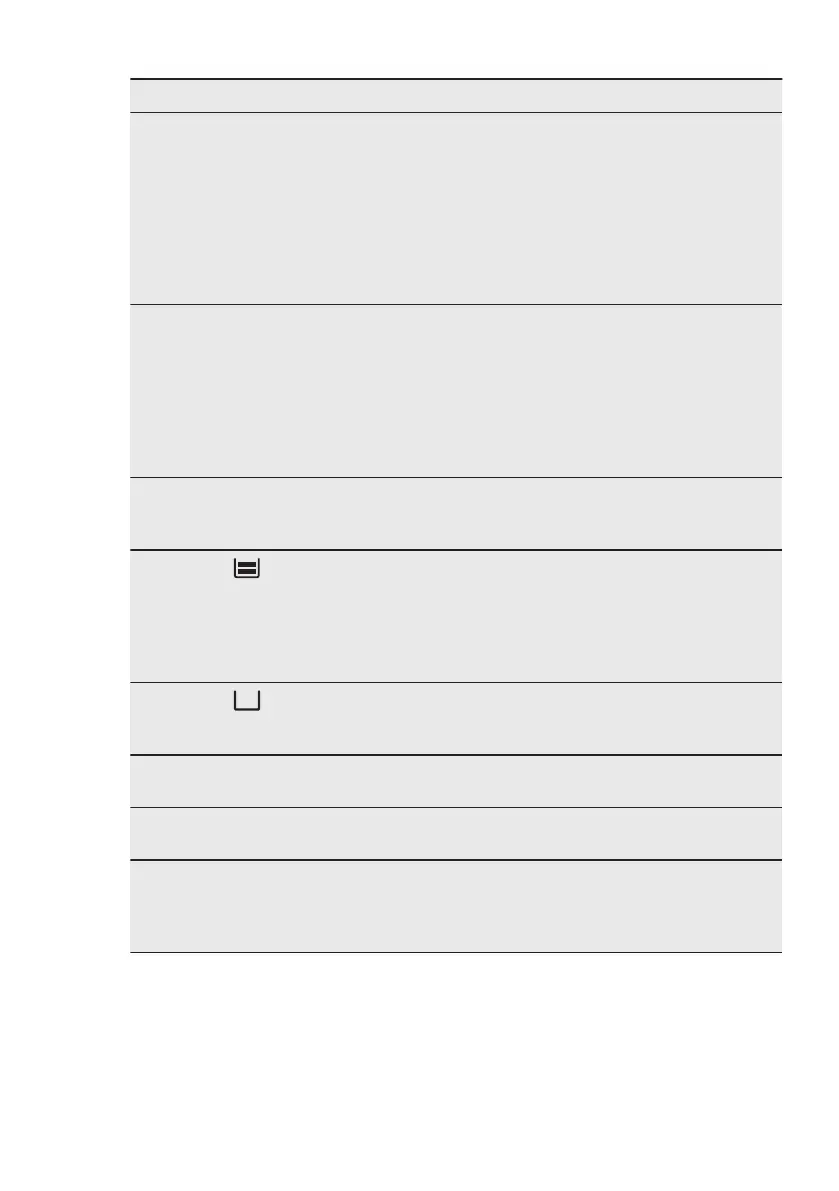
Problem Possible cause Remedy
The display shows "F102". • You did not fully close
the door.
• The door lock is defec-
tive.
• Fully close the door.
• Deactivate the oven with
the house fuse or the
safety switch in the fuse
box and activate it again.
• If the display shows
"F102" again, contact the
Customer Care Depart-
ment.
The display shows an error
code that is not in this table.
There is an electrical fault. • Deactivate the oven with
the house fuse or the
safety switch in the fuse
box and activate it again.
• If the display shows the
error code again, contact
the Customer Care De-
partment.
There is water inside the
oven.
There is too much water in
the tank.
Deactivate the oven and
wipe the water with a cloth
or sponge.
The indicator is off.
There is not enough water in
the tank.
Fill the tank with water until
the indicator turns on. If wa-
ter starts to leak in the oven,
and the indicator is still off,
contact a qualified service
engineer.
The indicator is on.
There is no water in the tank. Fill the tank. If the indicator
is still on, contact a qualified
service engineer.
The steam cooking does not
work.
Lime obstructs the hole. Check the steam inlet open-
ing. Remove the lime.
The steam cooking does not
work.
There is no water in the tank. Fill the water tank.
It takes more than three mi-
nutes to empty the water
tank or the water leaks from
the steam inlet opening.
There are lime deposits in
the oven.
Clean the water tank. Refer
to "Cleaning the water
tank".
ENGLISH 41


 To Next Page