Accessories
Clean all accessories after each use and let them dry. Use a soft cloth with
warm water and a cleaning agent. Do not clean the accessories in a dish-
washer.
Do not clean the non-stick accessories using aggressive agents, sharp-
edged objects or in a dishwasher.
12.2 Recommended cleaning
products
Do not use abrasive sponges or
aggressive detergents. It can cause
damage to the enamel and the stainless
steel parts.
You can buy our products at
www.aeg.com/shop and at the best
retailer shops.
12.3 Removing the shelf
supports
Before maintenance, make sure that the
oven is cool. There is a risk of burns.
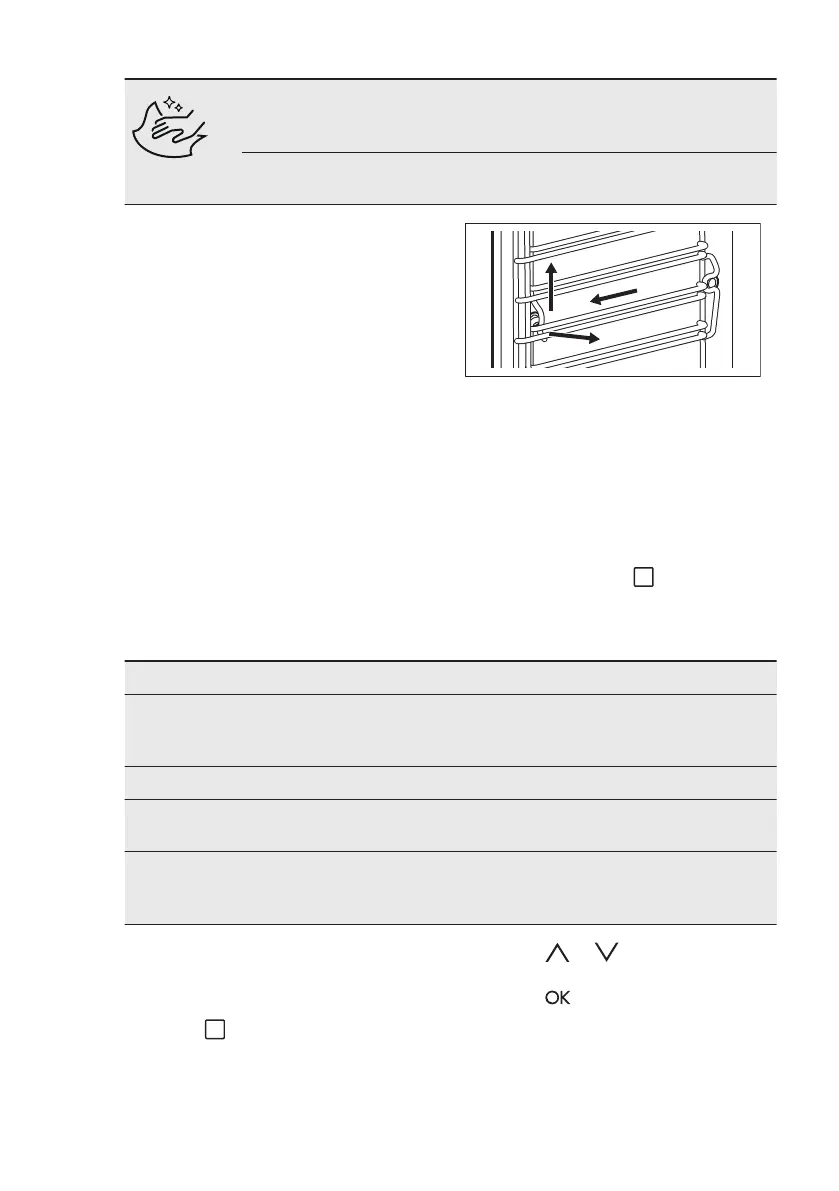
To clean the oven, remove the shelf
supports.
1. Pull carefully the supports up and out
of the front catch.
2. Pull the front end of the shelf support
away from the side wall.
3. Pull the supports out of the rear
catch.
Install the shelf supports in the opposite
sequence.
12.4 Submenu for: Cleaning
The submenu with cleaning functions is
under the sensor field
.
Symbol Menu item Description
S1 Tank Emptying Procedure for removing the residual water
from the water drawer after use of the
steam functions.
S2 Steam Cleaning Cleaning the appliance with steam.
S3 Descaling Procedure for cleaning the steam genera-
tion circuit from residual limestone.
S4 Rinsing Procedure for rinsing and cleaning the
steam generation circuit after frequent use
of the steam functions.
12.5 Activating a cleaning
function
1. Activate the appliance.
2. Touch until the display showsS1.
In some models you can also choose
S2, S3, S4.
3. Touch or to select a cleaning
function.
4. Touch to confirm.
12.6 Tank Emptying - S1
Remove all accessories.
www.aeg.com46


 To Next Page