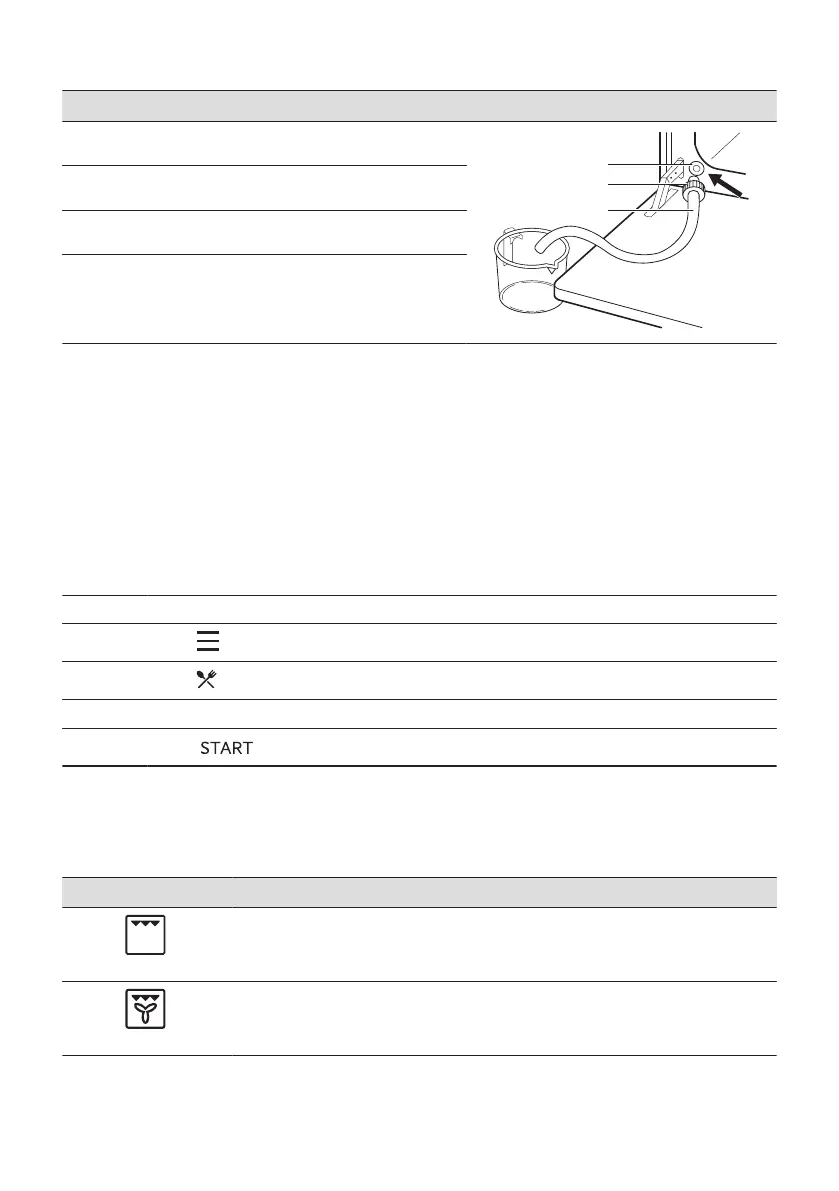
Emptying the water tank
Step 1
Turn off the oven, leave it with the door open and
wait until the oven is cold.
Step 2
Connect the draining pipe (C) to the outlet valve (A)
through the connector (B).
Step 3
Keep the end of the pipe below the level of A and
push B repeatedly to collect remaining water.
Step 4
Detach the C and B and dry the oven with a soft
sponge.
7.4 How to set: Assisted Cooking
Every dish in this submenu has a recommended function and temperature. You can adjust the
time and the temperature.
For some of the dishes you can also cook with:
• Weight Automatic
• Food Sensor
The degree to which a dish is cooked:
• Rare or Less
• Medium
• Well done or More
Step 1 Turn on the oven.
Step 2
Press: .
Step 3
Press: . Enter: Assisted Cooking.
Step 4 Choose a dish or a food type.
Step 5
Press: .
7.5 Heating functions
STANDARD
Heating function Application
Grill
To grill thin pieces of food and to toast bread.
Turbo Grilling
To roast large meat joints or poultry with bones on one shelf position. To make gratins
and to brown.
252 ENGLISH


 To Next Page
 Loading...