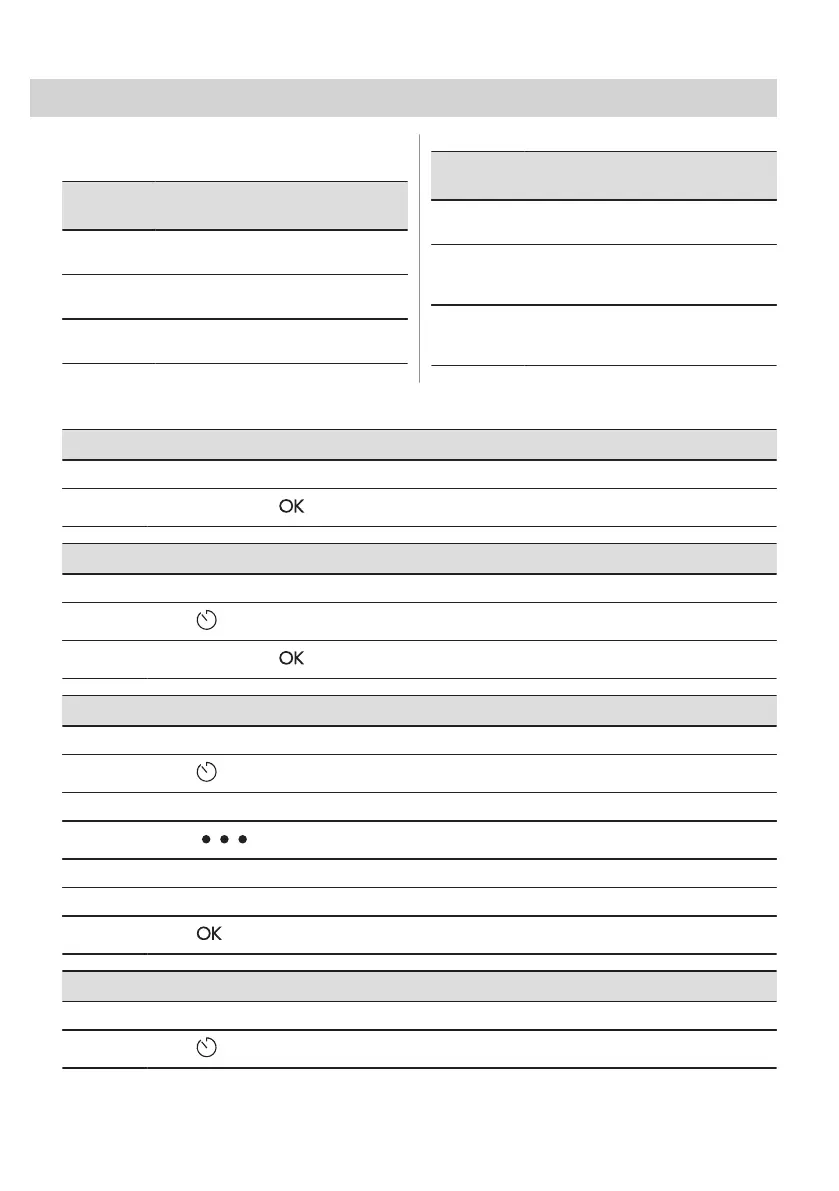
8. CLOCK FUNCTIONS
8.1 Clock functions description
Clock
function
Application
Cooking time To set the length of cooking. Maximum
is 23 h 59 min.
End action To set what happens when the timer
ends counting.
Delayed
start
To postpone the start and / or end of
cooking.
Clock
function
Application
Time exten‐
sion
To extend cooking time.
Reminder To set a countdown. Maximum is 23 h
59 min. This function has no effect on
the operation of the appliance.
Uptimer Monitors how long the function oper‐
ates. Uptimer - you can turn it on and
off.
8.2 How to set: Clock functions
How to set the clock
Step 1 Press: Time of day.
Step 2
Set the time. Press: .
How to set cooking time
Step 1 Choose the heating function and set the temperature.
Step 2
Press: .
Step 3
Set the time. Press: .
How to choose end option
Step 1 Choose the heating function and set the temperature.
Step 2
Press: .
Step 3 Set the cooking time.
Step 4
Press: .
Step 5 Press: End action.
Step 6 Choose the preferred: End action.
Step 7
Press: . Repeat the action until the display shows the main screen.
How to delay start of cooking
Step 1 Set the heating function and the temperature.
Step 2
Press: .
ENGLISH 255


 To Next Page
 Loading...