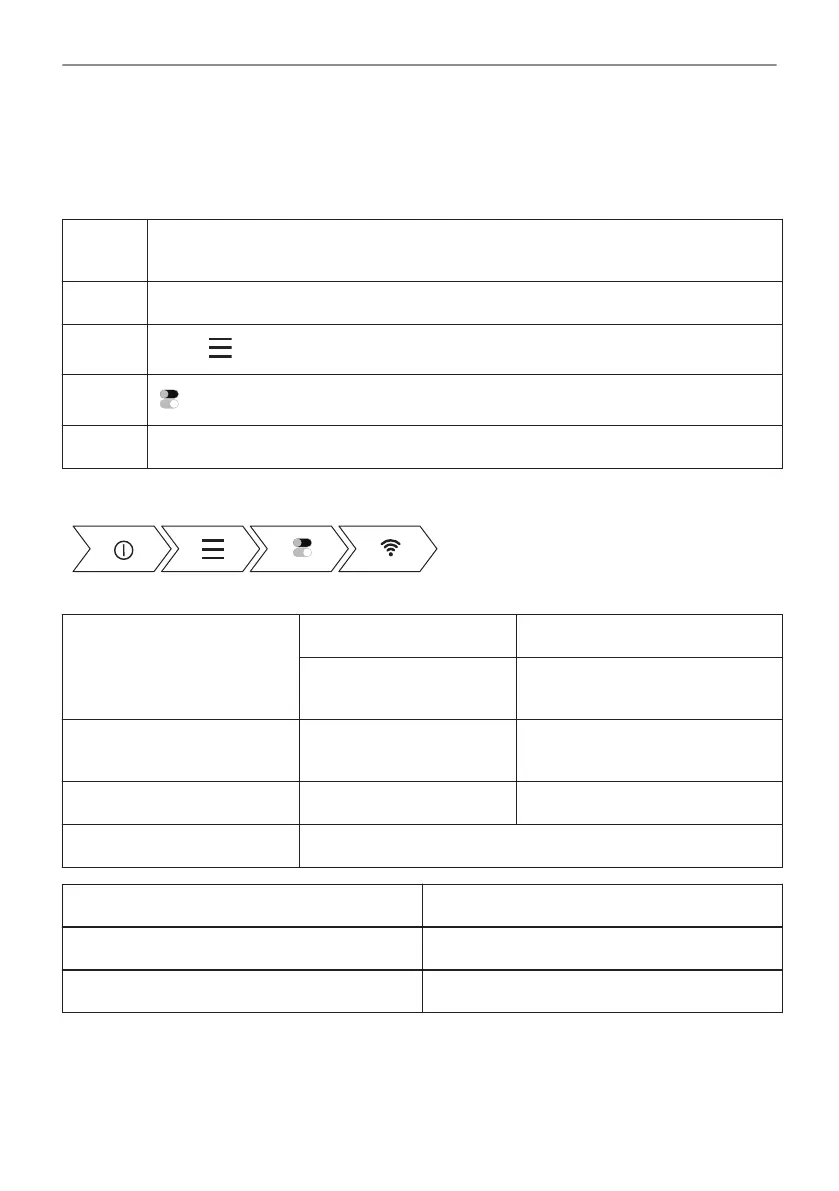
5.3 Wireless connection
To connect the oven you need:
• Wireless network with the Internet connection.
• Mobile device connected to your wireless network.
Step 1 Download the mobile app My AEG Kitchen and follow the instructions for the next
steps.
Step 2 Turn on the oven.
Step 3
Press: . Select: Settings / Connections.
Step 4
- slide or press to turn on: Wi-Fi.
Step 5 The oven wireless module starts within 90 sec.
Take a shortcut!
Frequency 2.4 GHz WLAN 5 GHz WLAN
2400 - 2483.5 MHz 5150 - 5350 MHz
5470 - 5725 MHz
Protocol IEEE 802.11b DSSS,
802.11g/n OFDM
IEEE 802.11 a/n OFDM
Max Power EIRP < 20 dBm (100 mW) EIRP < 23 dBm (200 mW)
Wi-Fi module NIU5-50
Frequency Bluetooth 2400 - 2483.5 MHz
Protocol LE: DSSS
Max Power EIRP < 4 dBm (2.5 mW)
EU member states covered by the provision of Directive 2014/53/EU: Belgium, Bulgaria, Czech
Republic, Denmark, Germany, Estonia, Ireland, Greece, Spain, France, Croatia, Italy, Cyprus,
Latvia, Lithuania, Luxemburg, Hungary, Malta, Netherlands, Austria, Poland, Portugal,
Romania, Slovenia, Slovakia, Finland, Sweden, Norway, Switzerland, United Kingdom, Turkey.
13/216
BEFORE FIRST USE



 To Next Page