5.4 Software licences
The software in this product contains components that are based on free and open source soft‐
ware. AEG gratefully acknowledges the contributions of the open software and robotics communi‐
ties to the development project.
To access the source code of these free and open source software components whose license
conditions require publishing, and to see their full copyright information and applicable license
terms, please visit: http://aeg.opensoftwarerepository.com (folder NIU5).
5.5 Initial preheating
Preheat the empty oven before the first use.
Step 1 Remove all accessories and removable shelf supports from the oven.
Step 2
Set the maximum temperature for the function: .
Let the oven operate for 1 h.
Step 3
Set the maximum temperature for the function: .
Let the oven operate for 15 min.
The oven can emit an odour and smoke during preheating. Make sure that the room is ventila‐
ted.
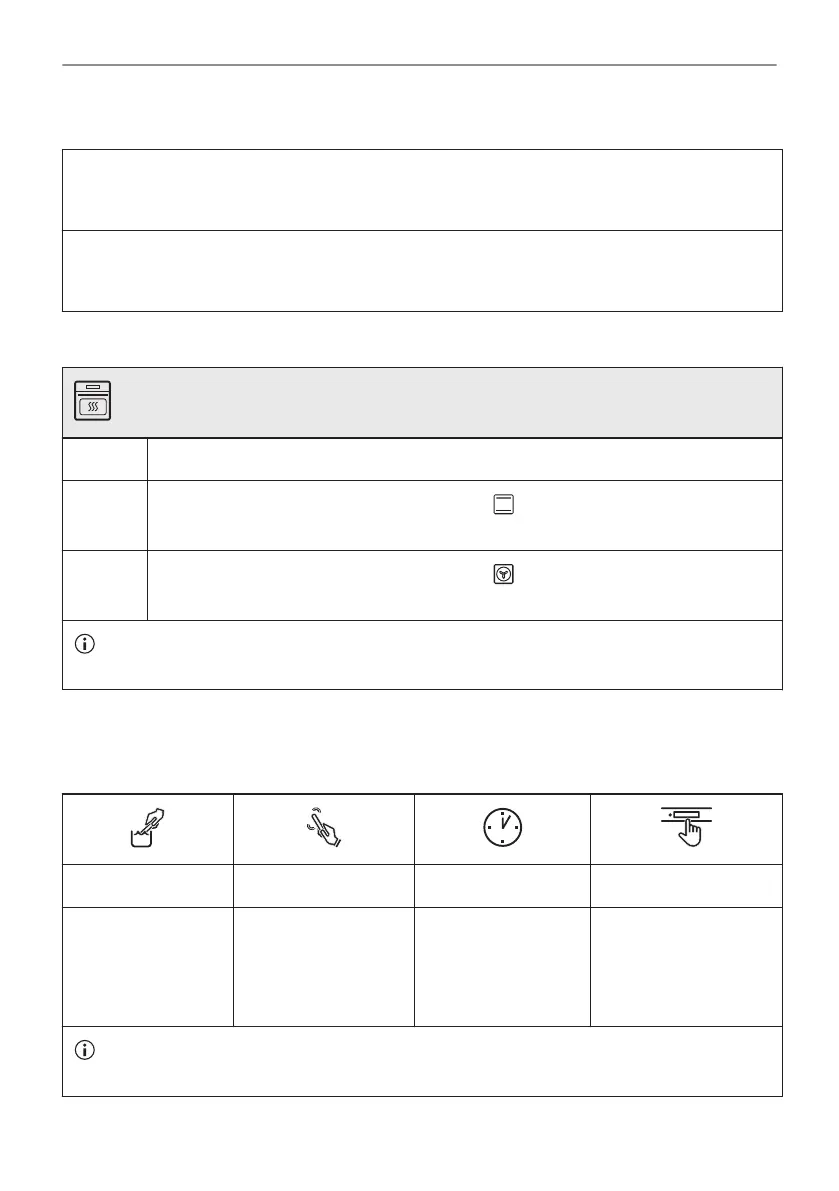
5.6 How to set: Water hardness
When you connect the oven to the mains you have to set the water hardness level.
Use the test paper supplied with the steam set.
Step 1 Step 2 Step 3 Step 4
Put the test paper
into water for about
1 sec. Do not put
the test paper under
running water.
Shake the test paper
to remove the excess
of water.
After 1 min, check
water hardness with
the table below.
Set the water hardness
level: Menu / Settings /
Setup / Water hard‐
ness.
The colours of the test paper continue to change. Do not check water hardness later than 1
min after test.
14/216
BEFORE FIRST USE



 To Next Page